SD1 Series Inverters Keypad Operation
-32-
The units place
is blinking
All digits are
blinking
Note: When setting the value, you can press and + to modify the value.
SHIFT
PRG
ESC
PRG
ESC
PRG
ESC
PRG
ESC
DATA
ENT
DATA
ENT
DATA
ENT
The units place
is blinking
The units place is
blinking
The units place is blinking
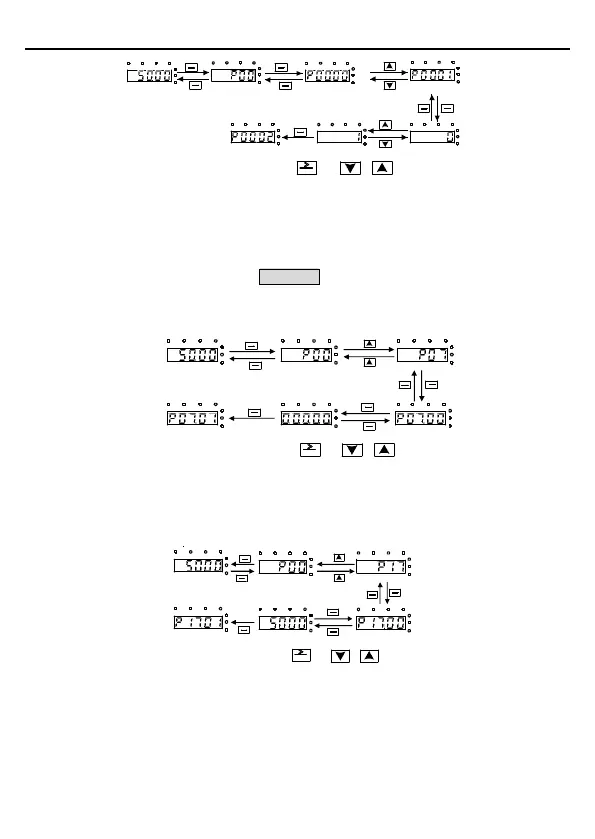
Figure 4-4 Modifying a parameter
4.3.2 Setting a password for the inverter
SD1 series inverters p
rovide password protection function to users. Set P07.00 to gain the
password and the password protection becomes effective 1 minute later after retreating from
the function code editing state. Press PRG/ESC again to the function code editing state,
"0.0.0.0.0" will be displayed. Unless using the correct password, you cannot enter it.
To disable the password protection function, you need only to set P07.00 to 0.
All digits are blinking
PRG
ESC
PRG
ESC
PRG
ESC
PRG
ESC
DATA
ENT
DATA
ENT
DATA
ENT
The units place is blinking
The units place is blinking
The units place is blinking The units place is blinkingThe units place is blinking
Note: When setting the value, you can press and + to modify the value.
SHIFT
Figure 4-5 Setting a password
4.3.3 Viewing inverter status
The inverter provides group P17 for status viewing. You can enter group P17 for viewing.
All digits are blinking
The units place
is blinking
The units place is blinking
The units place is blinking
The units place is blinking
PRG
ESC
PRG
ESC
PRG
ESC
DATA
ENT
DATA
ENT
DATA
ENT
PRG
ESC
Note: When setting the value, you can press and + to modify the value.
SHIFT
Figure 4-6 Viewing a parameter



 To Next Page