SD1 Series Inverters Fault Tracking
-112-
Fault type Possible cause Solutions
LL
Electronic
underload fault
The inverter will report the
underload pre-alarm
according to the set value.
Check the load and the
underload pre-alarm point.
STO Safe torque off
STO function operates
STL1
Channel H1
abnormal
Fault or internal hardware
circuit fault occurred to H1
Replace STO switch; if
problem persists after
replacement, contact the
manufacturer.
STL2
Channel H2
abnormal
Fault or internal hardware
circuit fault occurred to H2
STL3
Internal circuit
abnormal
Fault or internal hardware
circuit fault occurred to H1
and H2 channels
CrCE
Safe code
FLASH CRC
Error occurred to STO safe
code FLASH CRC check
Contact the manufacturer.
STO alarm
1. When the hundreds of P11.16 is set to 0, the STO alarm is locked.
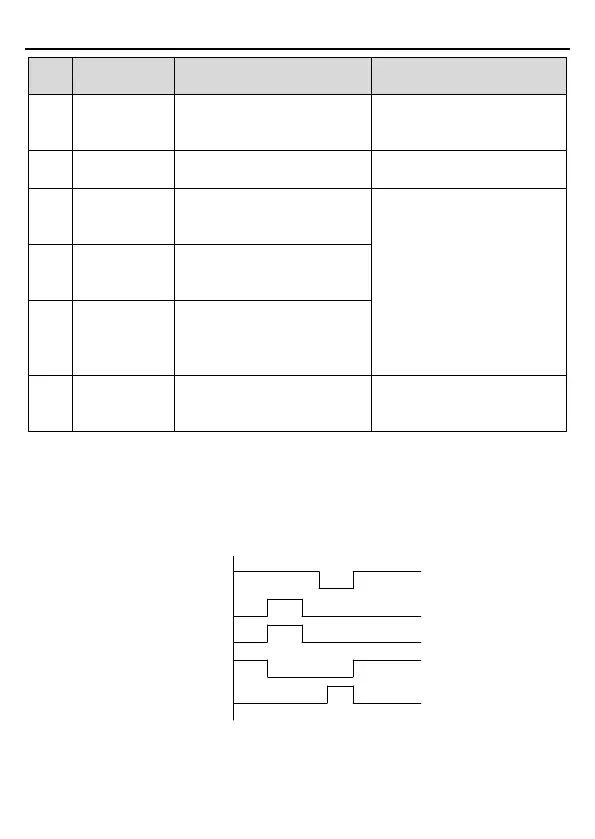
As shown in below fig 6.3, When H1 and H2 are 'OFF' during operation (safety function is
required), the drive enters safety mode and stops output. STO alarm will only disappear once
reset action is valid. External running command needs to be reset for the drive to execute
running command again.
Running
command
Running
VFD output
Running
Stop
Running
Reset
Reset (RST)
Running
Stop
H1
H2
ON
ON
ON
ON
OFF
OFF
Fig 6.3
2. When the hundreds of P11.16 is set to 1, the STO alarm will be unlocked
As shown in below fig 6.4, alarm unlock means when STO appears, the STO alarm will



 To Next Page