SD1 Series Inverters Keypad Operation
-29-
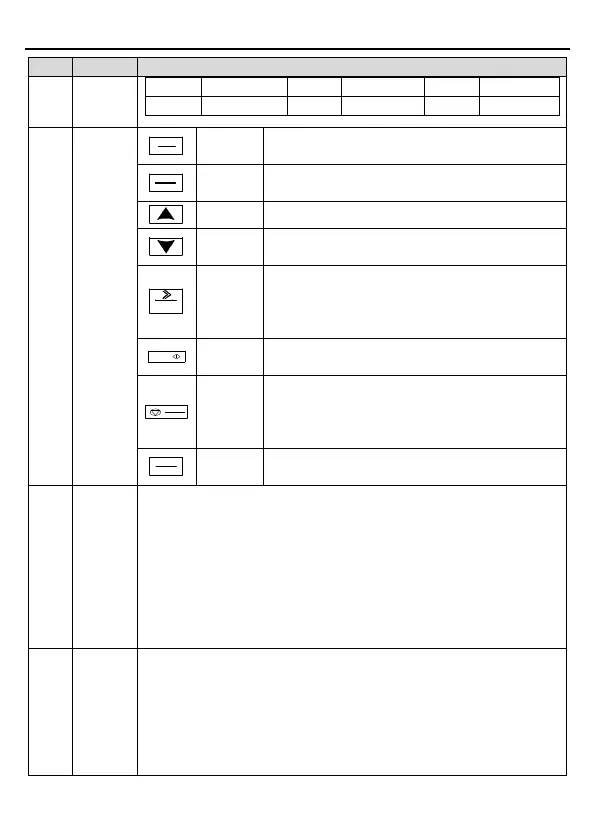
4 Buttons
Programm
Enter or escape from the first level menu and
remove the parameter quickly
Entry key
Enter the menu step-by-step
Confirm parameters
UP key Increase data or function code progressively
DOWN
Decrease data or function code progressively
Right-
key
Move right to select the displaying parameter
circularly in stopping and running mode.
Select the parameter modifying digit during the
parameter modification
Ru
n key
This key is used to operate on the inverter
Stop/
Reset key
This key is used to stop in running state and it is
limited by function code P07.04.
This key is used to reset all control modes in the
fault alarm state
Quick key
The function of this key is confirmed by function
code P07.02.
5
Analog
potential
meter
AI1, When the external common keypad (without the function of
parameter copy)
is valid, the difference between the local keypad AI1 and
the external keypad AI1 is:
When the external keypad AI1 is set to the Min. value, the local keypad
AI1 will be valid and P17.19
will be the voltage of the local keypad AI1;
otherwise, the external keypad AI1 will be valid and P17.19
voltage of the external keypad AI1.
Note
: If the external keypad AI1 is frequency reference source, adjust the
local potentiometer AI1 to 0V/0mA before starting the inverter.
6
Keypad
port
External keypad port. When the external keypad
with the function of
parameter copying is valid, the local keypad LED is off; When the external
keypad without the function of parameter copying is valid, the local and
external keypad LEDs are on.
Note: Only the external keypad which has the function of p
arameters
copy owns the function of parameters copy, other keypads do not have.
(Only for the inverters≤2.2kW)



 To Next Page