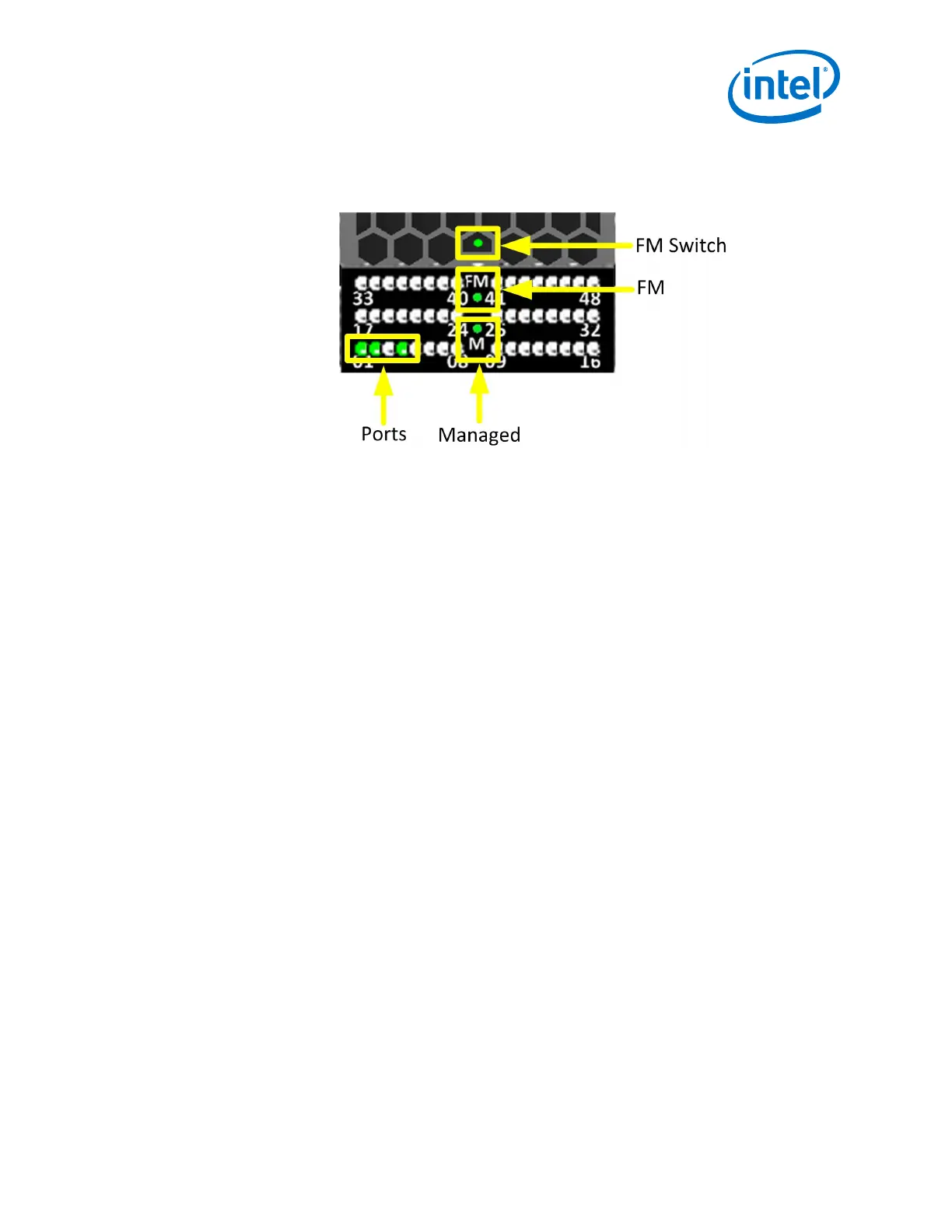
Ports, Fabric Manager (FM), Managed (M), and FM Switch LEDs
Figure 61. Ports, Fabric Manager (FM), Managed (M), and FM Switch LEDs
Ports
Each switch cable port has a Green link status LED that provide the following
indications:
• On: the logical link is up (port is in the Active state).
• Off: the physical link is down (port is in the Down state).
• Blink: traffic passing through the port
Fabric Manager (FM)
The FM LED indicates that the switch is recognized by the active Fabric Manager.
Managed (M)
The Managed (M) LED indicates that a Q7 management module is installed switch.
FM Switch
On an externally-managed switch, the FM Switch LED is used to restrict whether the
end-node attached to a switch port is trusted to run a Fabric Manager, or to issue
Fabric Manager-related packets and operations.
The user activates the LED using a small, straight instrument (e.g., a standard-size
paper clip).
2.8.1.3
Installation—Intel
®
Omni-Path Fabric
Intel
®
Omni-Path Fabric Switches Hardware
June 2019 Installation Guide
Doc. No.: H76456, Rev.: 10.0 77



 To Next Page