Operation DVR Integration Option
3-8 24-10515-13 Rev. –
This document contains confidential and proprietary information of Johnson Controls, Inc.
© 2010 Johnson Controls, Inc.
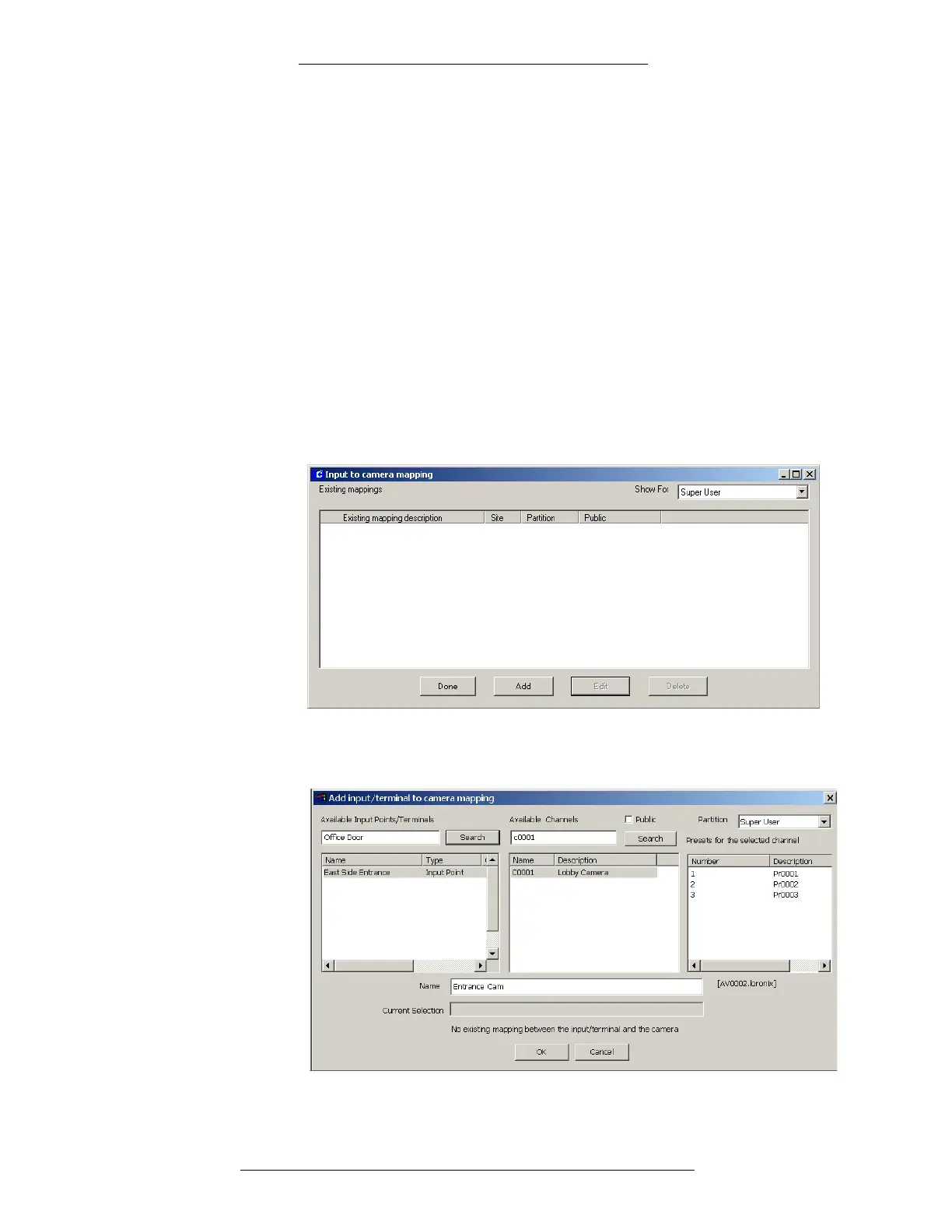
Input to camera mapping allows you to bring up camera image via Alarm Monitor and/or
Real Time list. It does not automatically result in recording. In order to record you need to
create a P2000 event.
For example, the operator may want to issue
a command to start recording image from a
particular camera when an invalid card is swiped at a reader monitored by that camera. Such
action is made possible by the mapping information that describes which camera is
monitoring which alarm/event source.
All system configuration items such as T
erminals, Input Points, AV Switches, Cameras, and
Presets must be registered in the P2000 database before using the Input to Camera
application.
T
o associate cameras to Input Points or Terminals:
1. From the P2000 Main menu, select Options>CCTV/A
V>Input to Camera.
The Input to camera mapping window appears.
2. Click the Add button. The Add input/terminal to camera mapping window
appears.





 To Next Page