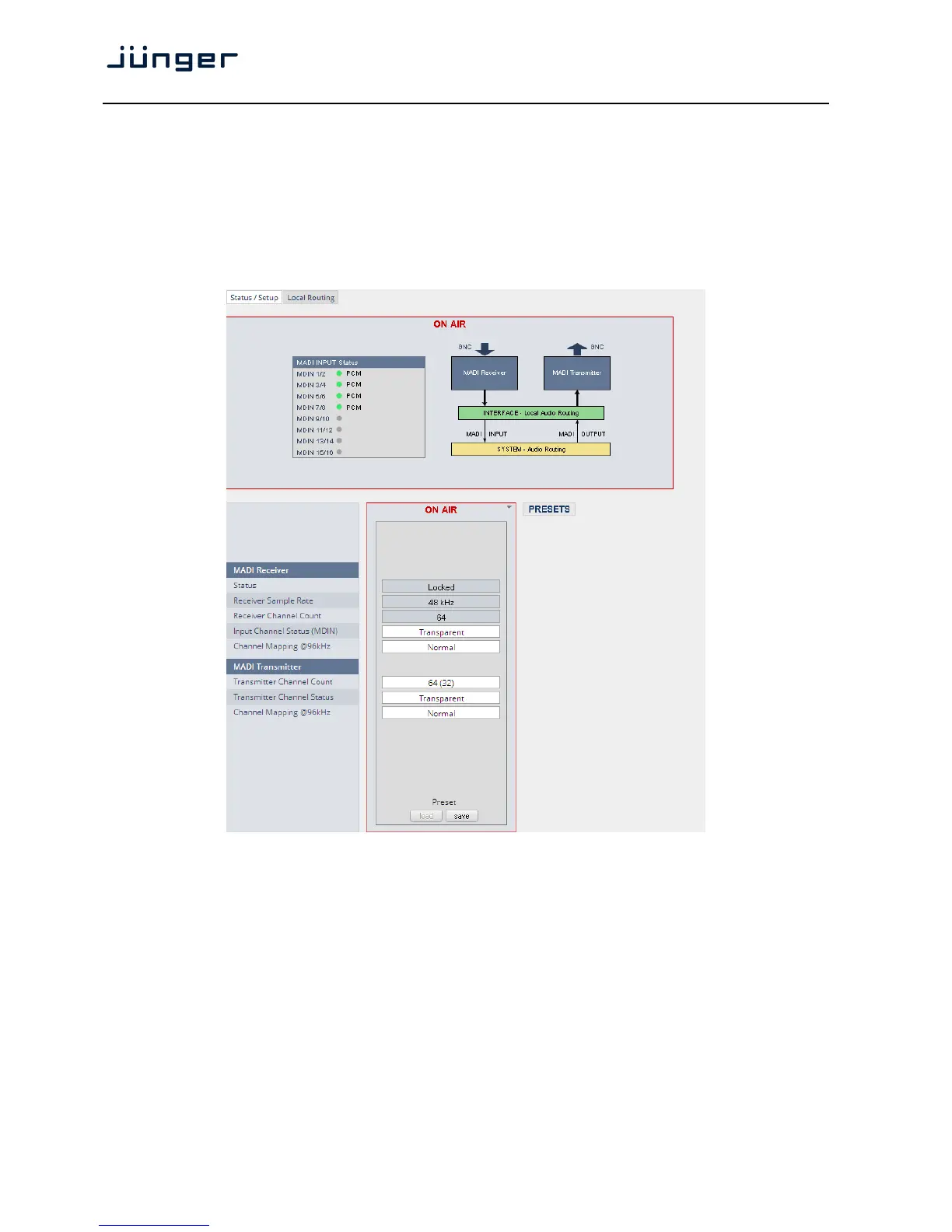
Set up GUI – INTERFACES – MADI Interface – Status / Setup
The implementation of MADI for the D*AP4 is based on the option module O_DAP_MB (BNC) or
O_DAP_MO_MM (MADI optical multi mode fiber) or O_DAP_MO_SM (MADI optical single mode fiber).
Since the V*AP is a 4 channel processing device not all 64 MADI channels are available for device I/O.
The first 8 channels are available via the MADI local router to the device router.
They appear at the device router pane as MDIN 1 .. 8 and MDOUT 1 … 8.
These channels can be routed to and from any of the local routing sources MADIRX 1 … 64
and MADITX 1 … 64 respectively.
MADI Receiver
Status [Locked / Locked-Async / Error]
The timing of the audio decoding is locked to the MADI clock. If the
internal timing of the D*AP4 is different "Locked-Async" is displayed.
Receiver Sample Rate [44.1 / 32 / 48 / 88.2 / 96kHz / Unknown]
The measured sample rate from the received MADI stream.
Receiver Channel Count [32 / 56 / 64]
Depends on the upstream MADI transmitter settings.
Input Channel Status (MDIN) [Transparent / Professional]
One may overwrite the input channel status by a set of professional
ones.
Channel Mapping @ 96 kHz [Normal]



 To Next Page