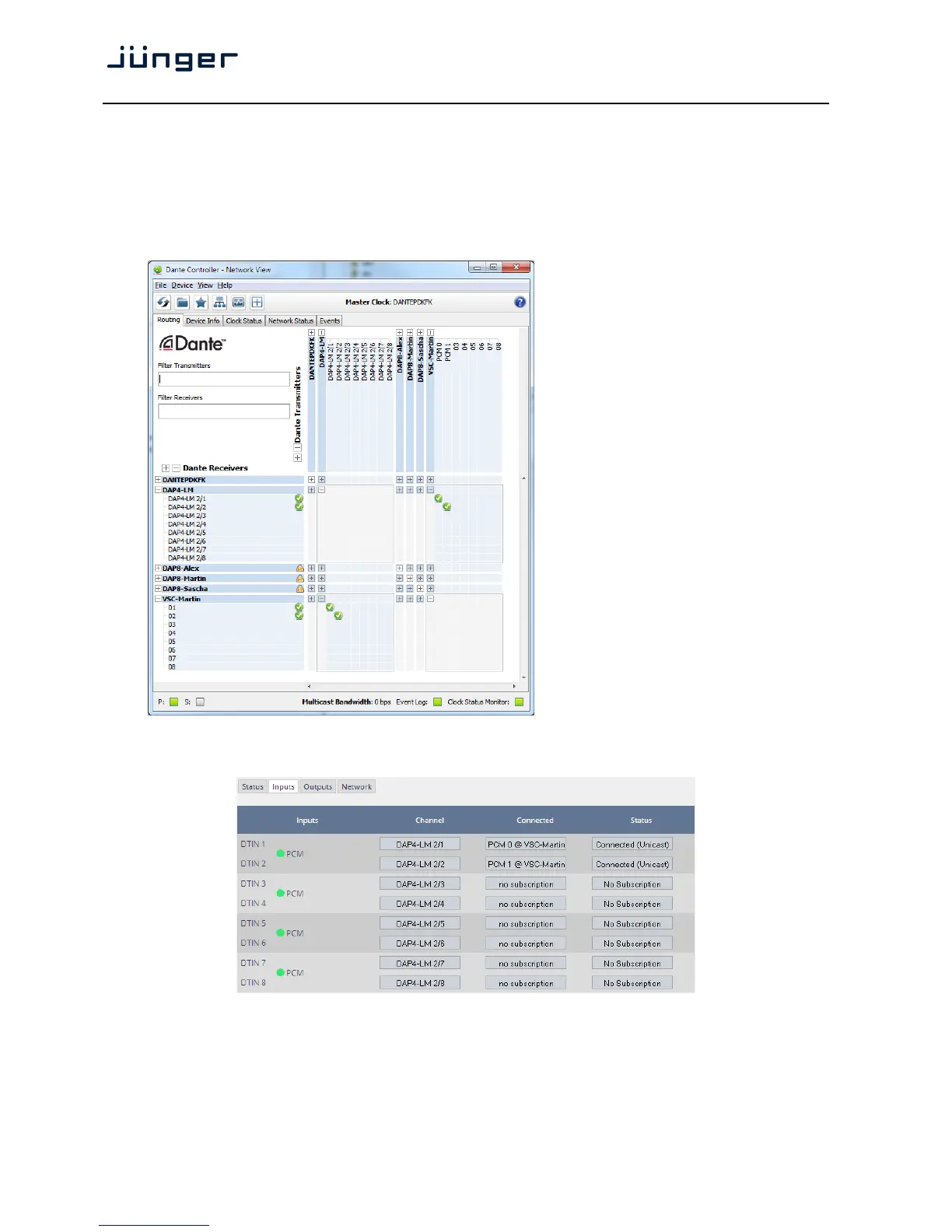
Set up GUI – INTERFACES – Dante I/O Interface – Inputs
The DanteController software gives you an overview of all members of such a DANTE network.
You can assign channel labels for the inputs (from the network to the device interface). Those labels will
automatically appear in the D*AP4 and will be displayed there.
Here is a glimpse on the GUI of the DanteController:
As an example you see here a
"DAP4-LM" (name given by the Dante
Controller) that has assigned the labels
DAP-4 2/1 … 2/8 for both the inputs and
the outputs.
Beside a few more devices on that
network, we see the unfolded outputs
of a DanteVirtualSoundcard (VSC)
named "VSC-MARTIN" on the upper
right hand side.
The top horizontal area shows the
transmitters while the receivers are
shown vertically on the left hand side.
The outputs PCM 0 and PCM 1 from the
VCS are assigned to the D*AP4 inputs
DAP4-LM 2/1 and 2/2 while two outputs
from the "DAP4-LM" are assigned to the
VSC inputs "01" and "02".
We see the labels assigned by the DanteController software in the "Channel" column:
Inputs Eight inputs are pre-defined for the DANTE interface installed in a
D*AP4. They are organized in pairs and the input status is shown by
soft LEDs (green = PCM audio / yellow = non audio/ grey no audio).



 To Next Page