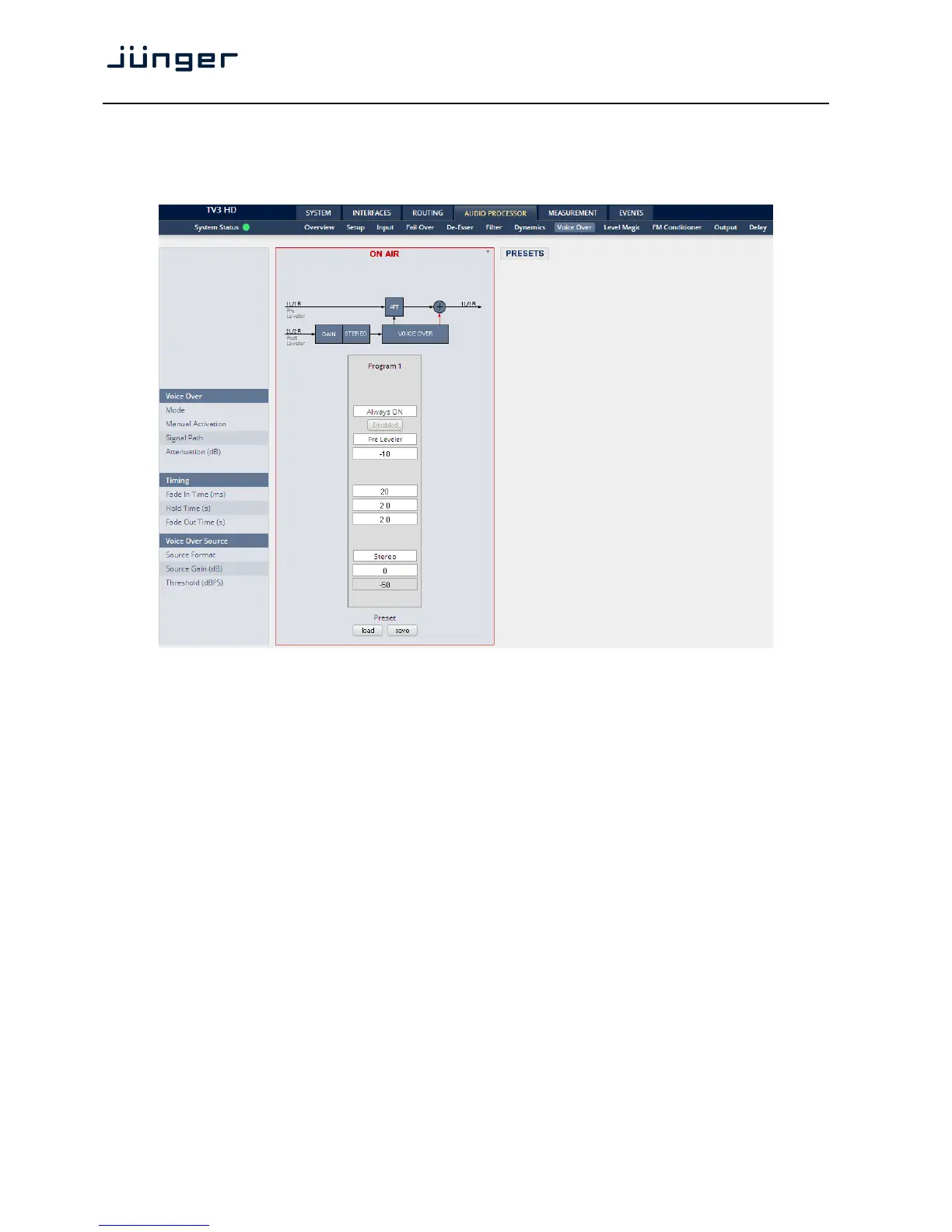
Setup GUI – AUDIO PROCESSOR – Voice Over
The voice over section allows for manual (mixing) / automatic (ducking) of a voice channel over the
program feed. The dynamic schematic in the top of the pane shows the actual signal flow:
Voice Over
Mode [OFF / Always ON / AUTO]
Defines the operating mode of the voice over block. AUTO will detect
the signal in the voice channel and will automatically perform the voice
over (ducking).
Manual Activation [Enable / Disable]
Mostly used for testing
Signal Path [Pre Leveler / Post Leveler]
See AUDIO PROCESSOR > Overview for the actual location of the
circuit in the signal path.
Attenuation (dB) [-30 … -10 … 0]
Timing
Fade In Time (ms) [10 / 20 … 1000]
Hold Time (ms) [0.0 … 2.0 … 10.0]
Fade Out Time (ms) [0.0 … 2.0 … 10.0]
Voice Over Source
Source Format [Stereo / Mono LL / Mono RR / Mono L+R]
Source Gin (dB) [-20 … 0 … 20]
Threshold (dBFS) [-60 … -50 … -40]
Sets the threshold for detection in AUTO mode.



 To Next Page