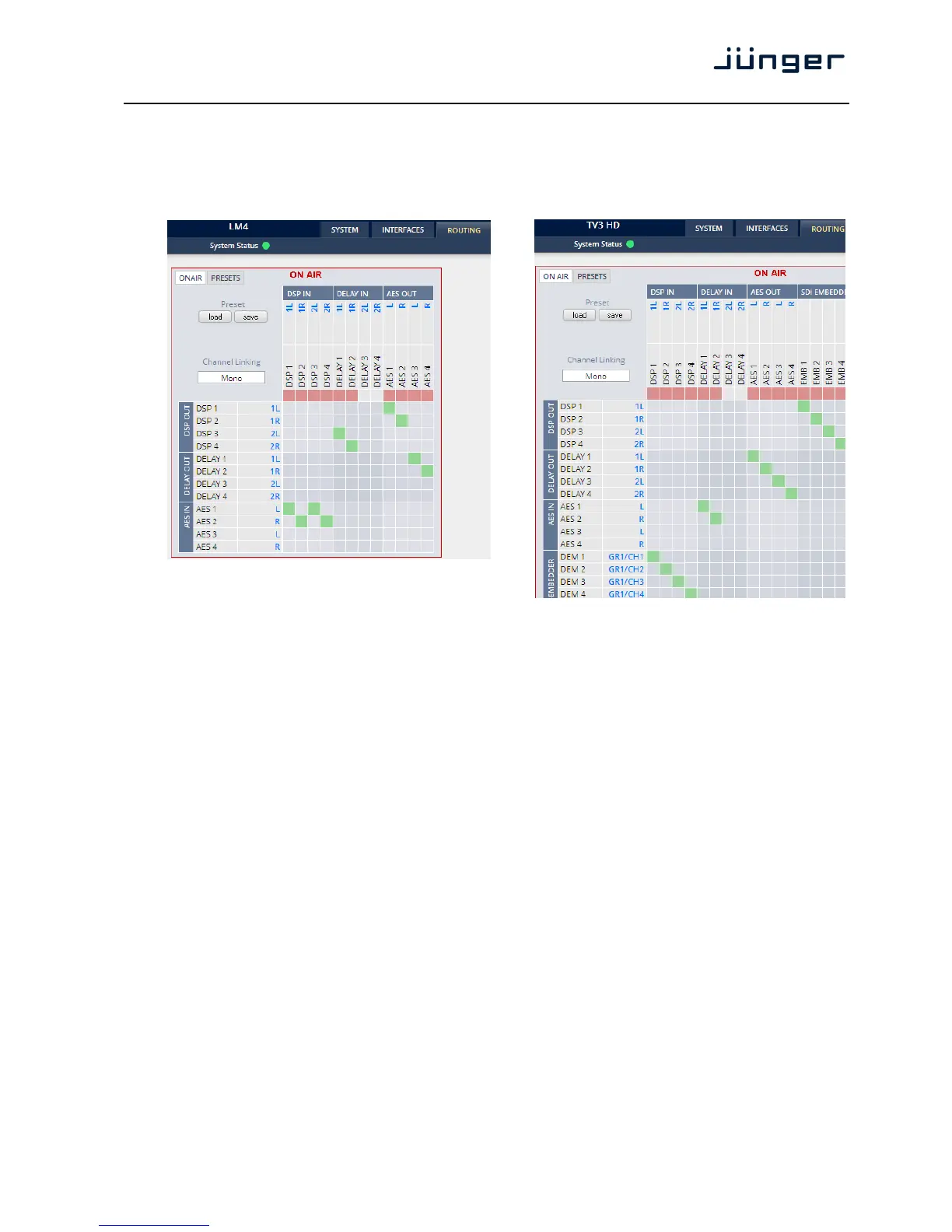
Setup GUI – ROUTING
This is the core of the D*AP4 as it defines the audio signal flow inside the device. It appears differently
depending on the type of optional interface boards installed.
Example without an interface board: example for an SDI interface board:
Each functional block of the device has a source label and a destination label. Additional blue signal
labels give an indication of the type of signal that is expected or issued by the respective function block
or I/O interface (e.g. 1L/1R for AES or 2L/2R for DSP 3/4 and so forth).
Top / horizontal (column headlines) = signal destinations
DSP [DSP 1 … DSP 4]
The DSP inputs carrying the signal type labels 1L, 1R, 2L, 2R
of the two programs 1/2 (see AUDIO PROCESSOR > Overview).
DELAY [DELAY 1 … 4]
The four inputs of the extra delay lines of the D*AP4
AES [AES 1 … 4]
The AES outputs of the device.
Left hand / vertical (line headlines) = signal sources
DSP [DSP 1 … DSP4]
The DSP outputs carrying the signal type labels 1L, 1R, 2L, 2R
DELAY [DELAY 1 … 4]
The four outputs of the extra delay lines of the D*AP4
AES [AES 1 / AES2]
The AES inputs of the D*AP4.



 To Next Page