Graph [ON / OFF]
Permanently The color code of the column
Visisble headerswill change depending on
the program selected for display
(see upper) display.
White color represents the
selected program. If you select
program 1 for example it
becomes white while
Program 1 is colored orange.
Link [Unlinked, Linked]
For stereo operation you may link
the setup parameters
Equalizer [ON / OFF]
Band 1
Filter Type [OFF / Peak 1 / Peak 2 / Lo Shelf / Hi Shelf / Lo Cut / Hi Cut]
Frequency (Hz) [20 … 20000]
Gain (dB) [-20.0 … 20.0]
Q [0.4 … 4.0]
Band 2 … 5 similar parameters as Band 1
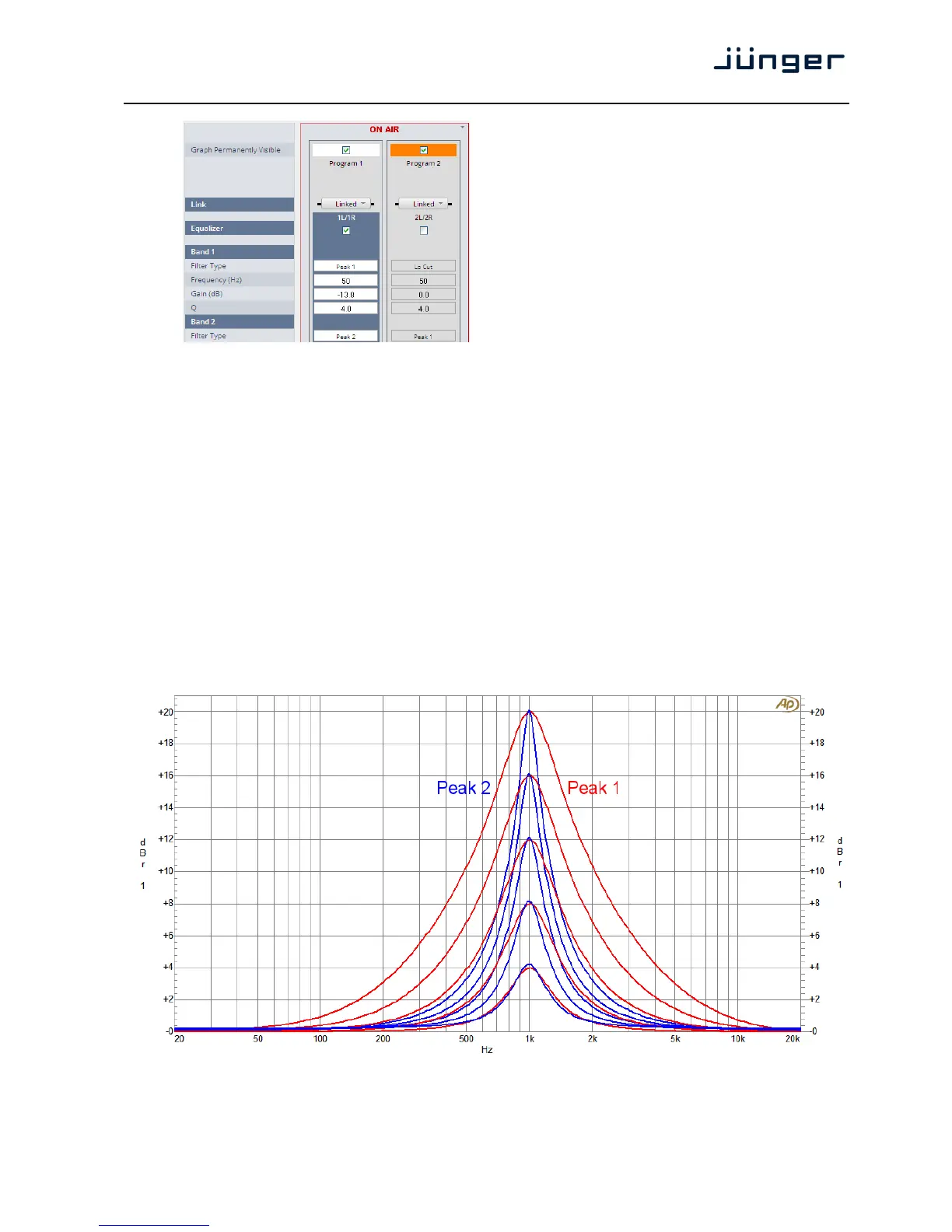
The EQs offer two different peak modes:
Peak 1: The bell curves of the Peak 1 filter features constant quality (Q) over gain.
Q is defined at -3dB below peak. It does not change when altering gain.
Peak2: The bell curves of the Peak 2 filter also features constant quality (Q) over gain.
But Q is defined at 50 % of gain. Subjectively the bell curve becomes sharper when
increasing gain, but this is only true for the lower 6-8dB of gain.



 To Next Page