EasyManua.ls Logo

JVC KY-D29 - Page 20

JVC KY-D29
56 pages
Print Icon
To Next Page IconTo Next Page
To Previous Page IconTo Previous Page
Loading...
3.
BASIC
SYSTEM
CONNECTIONS
AND
ADJUSTMENTS
EAR
PHONt
bs
Wye
INCOM
LEVEL
=
=
20
3-2
INSTALLING
THE
BASIC
SYSTEM
(Cont’d)
7.
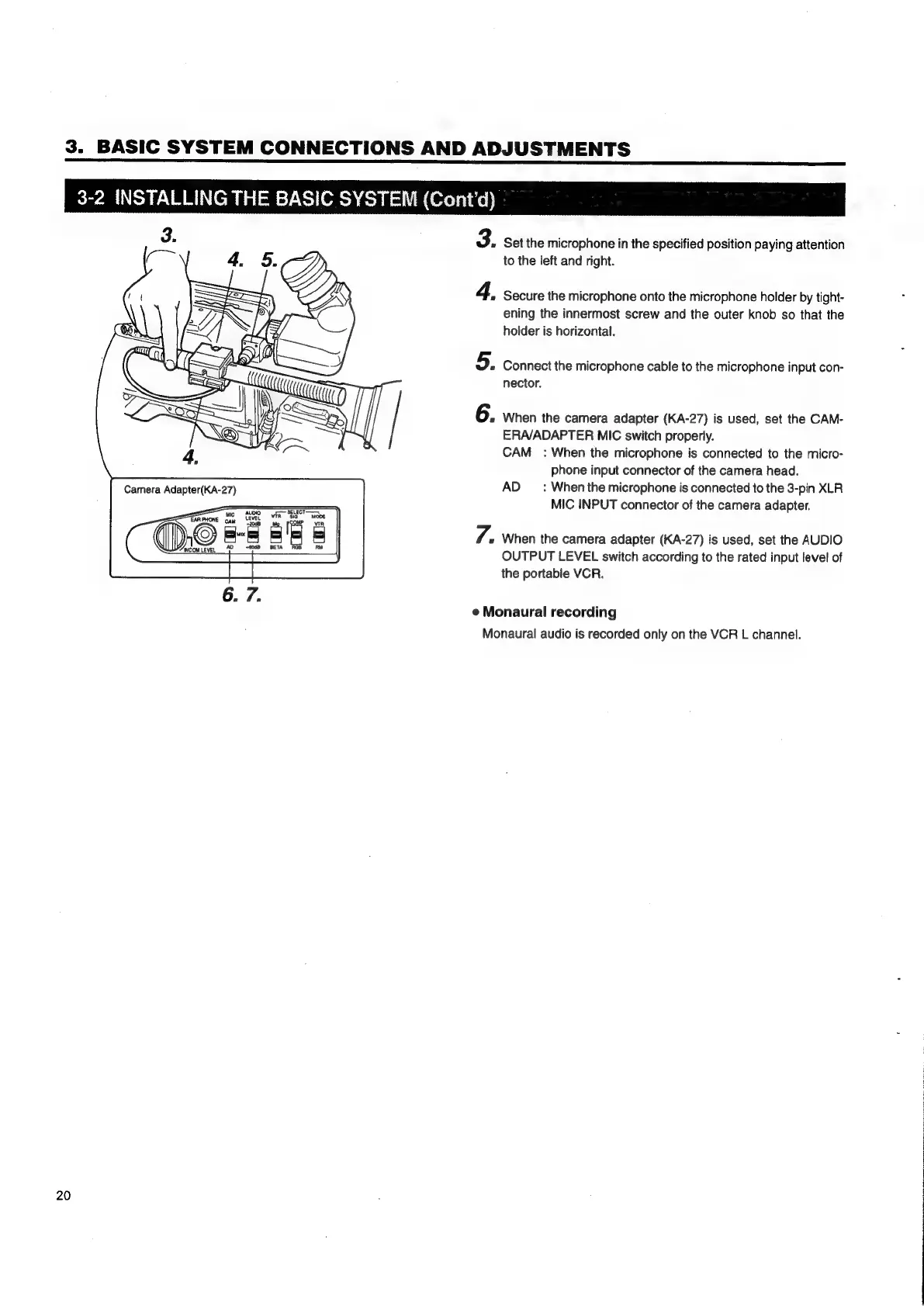
Set
the
microphone
in
the
specified
position
paying
attention
to
the
left
and
right.
Secure
the
microphone
onto
the
microphone
holder
by
tight-
ening
the
innermost
screw
and
the
outer
knob
so
that
the
holder
is
horizontal.
Connect
the
microphone
cable
to
the
microphone
input
con-
nector.
When
the
camera
adapter
(KA-27)
is
used,
set
the
CAM-
ERA/ADAPTER
MIC
switch
properly.
CAM_:
When
the
microphone
is
connected
to
the
micro-
phone
input
connector
of
the
camera
head.
AD
_
:
Whenthe
microphone
is
connected
to
the
3-pin
XLR
MIC
INPUT
connector
of
the
camera
adapter.
When
the
camera
adapter
(KA-27)
is
used,
set
the
AUDIO
OUTPUT
LEVEL
switch
according
to
the
rated
input
level
of
the
portable
VCR.
@
Monaural
recording
Monaural
audio
is
recorded
only
on
the
VCR
L
channel.

Table of Contents

Related product manuals