EasyManua.ls Logo

JVC KY-D29 - Connection with Other Accessories

JVC KY-D29
56 pages
Print Icon
To Next Page IconTo Next Page
To Previous Page IconTo Previous Page
Loading...
6.
SYSTEM
UPGRADING
6-7
CONNECTION
WITH
OTHER
ACCESSORIES
Ce
Bi
Connection
with
the
BVV-5
Betacam
SP
VCR
The
KA-B27
VCR
adapter
is
required
for
connecting
the
BVV-5
to
the
camera.
e@
Connection
of
the
KA-B27
Use
the
handle
supplied
with
the
BVV-5.
It
is
not
necessary
to
remove
the
VCR
mounting
bracket
to
allow
connection.
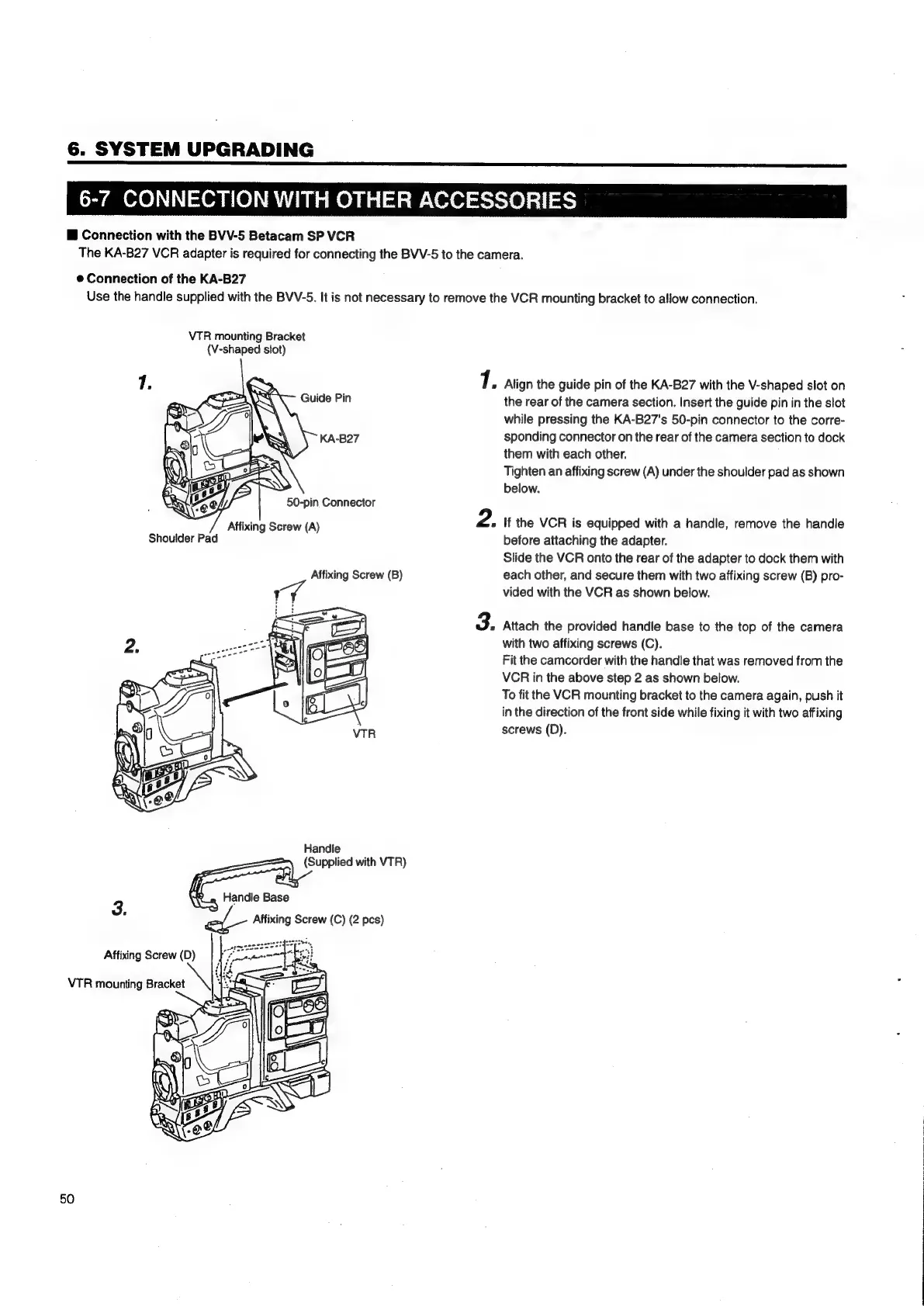
VTR
mounting
Bracket
(V-shaped
slot)
Guide
Pin
KA-B27
Affixing
Screw
(A)
Shoulder
Pad
Affixing
Screw
(B)
Y
Handle
(Supplied
with
VTR)
Handle
Base
3.
el-
Affixing
Screw
(C)
(2
pcs)
Affixing
Screw
(D)
\
VTR
mounting
Bracket
50
1.
Align
the
guide
pin
of
the
KA-B27
with
the
V-shaped
slot
on
the
rear
of
the
camera
section.
Insert
the
guide
pin
in
the
slot
while
pressing
the
KA-B27's
50-pin
connector
to
the
corre-
sponding
connector
on
the
rear
of
the
camera
section
to
dock
them
with
each
other.
Tighten
an
affixing
screw
(A)
under
the
shoulder
pad
as
shown
below.
If
the
VCR
is
equipped
with
a
handle,
remove
the
handle
before
attaching
the
adapter.
Slide
the
VCR
onto
the
rear
of
the
adapter
to
dock
them
with
each
other,
and
secure
them
with
two
affixing
screw
(B)
pro-
vided
with
the
VCR
as
shown
below.
Attach
the
provided
handle
base
to
the
top
of
the
camera
with
two
affixing
screws
(C).
Fit
the
camcorder
with
the
handle
that
was
removed
from
the
VCR
in
the
above
step
2
as
shown
below.
To
fit
the
VCR
mounting
bracket
to
the
camera
again,
push
it
in
the
direction
of
the
front
side
while
fixing
it
with
two
affixing
screws
(D).

Table of Contents

Related product manuals