EasyManua.ls Logo

JVC KY-D29 - Resetting the File; Rsptarerents

JVC KY-D29
56 pages
Print Icon
To Next Page IconTo Next Page
To Previous Page IconTo Previous Page
Loading...
5.
SHOOTING
(APPLIED
OPERATIONS)
5-4
MENU
SCREEN
(Cont'd)
Displayed
Screen
Function,
Operation
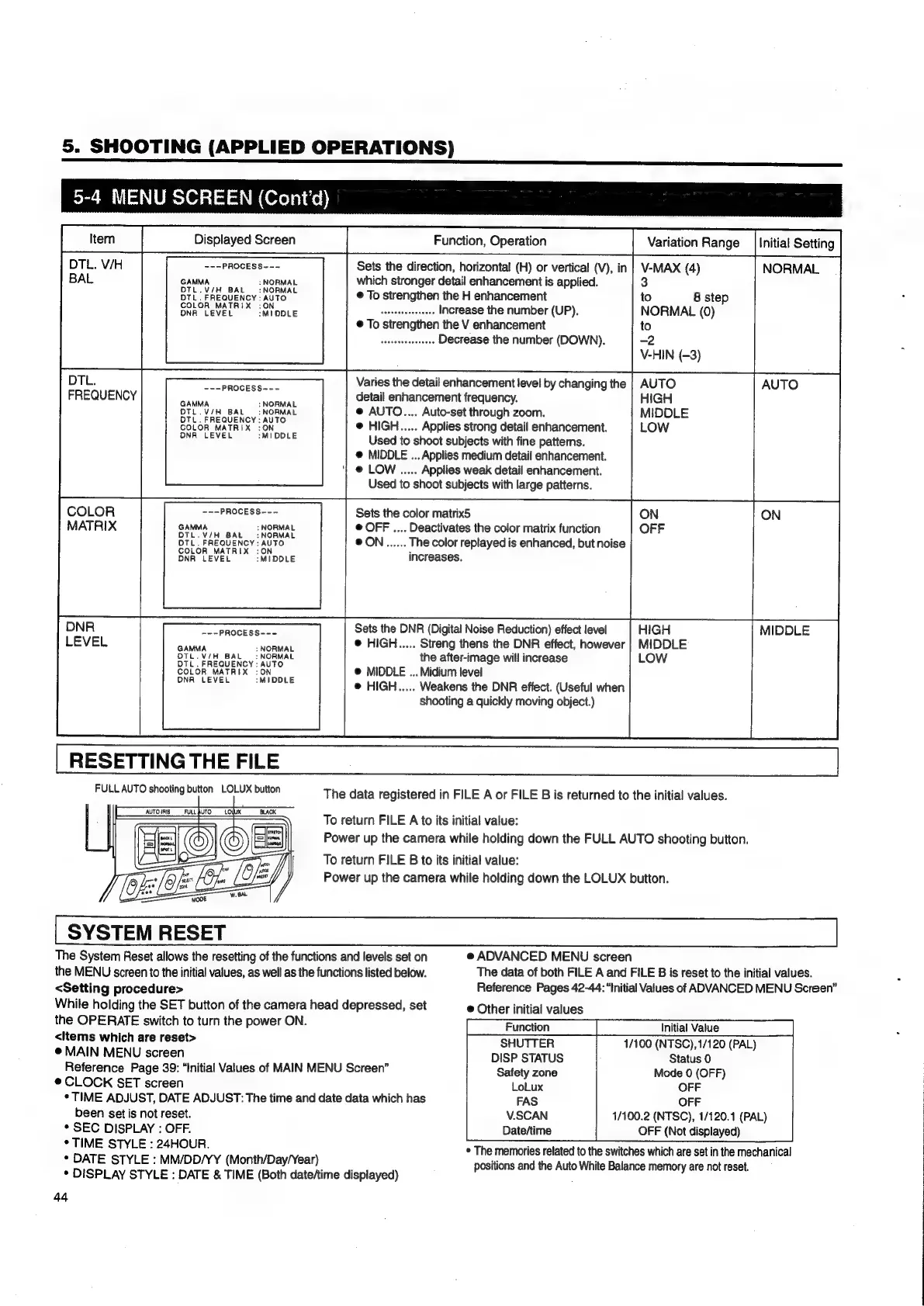
DTL.
V/H
---PROCESS---
Sets
the
direction,
horizontal
(H)
or
vertical
(V),
in
BAL
GAMMA
:
NORMAL
which
stronger
detail
enhancement
is
applied.
ee
ea
cy
eo
RMAL
©
To
strengthen
the
H
enhancement
SOR
LEME
tO
opuE
iho
Ea.
Seceteitansedtess
Increase
the
number
(UP).
®
To
strengthen
the
V
enhancement
sakssdacehevsesi
Decrease
the
number
(DOWN).
DTL.
FREQUENCY
COLOR
MATRIX
RESETTING
THE
FILE
Variation
Range
|
Initial
Setting
VMAX
(4)
NORMAL
S
8
step
NORMAL
(0)
to
°
-2
V-HIN
(-3)
Varies
the
detail
enhancement
level
by
changing
the
detail
enhancement
frequency.
@
AUTO....
Auto-set
through
zoom.
@
HIGH.....
Applies
strong
detail
enhancement.
Used
to
shoot
subjects
with
fine
patterns.
@
MIDDLE
...
Applies
medium
detail
enhancement.
@
LOW
.....
Applies
weak
detail
enhancement.
Used
to
shoot
subjects
with
large
patterns.
~--PROCESS~--
GAMMA
:
NORMAL
DTL.V/H
BAL
:
NORMAL
DTL.
FREQUENCY:
AUTO
COLOR
MATRIX
:ON
DNA
LEVEL
:MIDOLE
---PROCESS---
GAMMA
:
NORMAL
OTL.V/H
BAL
:
NORMAL
OTL.
FREQUENCY:
AUTO
COLOR
MATRIX
:ON
DNA
LEVEL
:MIDDLE
Sets
the
color
matrix5
@
OFF
....
Deactivates
the
color
matrix
function
@ON......
The
color
replayed
is
enhanced,
but
noise
increases.
MIDDLE
Sets
the
DNR
(Digital
Noise
Reduction)
effect
level
@
HIGH.....
Streng
thens
the
DNR
effect,
however
the
after-image
will
increase
@
MIDDLE
...
Midium
level
@
HIGH.....
Weakens
the
DNR
effect.
(Useful
when
shooting
a
quickly
moving
object.)
-~-PROCESS---
GAMMA
:
NORMAL
DTL.V/H
BAL
:
NORMAL
DTL
.
FREQUENCY
;:
AUTO
COLOR
MATRIX
:ON
DNA
LEVEL
:MIDDLE
FULL
AUTO
shooting
button
LOLUX
button
The
data
registered
in
FILE
A
or
FILE
B
is
returned
to
the
initial
values.
To
return
FILE
A
to
its
initial
value:
Power
up
the
camera
while
holding
down
the
FULL
AUTO
shooting
button.
To
return
FILE
B
to
its
initial
value:
Power
up
the
camera
while
holding
down
the
LOLUX
button.
SYSTEM
RESET
The
System
Reset
allows
the
resetting
of
the
functions
and
levels
set
on
@
ADVANCED
MENU
screen
the
MENU
screen
to
the
initial
values,
as
well
as
the
functions
listed
below.
The
data
of
both
FILE
A
and
FILE
B
is
reset
to
the
initial
values.
<Setting
procedure>
Reference
Pages
42-44:
“Initial
Values
of
ADVANCED
MENU
Screen”
While
holding
the
SET
button
of
the
camera
head
depressed,
set
@
Other
initial
values
ee
ee
eeNeE
ae
<items
which
are
reset>
SHUTTER
1/100
(NTSC),1/120
(PAL)
@
MAIN
MENU
screen
DISP
STATUS
Status
0
Reference
Page
39:
“Initial
Values
of
MAIN
MENU
Screen”
Safety
zone
Mode
0
(OFF)
@
CLOCK
SET
screen
LoLux
OFF
*
TIME
ADJUST,
DATE
ADJUST:
The
time
and
date
data
which
has
FAS
OFF
been
set
is
not
reset.
V.SCAN
1/100.2
(NTSC),
1/120.1
(PAL)
*
SEC
DISPLAY
:
OFF.
Date/time
OFF
(Not
displayed)
*
TIME
STYLE
:
24HOUR.
*
DATE
STYLE
:
MM/DD/YY
(Month/Day/Year)
¢
DISPLAY
STYLE
:
DATE
&
TIME
(Both
date/time
displayed)
44
*
The
memories
related
to
the
switches
which
are
set
in
the
mechanical
positions
and
the
Auto
White
Balance
memory
are
not
reset.

Table of Contents

Related product manuals