EasyManua.ls Logo

JVC KY-D29 - Viewfinder Display; Warning Indicators Inside the Viewfinder; Viewfinder Screen Gisplay

JVC KY-D29
56 pages
Print Icon
To Next Page IconTo Next Page
To Previous Page IconTo Previous Page
Loading...
2.
CONTROLS,
CONNECTORS
AND
INDICATORS
2-5
VIEWFINDER
DISPLAY
Warning
indicators
inside
the
viewfinder
The
viewfinder
has
two
LED
indicators
below
the
screen.
These
LEDs
light
or
blink
to
indicate
the
present
status
of
the
camera
or
the
VCR’s
camera
control
unit.
e@
[BATT]
BATTERY
LIGHT
This
blinks
red
when
battery
voltage
becomes
too
low
for
the
camera
to
operate.
*
Some
VCRs
signal
low
battery
with
the
REC/ALARM
light.
@
REC/ALARM
LIGHT
This
light
green
for
these
conditions.
REC
Solid
Green:
While
recording.
[ALARM]
Blinks
Green
:
¢
While
the
VCR
prerolls
before
recording.
BATT
LIGHT
REC/ALARM
LIGHT
*
If
the
Tape
is
finishing.
*
If
the
VCR
Malfunctions
¢
For
some
VCRs
this
indicates
Low
Battery.
Note
:
With
some
VCRs,
the
REC
indicator
may
turn
off
when
the
green
tally
blinks
during
recording.
In
this
case,
the
accumulating
timer
does
not
operate.
Viewfinder
screen
display
The
viewfinder
screen
displays
the
following
information:
7.
Status
screens
(screens
for
use
in
checking
the
current
camera
setup)
NO
AUTOIRIS
ANLAUTO
_LOLUX
«
Alarm
message
display
&
Safety
zone
display
&
Setting
screen
(screen
for
use
in
the
camera
setup
including
the
date)
Auto
white
balance
display
DH
Shutter
speed
display
Display
/
Zone
switch
N
«
TIME
DATE
display
1.
STATUS
SCREENS
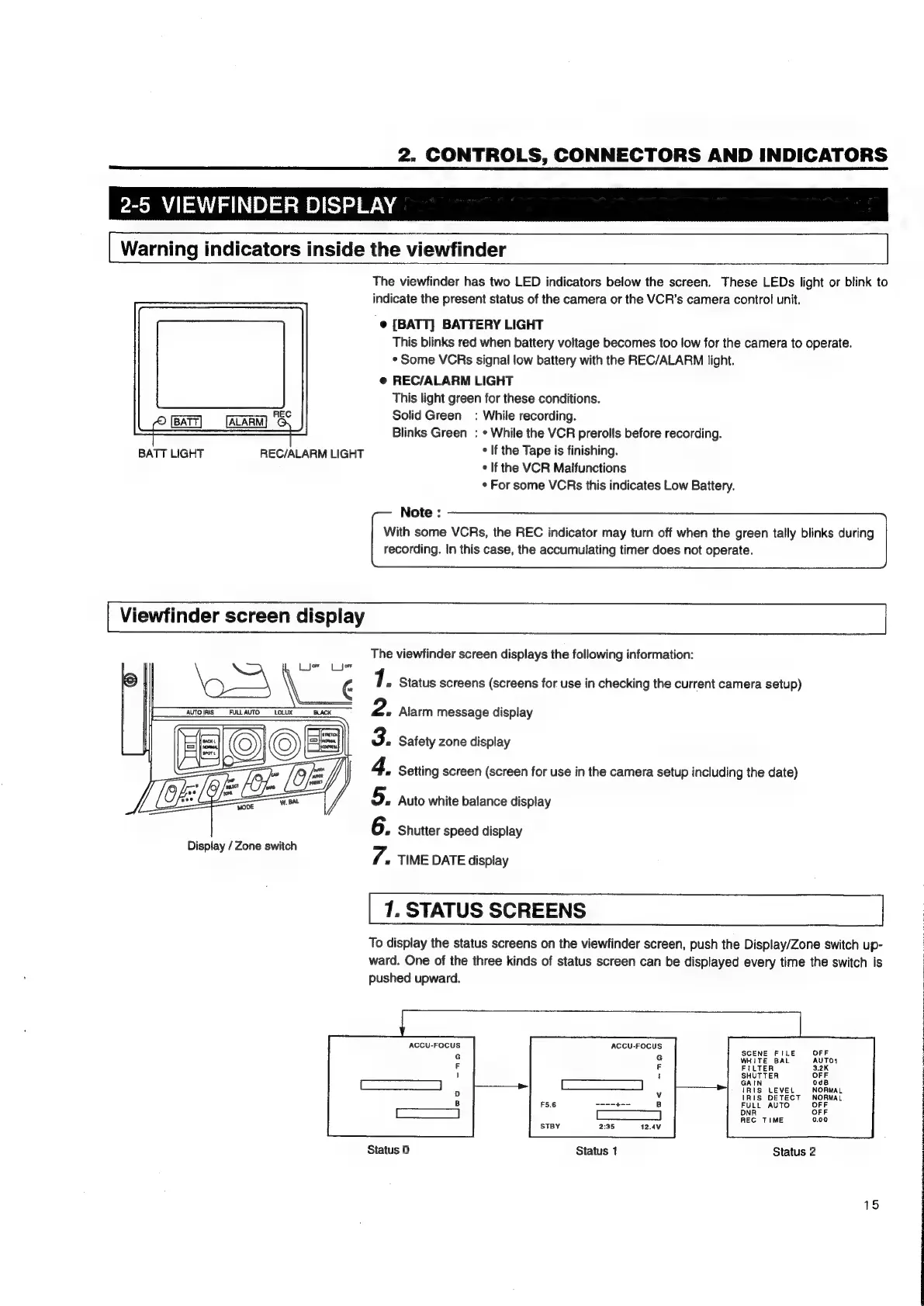
To
display
the
status
screens
on
the
viewfinder
screen,
push
the
Display/Zone
switch
up-
ward.
One
of
the
three kinds
of
status
screen
can
be
displayed
every
time
the
switch
is
pushed
upward.
ACCU-FOCUS
ACCU-FOCUS
SCENE
FILE
WHITE
BAL
GAIN
IRIS
LEVEL
(RIS
OETECT
FULL
AUTO
DNR
REC
TIME
Status
0
Status
1
Status
2
15

Table of Contents

Related product manuals