EasyManua.ls Logo

JVC KY-D29 - Setting the Advanced Menu SCIEN; Executing the Operation;Process Menu Fil€S

JVC KY-D29
56 pages
Print Icon
To Next Page IconTo Next Page
To Previous Page IconTo Previous Page
Loading...
-4
MENU
SCREENS
(Cont'd)
5.
SHOOTING
(APPLIED
OPERATIONS)
SETTING
THE
ADVANCED
MENU
SCREEN
DNR
‘SHUTTER
FILE
Be
ES
6
---ADVANCED
MENU--—
SCENE
FILE
A
D1:OPERATION
2:PROCESS
3:SCENE
FILE
PUSH
SET
BUTTON
TO
ENTER
ADVANCED
MENU
screen
---OPERATION
1/2--~
SCENE
FIL
FAW
ONE
GAINe
NON
LOLUX
IN
SMOOTH
TRANS
:OF
Selection
screen
(Example
with
OPERATION
1/2)
---SCENE
FILE---
SCENE
FILE
PUSH
SET
BUTTON
10
STORE
seanesrere
=STORE
OK?=
oeariaases
SCENE
FILE
screen
(Example
with
FILE
A)
---SCENE
FILE---
SCENE
FILE
OFF
PUSH
SET
BUTTON
SCENE
FILE
screen
(Example
with
FILE
OFF)
Sy
o
o>)
SN
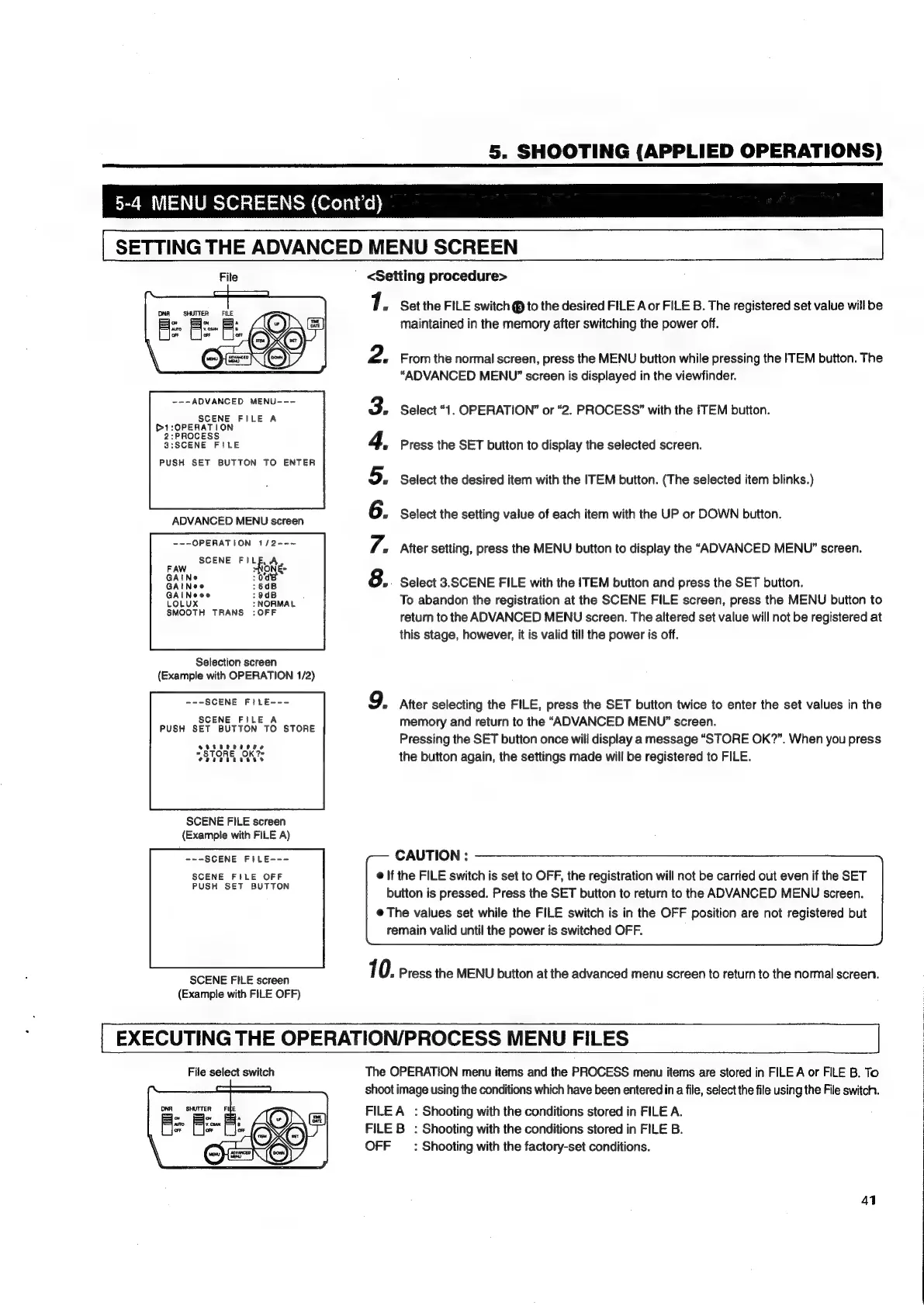
<Setting
procedure>
7.
Set
the
FILE
switch
@
to
the
desired
FILE
Aor
FILE
B.
The
registered
set
value
will
be
maintained
in
the
memory
after
switching
the
power
off.
2.
From
the
normal
screen,
press
the
MENU
button
while
pressing
the
ITEM
button.
The
“ADVANCED
MENU”
screen
is
displayed
in
the
viewfinder.
»
Select
“1.
OPERATION”
or
“2.
PROCESS?”
with
the
ITEM
button.
Press
the
SET
button
to
display
the
selected
screen.
Select
the
desired
item
with
the
ITEM
button.
(The
selected
item
blinks.)
Select
the
setting
value
of
each
item
with
the
UP
or
DOWN
button.
After
setting,
press
the
MENU
button
to
display
the
“ADVANCED
MENU”
screen.
Select
3.SCENE
FILE
with
the
ITEM
button
and
press
the
SET
button.
To
abandon
the
registration
at
the
SCENE
FILE
screen,
press
the
MENU
button
to
return
to
the
ADVANCED
MENU
screen.
The
altered
set
value
will
not
be
registered
at
this
stage,
however,
it
is
valid
till
the
power
is
off.
9.
After
selecting
the
FILE,
press
the
SET
button
twice
to
enter
the
set
values
in
the
memory
and
return
to
the
“ADVANCED
MENU”
screen.
Pressing
the
SET
button
once
will
display
a
message
“STORE
OK?”.
When
you
press
the
button
again,
the
settings
made
will
be
registered
to
FILE.
CAUTION
:
@
If
the
FILE
switch
is
set
to
OFF,
the
registration
will
not
be
carried
out
even
if
the
SET
button
is
pressed.
Press
the
SET
button
to
return
to
the
ADVANCED
MENU
screen.
@
The
values
set
while
the
FILE
switch
is
in
the
OFF
position
are
not
registered
but
remain
valid
until
the
power
is
switched
OFF.
10.
Press
the
MENU
button
at
the
advanced
menu
screen
to
return
to
the
normal
screen.
EXECUTING
THE
OPERATION/PROCESS
MENU
FILES
File
select
switch
The
OPERATION
menu
items
and
the
PROCESS
menu
items
are
stored
in
FILE
A
or
FILE
B.
To
shoot
image
using
the
conditions
which
have
been
entered
in
a
file,
select
the
file
using
the
File
switch.
FILE
A
:
Shooting
with
the
conditions
stored
in
FILE
A.
FILE
B
:
Shooting
with
the
conditions
stored
in
FILE
B.
OFF
_
:
Shooting
with
the
factory-set
conditions.
41

Table of Contents

Related product manuals