EasyManua.ls Logo

JVC KY-D29 - Menu Screens; FIOW of MENU SCFEEMNS

JVC KY-D29
56 pages
Print Icon
To Next Page IconTo Next Page
To Previous Page IconTo Previous Page
Loading...
5.
SHOOTING
(APPLIED
OPERATIONS)
5-4
MENU
SCREENS
FLOW
OF
MENU
SCREENS
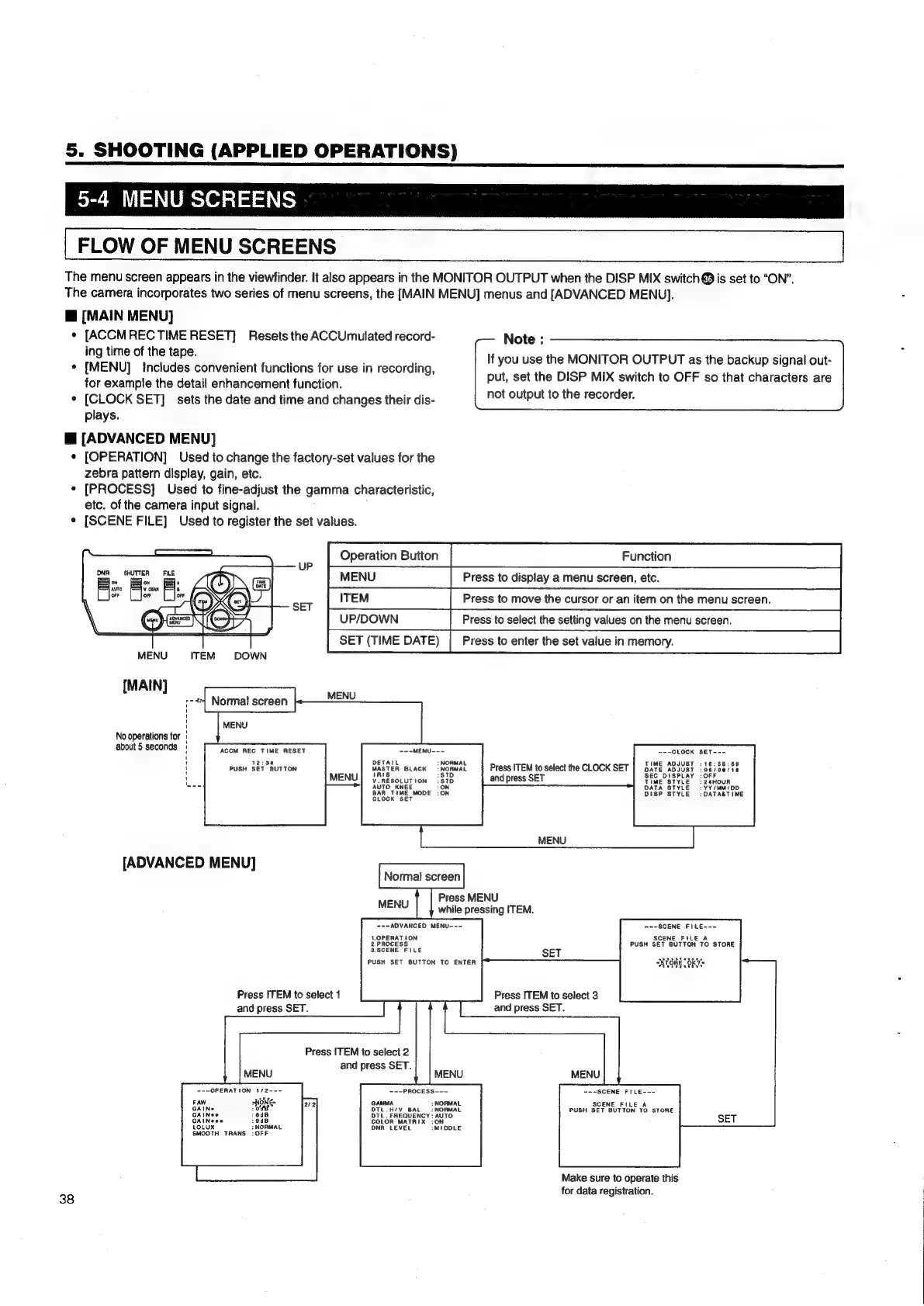
The
menu
screen
appears
in
the
viewfinder.
It
also
appears
in
the
MONITOR
OUTPUT
when
the
DISP
MIX
switch
@
is
set
to
“ON”.
The
camera
incorporates
two
series
of
menu
screens,
the
[MAIN
MENU]
menus
and
[ADVANCED
MENU].
@
[MAIN
MENU]
*
[ACCMREC
TIME
RESET]
Resets
the
ACCUmulated
record-
ing
time
of
the
tape.
*
[MENU]
Includes
convenient
functions
for
use
in
recording,
for
example
the
detail
enhancement
function.
¢
[CLOCK
SET]
sets
the
date
and
time
and
changes
their
dis-
plays.
@
[ADVANCED
MENU]
¢
[OPERATION]
Used
to
change
the
factory-set
values
for
the
zebra
pattern
display,
gain,
etc.
[PROCESS]
Used
to
fine-adjust
the
gamma
characteristic,
etc.
of
the
camera
input
signal.
¢
[SCENE
FILE]
Used
to
register
the
set
values.
Note
:
If
you
use
the
MONITOR
OUTPUT
as
the
backup
signal
out-
put,
set
the
DISP
MIX
switch
to
OFF
so
that
characters
are
not
output
to
the
recorder.
UPDOWN
SHUTTER
Fi:
FILE
F
MENU
ITEM
DOWN
[MAIN]
No
operations
for
about
5
seconds
ACCM
REG
TIME
RESET
~--MENU--~
~--CLOCK
SET---
:
DETAIL
NORMAL
TIME
ADJUST
:
16:85:
PUSH
SET
BUTTON
MASTER
BLACK
—:
NORMAL
Press
ITEM
to
select
the
CLOCK
SET
av
raaioerie
1
:STD
:
V.RESOLUTION
:STD
and
press
SET
LE
:24HOUR
AUTO
KNEE
:YY/MM/DD
ON
BAR
TIME
MODE
:ON
DISP
STYLE
:DATA&TIME
CLOCK
SET
[ADVANCED
MENU]
Normal
screen
Press
MENU
while
pressing
ITEM.
=--ADVANCED
MENU--—-
1.OPERATION
2.PROCESS
3.SCENE
FILE
PUSH
SET
SUTTON
TO
ENTER
MENU
=--SCENE
FILE~--
SCENE
FILE
A
PUSH
SET
BUTTON
TO
STORE
Press
ITEM
to
select
3
and
press
SET.
Press
ITEM
to
select
1
and
press
SET.
Press
ITEM
to
select
2
and
press
SET.
MENU
=-~OPERATION
1/2---
~--PROCESS---
~+-SCENE
FILE---
aoe
FAW
sNONK-
GAMMA
:
NORMAL
SCENE
FILE
A
GAINe
ode
DIL.H/¥
BAL
=
NORMAL
PUSH
SET
BUTTON
TO
STORE
GAINee
:6dB
OTL
.
FREQUENCY
:
AUTO
GAINeees
:9dB
COLOR
MATRIX
:ON
LOL
:NORMAL
DNA
LEVEL
:MIDDLE
Ux
NO!
SMOOTH
TRANS
:OFF
Make
sure
to
operate
this
for
data
registration.
38

Table of Contents

Related product manuals