EasyManua.ls Logo

JVC KY-D29 - Wee; Tripod Installation Oo

JVC KY-D29
56 pages
Print Icon
To Next Page IconTo Next Page
To Previous Page IconTo Previous Page
Loading...
3.
BASIC
SYSTEM
CONNECTIONS
AND
ADJUSTMENTS
3-2
INSTALLING
THE
BASIC
SYSTEM
(Cont’d)
TRIPOD
INSTALLATION
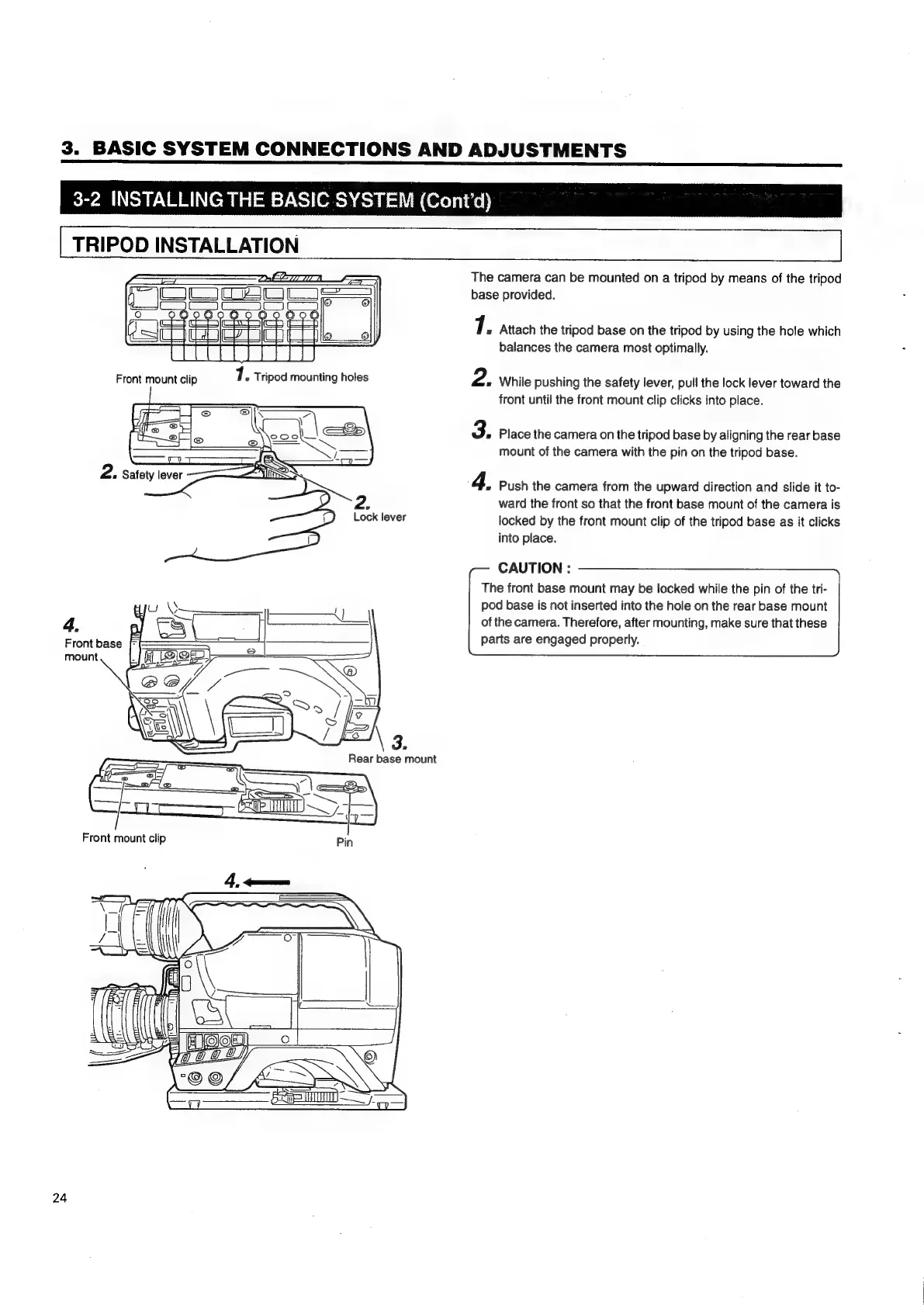
The
camera
can
be
mounted
on
a
tripod
by
means
of
the
tripod
base
provided.
7.
Attach
the
tripod
base
on
the
tripod
by
using
the
hole
which
balances
the
camera
most
optimally.
Front
mount
clip
7..
Tripod
mounting
holes
2.
While
pushing
the
safety
lever,
pull
the
lock
lever
toward
the
front
until
the
front
mount
clip
clicks
into
place.
3.
Place
the
camera
on
the
tripod
base
by
aligning
the
rear
base
mount
of
the
camera
with
the
pin
on
the
tripod
base.
&
Push
the
camera
from
the
upward
direction
and
slide
it
to-
ward
the
front
so
that
the
front
base
mount
of
the
camera
is
locked
by
the
front
mount
clip
of
the
tripod
base
as
it
clicks
{
into
place.
CAUTION
:
The
front
base
mount
may
be
locked
while
the pin
of
the
tri-
u
\S
pod
base
is
not
inserted
into
the
hole
on
the
rear
base
mount
4.
of
the
camera.
Therefore,
after
mounting,
make
sure
that
these
Front
base
[-
parts
are
engaged
properly.
mount
=!
(OO
taeey)
24

Table of Contents

Related product manuals