EasyManua.ls Logo

JVC KY-D29 - How to Turn the Power on

JVC KY-D29
56 pages
Print Icon
To Next Page IconTo Next Page
To Previous Page IconTo Previous Page
Loading...
3.
BASIC
SYSTEM
CONNECTIONS
AND
ADJUSTMENTS
3-3
POWER
SUPPLY
PREPARATION
(Cont'd)
How
to
turn
the
power
ON
i
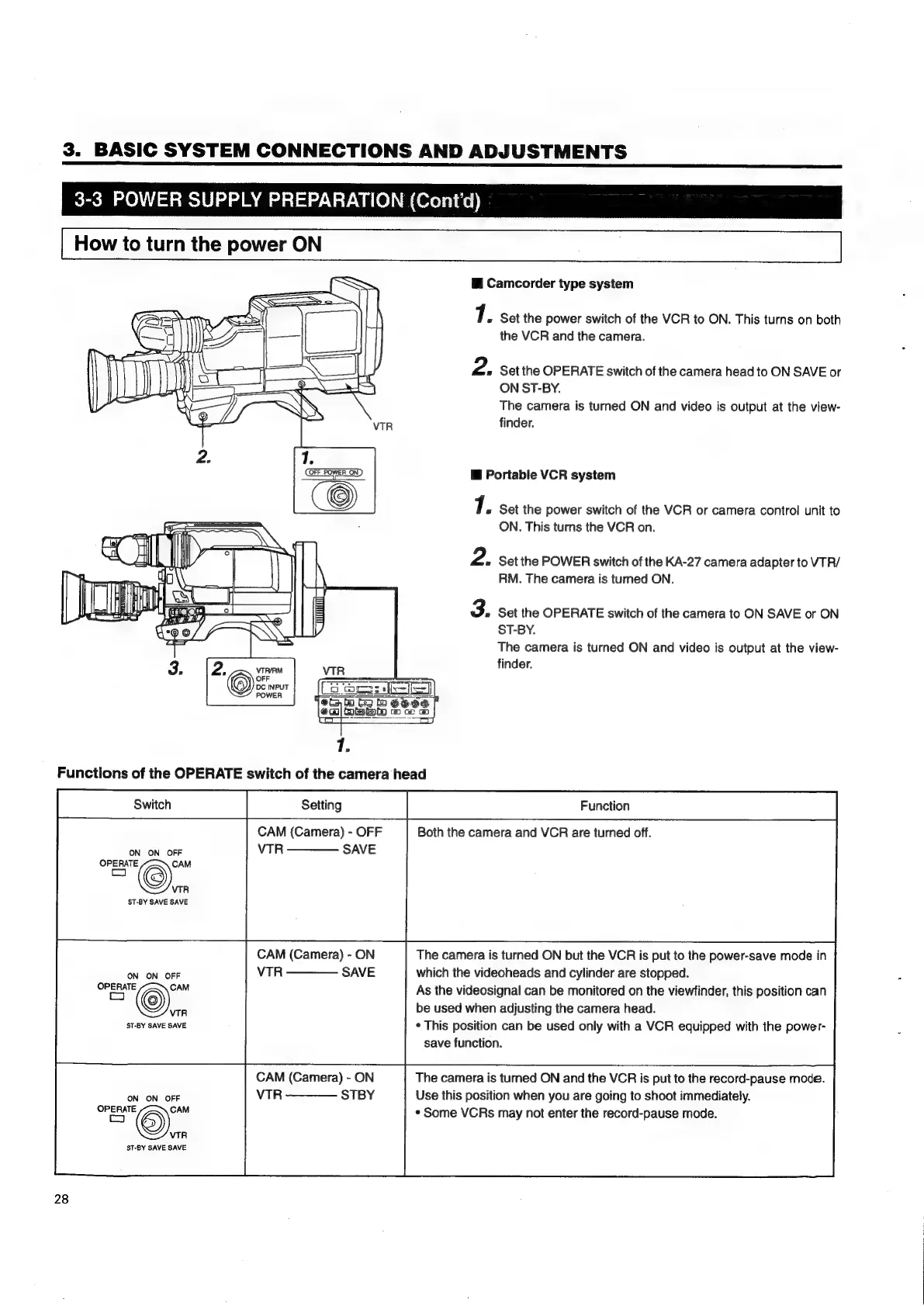
Camcorder
type
system
1:
Set
the
power
switch
of
the
VCR
to
ON.
This
turns
on
both
the
VCR
and
the
camera.
2.
Set
the
OPERATE
switch
of
the
camera
head
to
ON
SAVE
or
ON
ST-BY.
The
camera
is
turned
ON
and
video
is
output
at
the
view-
finder.
i
Portable
VCR
system
7.
Set
the
power
switch
of
the
VCR
or
camera
control
unit
to
ON.
This
turns
the
VCR
on.
2.
Set
the
POWER
switch
of
the
KA-27
camera
adapter
to
VTR/
RM. The
camera
is
turned
ON.
3.
Set
the
OPERATE
switch
of
the
camera
to
ON
SAVE
or
ON
ST-BY.
The
camera
is
turned
ON
and
video
is
output
at
the
view-
finder.
Functions
of
the
OPERATE
switch
of
the
camera
head
CAM
(Camera)
-
OFF
Both
the
camera
and
VCR
are
turned
off.
ON
ON
OFF
VTR
————
SAVE
OPERATE
CAM
co
VTR
ST-BY
SAVE
SAVE
CAM
(Camera)
-
ON
The
camera
is
turned
ON
but
the
VCR
is
put
to
the
power-save
mode
in
ON
ON
OFF
VTR
———
SAVE
which
the
videoheads
and
cylinder
are
stopped.
be
used
when
adjusting
the
camera
head.
ST-BY
SAVE
SAVE
*
This
position
can
be
used
only
with
a
VCR
equipped
with
the
power-
save
function.
OPERATE
©"
As
the
videosignal
can
be
monitored
on
the
viewfinder,
this
position
can
VTR
CAM
(Camera)
-
ON
The
camera
is
turned
ON
and
the
VCR
is
put
to
the
record-pause
mode.
ON
ON
OFF
VTR
————
STBY
Use
this
position
when
you
are
going
to
shoot
immediately.
"="©).
¢
Some
VCRs
may
not
enter
the
record-pause
mode.
VTR
ST-BY
SAVE
SAVE
28

Table of Contents

Related product manuals