EasyManua.ls Logo

JVC KY-D29 - Connection with the Camera Adapter (KA-27)

JVC KY-D29
56 pages
Print Icon
To Next Page IconTo Next Page
To Previous Page IconTo Previous Page
Loading...
3.
BASIC
SYSTEM
CONNECTIONS
AND
ADJUSTMENTS
3-2
INSTALLING
THE
BASIC
SYSTEM
(Cont'd)
Connection
with
the
camera
adapter
(KA-27)
Screw
x
2
7
VTR
mounting
bracket
50-pin
connector
Shoulder
pad
Fixing
screw
A
Phillips-head
screwdriver
4.
Bracket
Screw
x
4
22
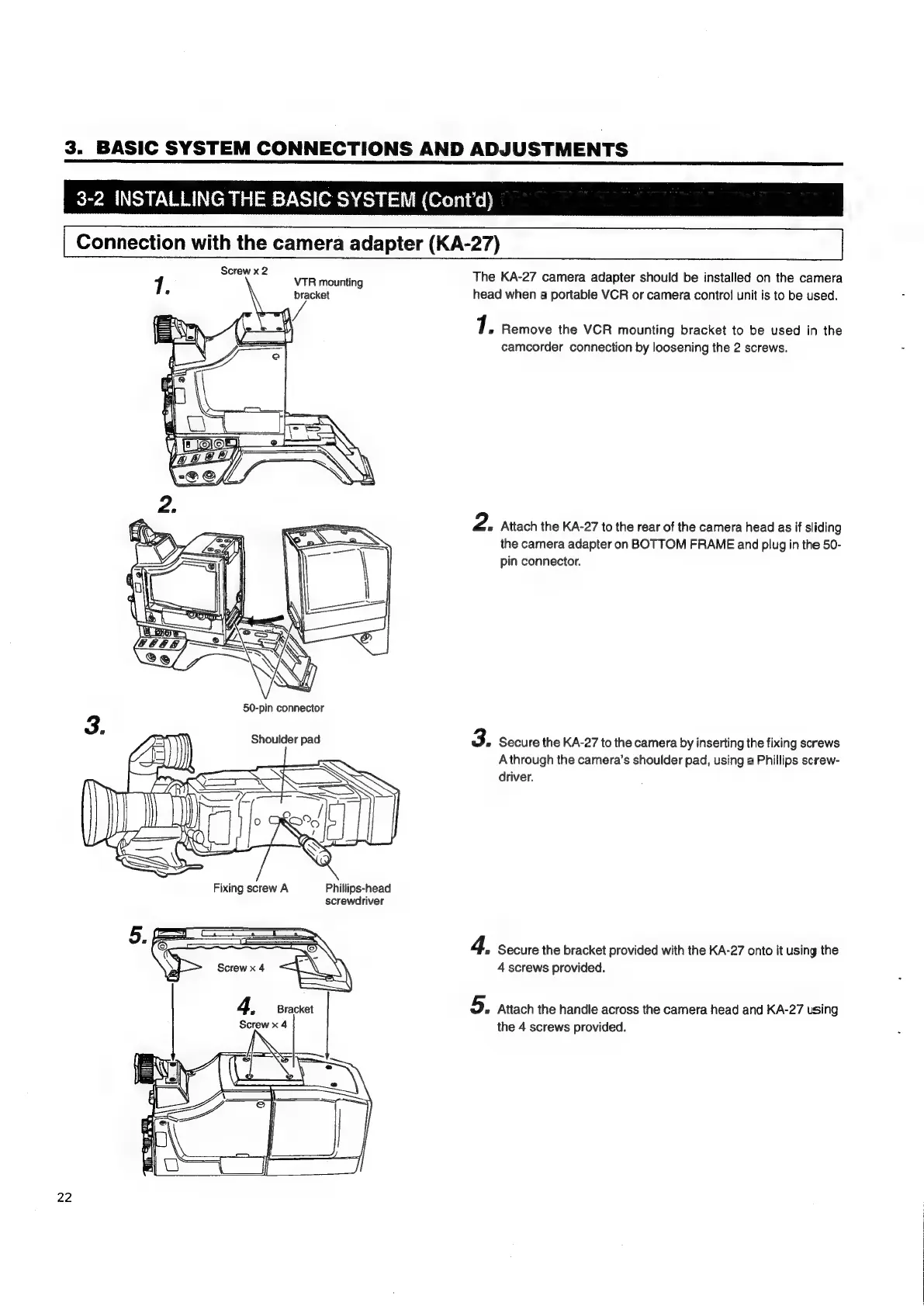
The
KA-27
camera
adapter
should
be
installed
on
the
camera
head
when
a
portable
VCR
or
camera
control
unit
is
to
be
used.
1.
Remove
the
VCR
mounting
bracket
to
be
used
in
the
camcorder
connection
by
loosening
the
2
screws.
2.
Attach
the
KA-27
to
the
rear
of
the
camera
head
as
if
sliding
the
camera
adapter
on
BOTTOM
FRAME
and
plug
in
the 50-
pin
connector.
3.
Secure
the
KA-27
to
the
camera
by
inserting
the
fixing
screws
Athrough
the
camera’s
shoulder
pad,
using
a
Phillips
screw-
driver.
4,
Secure
the
bracket
provided
with
the
KA-27
onto
it
using
the
4
screws
provided.
5.
Attach
the
handle
across
the
camera
head
and
KA-27
using
the
4
screws
provided.

Table of Contents

Related product manuals