EasyManua.ls Logo

JVC KY-D29 - Connection with the Remote Control Unit (RM-P200;-P300)

JVC KY-D29
56 pages
Print Icon
To Next Page IconTo Next Page
To Previous Page IconTo Previous Page
Loading...
6.
SYSTEM
UPGRADING
6-4
CONNECTION
WITH
THE
REMOTE
CONTROL
UNIT
(RM-P200/-P300)
The
camera
can
be
remote-controlled
by
connecting
it
to
the
RM-P200/-P300
remote
control
unit
(optional).
Be
sure
to
read
the
instruction
manual
of
your
remote
control
unit
before
proceeding
with
the
connection.
CONNECTION
METHOD
CAUTION
:
Be
sure
to
set
the
power
switches
of
the
camera
and
remote
control
before
proceeding
with
the
connection.
@
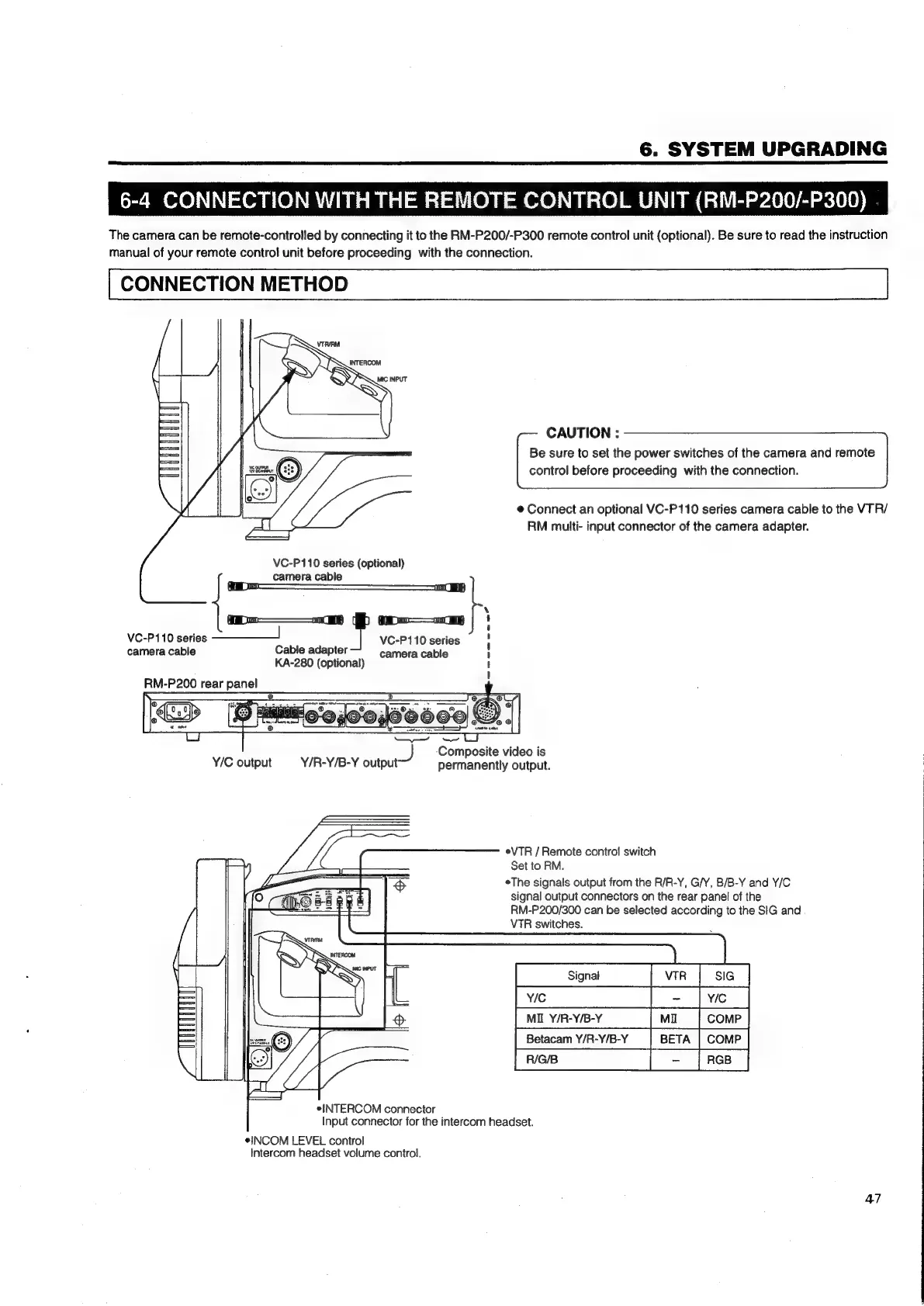
Connect
an
optional
VC-P110
series
camera
cable
to
the
VTR/
RM
multi-
input
connector
of
the
camera
adapter.
VC-P110
series
(optional)
KA-280
(optional)
camera
cable
ey
oo—_o
BB
o——n
ee
i
VC-P110
series
-————!
VC-P110
series
!
camera
cable
Cable
adapter
camera
cable
H
'
'
RM-P200
rear
panel
J
Composite
video
is
Y/C
output
Y/R-Y/B-Y
output
permanently
output.
eVTR
/
Remote
contro!
switch
Set
to
RM.
eThe
signals
output
from
the
R/R-Y,
G/Y,
B/B-Y
and
Y/C
signal
output
connectors
on
the
rear
panel
of
the
RM-P200/300
can
be
selected
according
to
the
SIG
and
VTR
switches.
MIL
Y/R-Y/B-Y
Betacam
Y/R-Y/B-Y
BETA
|
COMP
Pree
|
‘(rae
|
*INTERCOM
connector
Input
connector
for
the
intercom headset.
INCOM
LEVEL
control
Intercom
headset
volume
control.
47

Table of Contents

Related product manuals