EasyManua.ls Logo

JVC KY-D29 - VIEWFINDER (VF-P116) Vcesccccsscsscsssssssssssssesssssnsssssssssasesssess

JVC KY-D29
56 pages
Print Icon
To Next Page IconTo Next Page
To Previous Page IconTo Previous Page
Loading...
2.
CONTROLS,
CONNECTORS
AND
INDICATORS
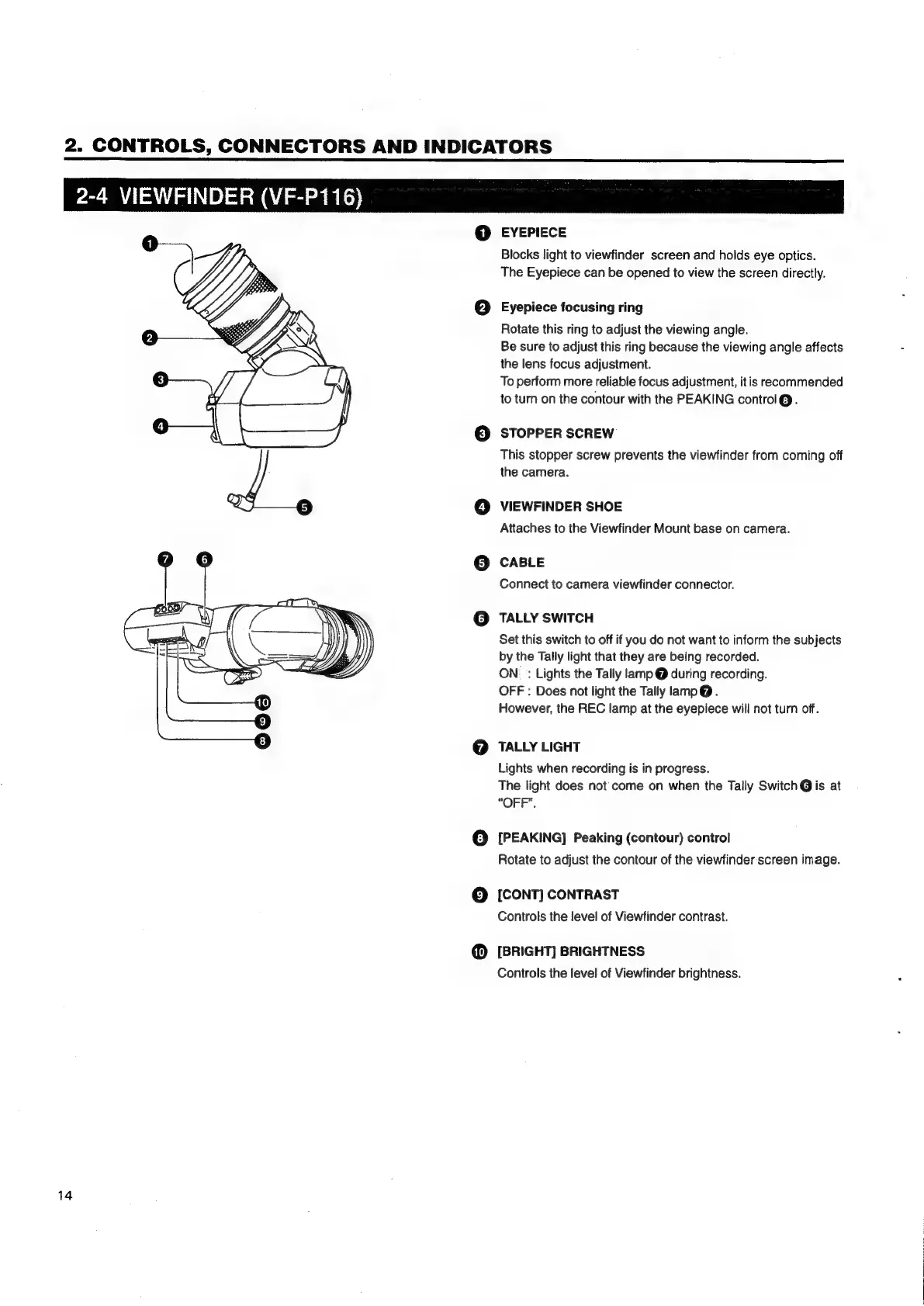
2-4
VIEWFINDER
(VF-P116)
14
e
EYEPIECE
Blocks
light
to
viewfinder
screen
and
holds
eye
optics.
The
Eyepiece
can
be
opened
to
view
the
screen
directly.
Eyepiece
focusing
ring
Rotate
this
ring
to
adjust
the
viewing
angle.
Be
sure
to
adjust
this
ring
because
the
viewing
angle
affects
the
lens
focus
adjustment.
To
perform
more
reliable
focus
adjustment,
it
is
recommended
to
turn
on
the
contour
with
the
PEAKING
control@.
STOPPER
SCREW
This
stopper
screw
prevents
the
viewfinder
from
coming
off
the
camera.
VIEWFINDER
SHOE
Attaches
to
the
Viewfinder
Mount
base
on
camera.
CABLE
Connect
to
camera
viewfinder
connector.
TALLY
SWITCH
Set
this
switch
to
off
if
you
do
not
want
to
inform
the
subjects
by
the
Tally
light
that
they
are
being
recorded.
ON
:
Lights
the
Tally
lamp
@
during
recording.
OFF:
Does
not
light
the
Tally
lamp@.
However,
the
REC
lamp
at
the
eyepiece
will
not
turn
off.
TALLY
LIGHT
Lights
when
recording
is
in
progress.
The
light
does
not
come
on
when
the
Tally
Switch
@
is
at
“OFF”.
[PEAKING]
Peaking
(contour)
control
Rotate
to
adjust
the
contour
of
the
viewfinder
screen
image.
[CONT]
CONTRAST
Controls
the
level
of
Viewfinder
contrast.
[BRIGHT]
BRIGHTNESS
Controls
the
level
of
Viewfinder
brightness.

Table of Contents

Related product manuals