EasyManua.ls Logo

JVC KY-D29 - Recoiding Procemui Oc Iccscsssectsssteseeetetsesresasenseseeaeeetatenes

JVC KY-D29
56 pages
Print Icon
To Next Page IconTo Next Page
To Previous Page IconTo Previous Page
Loading...
4.
SHOOTING
(BASIC
OPERATIONS)
4-1
BASIC
SHOOTING
OPERATION
(Cont'd)
RECORDING
PROCEDURE
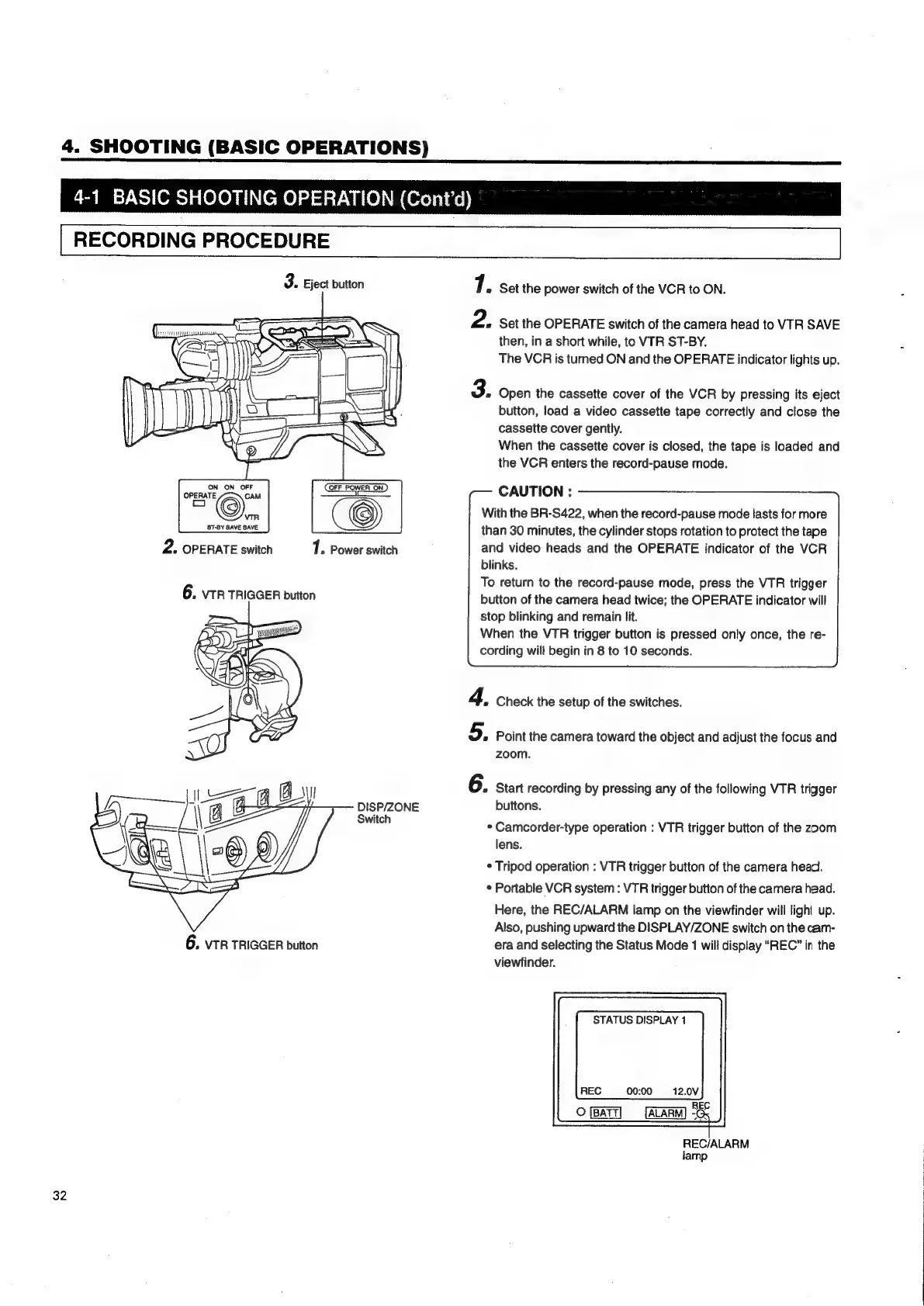
3.
Eject
button
7.
set
the
power
switch
of
the
VCR
to
ON.
2.
Set
the
OPERATE
switch
of
the
camera
head
to
VTR
SAVE
then,
in
a
short
while,
to
VTR
ST-BY.
The
VCR
is
turned
ON
and
the
OPERATE
indicator
lights
up.
3.
Open
the
cassette
cover
of
the
VCR
by
pressing
its
eject
button,
load
a
video
cassette
tape
correctly
and
close
the
cassette
cover
gently.
When
the
cassette
cover
is
closed,
the
tape
is
loaded
and
the
VCR
enters
the
record-pause
mode.
CAUTION
:
With
the
BR-S422,
when
the
record-pause
mode
lasts
for
more
than
30
minutes,
the
cylinder
stops
rotation
to
protect
the
tape
ON
ON
OFF OFF
POWER
ON
OPERATE
CAM
o
VIR
ST-BY
SAVE
SAVE
2.
OPERATE
switch
7.
Power
switch
and
video
heads
and
the
OPERATE
indicator
of
the
VCR
blinks.
To
return
to
the
record-pause
mode,
press
the
VTR
trigger
6.
vTR
TRIGGER
button
button
of
the
camera
head
twice;
the
OPERATE
indicator
will
stop
blinking
and
remain
lit.
When
the
VTR
trigger
button
is
pressed
only
once,
the
re-
cording
will
begin
in
8
to
10
seconds.
4,
Check
the
setup
of
the
switches.
5.
Point
the
camera
toward
the
object
and
adjust
the
focus
and
zoom.
6.
Start
recording
by
pressing
any
of
the
following
VTR
trigger
DISP/ZONE
buttons.
la
*
Camcorder-type
operation
:
VTR
trigger
button
of
the
zoom
lens.
*
Tripod
operation
:
VTR
trigger
button
of
the
camera
head.
*
Portable
VCR
system
:
VTR
trigger
button
of
the
camera
head.
Here,
the
REC/ALARM
lamp
on
the
viewfinder
will
light
up.
Also,
pushing
upward
the
DISPLAY/ZONE
switch
on
the
cam-
6.
vTR
TRIGGER
button
era
and
selecting
the
Status
Mode
1
will
display
“REC”
in
the
viewfinder.
STATUS
DISPLAY
1
REC
00:00 12.0V
Ri
Oo
&
REC/ALARM
lamp
32

Table of Contents

Related product manuals