EasyManua.ls Logo

JVC KY-D29 - Setting the Date and Time

JVC KY-D29
56 pages
Print Icon
To Next Page IconTo Next Page
To Previous Page IconTo Previous Page
Loading...
5.
SHOOTING
(APPLIED
OPERATIONS)
5-4
MENU
SCREENS
(Cont'd)
|
item
|
Displayed
Screen
Function,
Operation
Variation
Range
|
Initial
Setting
AUTO
KNEE
Selects
whether
the
auto
knee
point
is
varied}
ON
depending
on
the
input
signal.
OFF
@
ON.....
Varied
depending
on
the
input
signal
@
OFF
...
Not
varied
depending
on
the
input
signal
Sets
whether
the
time
is
displayed
together
with
|
ON
color
bars.
OFF
@ON....,
Displays
the
time
with
color
bars.
During
the
color
bar
mode
on
the
ordi-
nary
screen,
the
date/time
display
can
not
be
changed
with
the
SET
(TIME/DATE)
button.
@
OFF
...
Does
not
display
the
time
with
color
bars.
During
the
color
bar
mode
on
the
ordi-
nary
screen,
the
date/time
display
can
be
changed
with
the
SET
(TIME/DATE)
but-
ton
as
for
the
setting
in
the
camera
mode.
SETTING
THE
DATE
AND
TIME
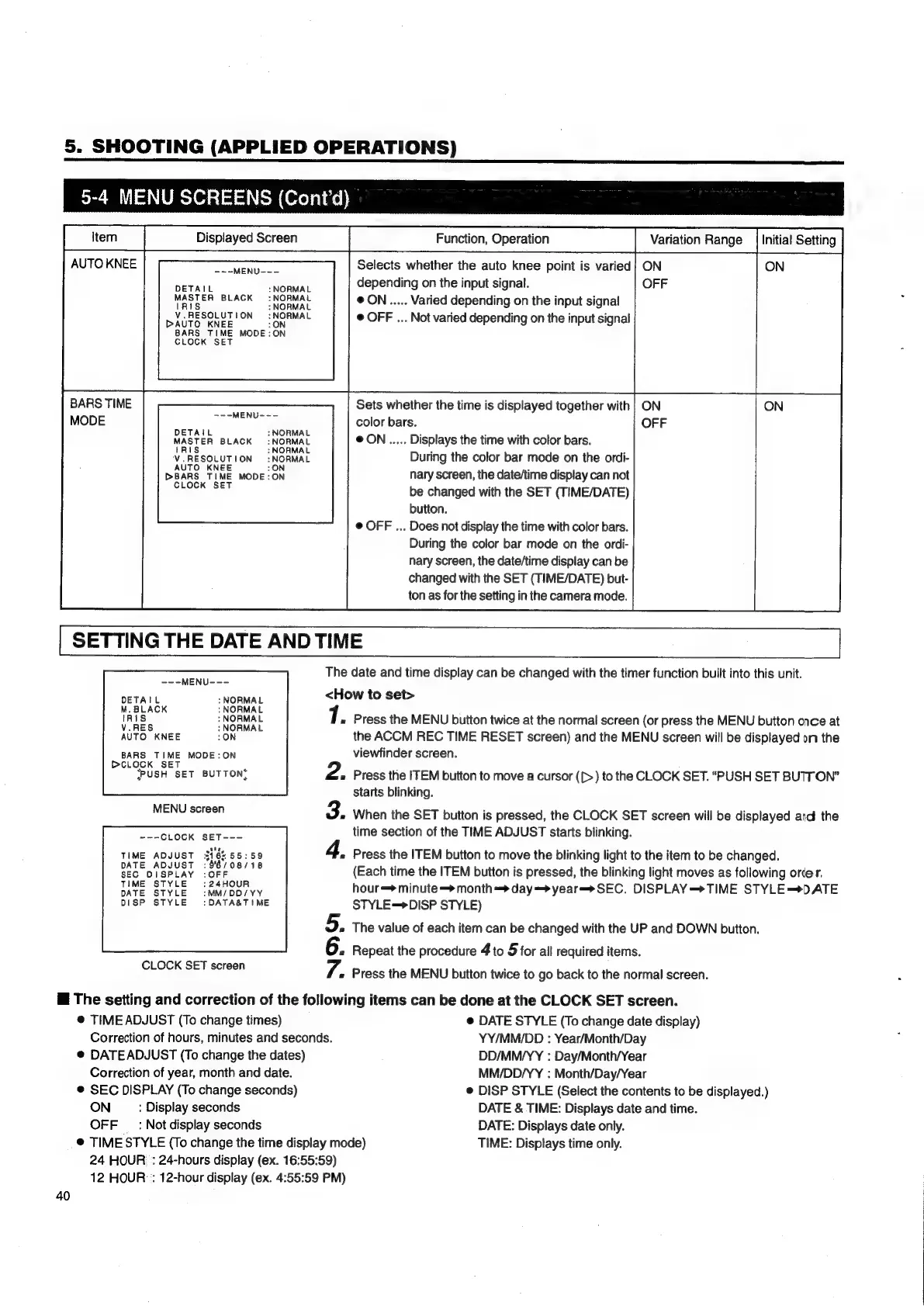
The
date
and
time
display
can
be
changed
with
the
timer
function
built
into
this
unit.
-~-MENU---
DETAIL
NORMAL
MAS
LER
BLACK
:
NORMAL
Al
NORMAL
Vv.
RESOLUTION
:NORMAL
DAUTO
KNEE
:ON
BARS
TIME
MODE:ON
CLOCK
SET
BARS
TIME
MODE
-~-MENU--~-
DETAIL
:
NORMAL
MASTER
BLACK
:NORMAL
tR
:
NORMAL
Vv.
RESOLUTION
:
NORMAL
AUTO
KNEE
:ON
DBARS
TIME
MODE:ON
CLOCK
SET
---MENU---
DETAIL
:
NORMAL
<How
to
set>
A
“NORMAL
7.
Press
the
MENU
button
twice
at
the
normal
screen
(or
press
the
MENU
button
once
at
AUTO
KNEE
LON
the
ACCM
REC
TIME
RESET
screen)
and
the
MENU
screen
will
be
displayed
on
the
BARS
TIME
MODE:ON
viewfinder
screen.
Pe
eeUSH
SET
BUTTON’
2.
Press
the
ITEM
button
to
move
a
cursor
([>)
to
the
CLOCK
SET.
“PUSH
SET
BUTTON”
starts
blinking.
MEN
ocean
3.
When
the
SET
button
is
pressed,
the
CLOCK
SET
screen
will
be
displayed
and
the
Soe
LOCK
BET
cs
time
section
of
the
TIME
ADJUST
starts
blinking.
TIME
ADJUST
316%
55:59
4,
Press
the
ITEM
button
to
move
the
blinking
light
to
the
item
to
be
changed.
DATE
ADJUST
:88/08/18
(Each
time
the
ITEM
button
is
pressed,
the
blinking
light
moves
as
following
order.
TOME
ETRE)
“lua
ops
ay
hour=*
minute
—>
month»
day=>year=—*SEC.
DISPLAY—*TIME
STYLE=*D
ATE
DISP
STYLE
:DATA&TIME
STYLE—>DISP
STYLE)
5.
The
value
of
each
item
can
be
changed
with
the
UP
and
DOWN
button.
«
Repeat
the
procedure
4
to
5
for
all
required
items.
CECE
CRT
sceen
7.
«
Press
the
MENU
button
twice
to
go
back
to
the
normal
screen.
The
setting
and
correction
of
the
following
items
can
be
done
at
the
CLOCK
SET
screen.
®@
TIME
ADJUST
(To
change
times)
@
DATE
STYLE
(To
change
date
display)
Correction
of
hours,
minutes
and
seconds.
YY/MM/DD
:
Year/Month/Day
@
DATEADJUST
(To
change
the
dates)
DD/MM/YY
:
Day/Month/Year
Correction
of
year,
month
and
date.
MM/DD/YY
:
Month/Day/Year
@
SEC
DISPLAY
(To
change
seconds)
e
DISP
STYLE
(Select
the
contents
to
be
displayed.)
ON
:
Display
seconds
DATE
&
TIME:
Displays
date
and
time.
OFF
_
:
Not
display
seconds
DATE:
Displays
date
only.
_@
TIME
STYLE
(To
change
the
time
display
mode)
TIME:
Displays
time
only.
24
HOUR
:
24-hours
display
(ex.
16:55:59)
12
HOUR
:
12-hour
display
(ex.
4:55:59
PM)
40

Table of Contents

Related product manuals