EasyManua.ls Logo

JVC KY-D29 - Operation (1;2) SCIECN Oo. Ccsescsessscssesscesessssecesssseesetseerensetsees; Operation (2;2) SCIEEN

JVC KY-D29
56 pages
Print Icon
To Next Page IconTo Next Page
To Previous Page IconTo Previous Page
Loading...
5.
SHOOTING
(APPLIED
OPERATIONS)
5-4
MENU
SCREENS
(Cont'd)
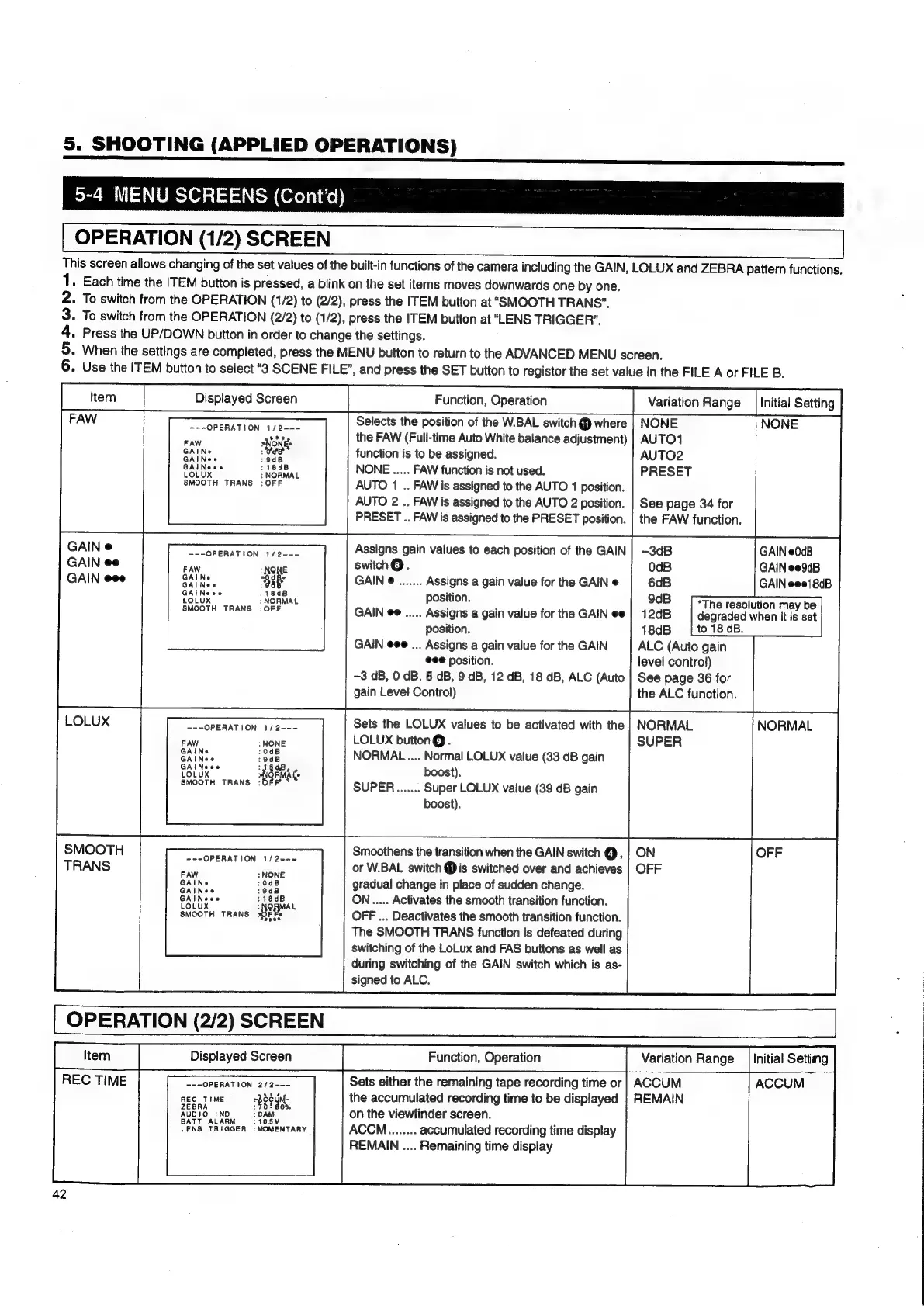
OPERATION
(1/2)
SCREEN
This
screen
allows
changing
of
the
set
values
of
the
built-in
functions
of
the
camera
including
the
GAIN,
LOLUX
and
ZEBRA
pattern
functions.
1.
Each
time
the
ITEM
button
is
pressed,
a
blink
on
the
set
items
moves
downwards
one
by
one.
2.
To
switch
from
the
OPERATION
(1/2)
to
(2/2),
press
the
ITEM
button
at
“SMOOTH
TRANS”.
3.
To
switch
from
the
OPERATION
(2/2)
to
(1/2),
press
the
ITEM
button
at
“LENS
TRIGGER”.
4.
Press
the
UP/DOWN
button
in
order
to
change
the
settings.
2
When
the
settings
are
completed,
press
the
MENU
button
to
return
to
the
ADVANCED
MENU
screen.
Use
the
ITEM
button
to
select
“8
SCENE
FILE”,
and
press
the
SET
button
to
registor
the
set
value
in
the
FILE
A
or
FILE
B.
Displayed
Screen
Function,
Operation
Selects
the
position
of
the
W.BAL
switch
@
where
NONE
-~-OPERATION
1/2---
Sy
Ane
the
FAW
(Full-time
Auto
White
balance
adjustment)
|
AUTO1
GAIN
oee
function
is
to
be
assigned.
AUTO2
GAINees
:18dB
NONE
.....
FAW
function
is
not
used.
PRESET
LOLUX
:
NORMAL
SMOOTH
TRANS
:
OFF
AUTO
1
..
FAW
is
assigned
to
the
AUTO
1
position.
AUTO
2
..
FAW
is
assigned
to
the
AUTO
2
position.
PRESET
..
FAW
is
assigned
to
the
PRESET
position.
See
page
34
for
the
FAW
function.
Assigns
gain
values
to
each
position
of
the
GAIN
switch®.
GAIN
e
.......
Assigns
a
gain
value
for
the
GAIN
e
---OPERATION
1/2---
FAW
position.
GAIN
ee
.....
Assigns
a
gain
value
for
the
GAIN
ee
position.
to
18
dB.
GAIN
eee
...
Assigns
a
gain
value
for
the
GAIN
ALC
(Auto
gain
eee
position.
level
control)
-3
dB,
0
dB,
6
dB,
9
dB,
12
dB,
18
dB,
ALC
(Auto
|
See
page
36
for
gain
Level
Control)
the
ALC
function.
Sets
the
LOLUX
values
to
be
activated
with
the
|
NORMAL
---OPERATION
1/2---
FAW
LOLUX
button
@.
SUPER
NORMAL
....
Normal
LOLUX
value
(33
dB
gain
LOLUX
AGRMAL
boost).
a
a
i
le
SUPER.......
Super
LOLUX
value
(39
dB
gain
boost).
Smoothens
the
transition
when
the
GAIN
switch
@,
or
W.BAL
switch
@
is
switched
over
and
achieves
gradual
change
in
place
of
sudden
change.
ON.....
Activates
the
smooth
transition
function.
OFF
...
Deactivates
the
smooth
transition
function.
The
SMOOTH
TRANS
function
is
defeated
during
switching
of
the
LoLux
and
FAS
buttons
as
well
as
during
switching
of
the
GAIN
switch
which
is
as-
signed
to
ALC.
SMOOTH
TRANS
~--OPERATION
1/2--~
FAW
GAINe
:0dB
GAINee
:9dB
GAINeee
:18dB
LOLUX
(
eBMAL
SMOOTH
TRANS
xOFTS
ost
ty
REC
TIME
=--OPERATION
2/2~--
ee
mme
9t
Sosy
LENS
TRIGGER
:MOMENTARY
accumulated
recording
time
display
REMAIN
....
Remaining
time
display
“The
resolution
may
be
degraded
when
it
is
set
Variation
Range
|
Initial
Setting
GAIN
e0cB
GAIN
ee9dB
GAIN
eee{8dB
NORMAL
Initial
Setiing
ACCUM

Table of Contents

Related product manuals