EasyManua.ls Logo

JVC KY-D29 - White Balance Adjustment; Full-Time Auto White Balance (FAW)

JVC KY-D29
56 pages
Print Icon
To Next Page IconTo Next Page
To Previous Page IconTo Previous Page
Loading...
4.
SHOOTING
(BASIC
OPERATIONS)
4-2
WHITE
BALANCE
ADJUSTMENT
Since
the
color
of
light
(color
temperature)
is
variable
depending
on
the
light
source,
it
is
required
to
re-adjust
the
while
balance
when
the
main
light
source
illuminating
the
object
changes.
|
WHITE
BALANCE
ADJUSTMENT
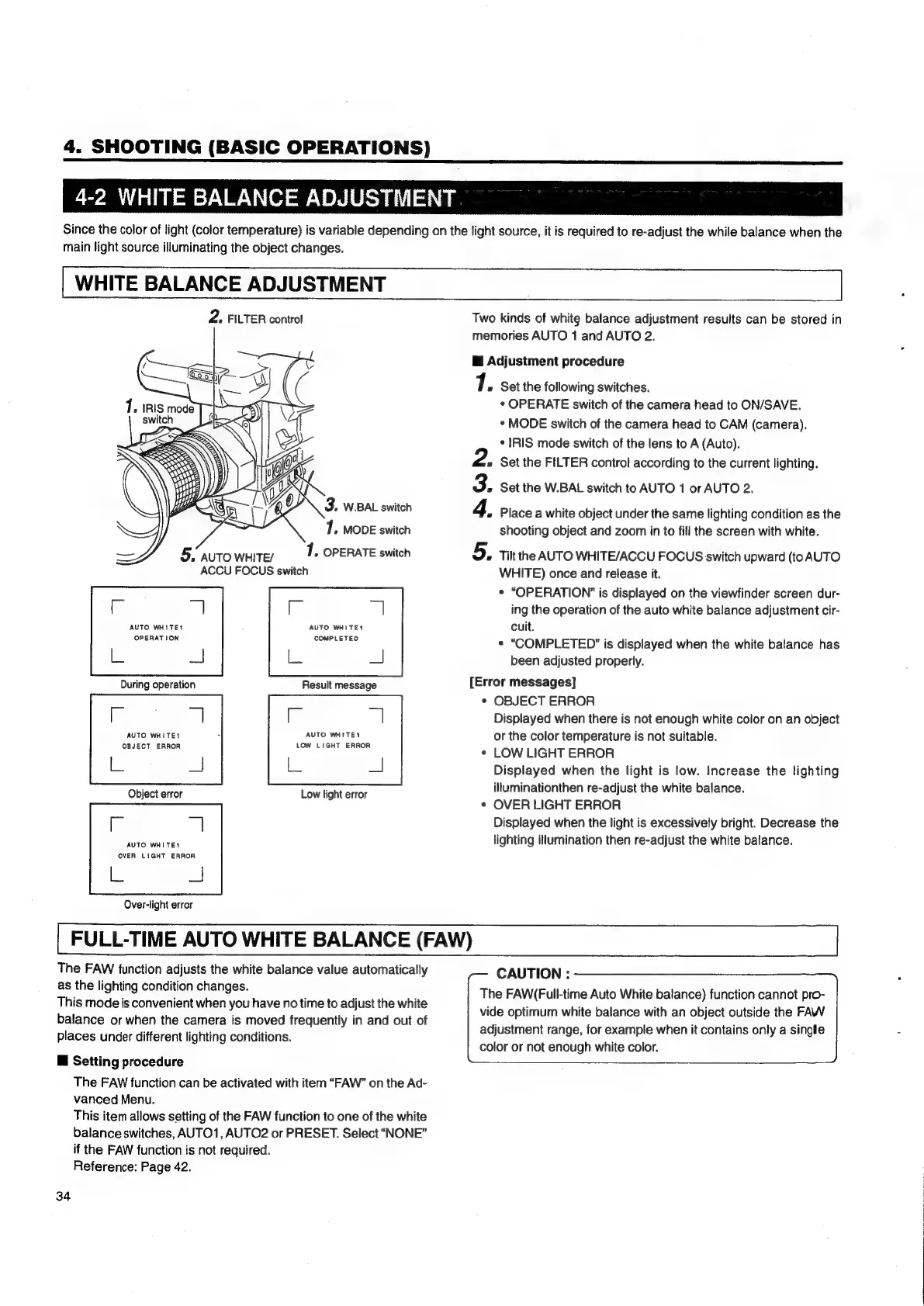
2.
FILTER
control
Two
kinds
of
white
balance
adjustment
results
can
be
stored
in
memories
AUTO
1
and
AUTO
2.
i
Adjustment
procedure
7.
Set
the
following
switches.
¢
OPERATE
switch
of
the
camera
head
to
ON/SAVE.
*
MODE
switch
of
the
camera
head
to
CAM
(camera).
*
IRIS
mode
switch
of
the
lens
to
A
(Auto).
Set
the
FILTER
control
according
to
the
current
lighting.
Set
the
W.BAL
switch
to
AUTO
1
or
AUTO
2.
RON
3.
W.BAL
switch
Place
a
white
object
under
the
same
lighting
condition
as
the
71.
MODE
switch
shooting
object
and
zoom
in
to
fill
the
screen
with
white.
5,
AUTO
WHITE/
1,
OPERATE
switch
Tilt
the
AUTO
WHITE/ACCU
FOCUS
switch
upward
(to
AUTO
ACCU
FOCUS
switch
WHITE)
once
and
release
it.
*
“OPERATION”
is
displayed
on
the
viewfinder
screen
dur-
ing
the
operation
of
the
auto
white
balance
adjustment
cir-
ad
AUTO
WHITES
AUTO
WHITES
cuit.
eye
atte
*
“COMPLETED?”
is
displayed
when
the
white
balance
has
=)
been
adjusted
properly.
Result
message
[Error
messages]
*
OBJECT
ERROR
-z
il
Displayed
when
there
is
not
enough
white
color
on
an
object
AUTO
WHITE?
AUTO
WHITE
or
the
color
temperature
is
not
suitable.
Mgeeare
ee
*
LOW
LIGHT
ERROR
L
ee
Displayed
when
the
light
is
low.
Increase
the
lighting
illuminationthen
re-adjust
the
white
balance.
¢
OVER
LIGHT
ERROR
Displayed
when
the
light
is
excessively
bright.
Decrease
the
lighting
illumination
then
re-adjust
the
white
balance.
Low
light
error
AUTO
WHITE?
OVER
LIGHT
ERROA
les
a
Over-light
error
FULL-TIME
AUTO
WHITE
BALANCE
(FAW)
The
FAW
function
adjusts
the
white
balance
value
automatically
CAUTION
:
Se
ne
Wohinig
condition
changes
The
FAW(Full-time
Auto
White
balance)
function
cannot
pro-
This
mode
is
convenient
when
you
have
no
time
to
adjust
the
white
vide
optimum
white
balance
with
an
object
outside
the
FAW
balance
or
when
the
camera
is
moved
frequently
in
and
out
of
places
under
different
lighting
conditions.
adjustment
range,
for
example
when
it
contains
only
a
single
color
or
not
enough
white
color.
@
Setting
procedure
The
FAW
function
can
be
activated
with
item
“FAW”
on
the
Ad-
vanced
Menu.
This
item
allows
setting
of
the
FAW
function
to
one
of
the
white
balance
switches,
AUTO1,
AUTO2
or
PRESET.
Select
“NONE”
if
the
FAW
function
is
not
required.
Reference:
Page
42.
34

Table of Contents

Related product manuals