EasyManua.ls Logo

JVC KY-D29 - CAMERA HEAD (KY-D29) V.sccscssssssssssscsscccssceseccsessessssnvnessnseeese

JVC KY-D29
56 pages
Print Icon
To Next Page IconTo Next Page
To Previous Page IconTo Previous Page
Loading...
2.
CONTROLS,
CONNECTORS
AND
INDICATORS
2-1
CAMERA
HEAD
(KY-D29)
[Right
side
panel]
Reference
Page
8.
(Setup/Mode
Setting
Selection)
3)
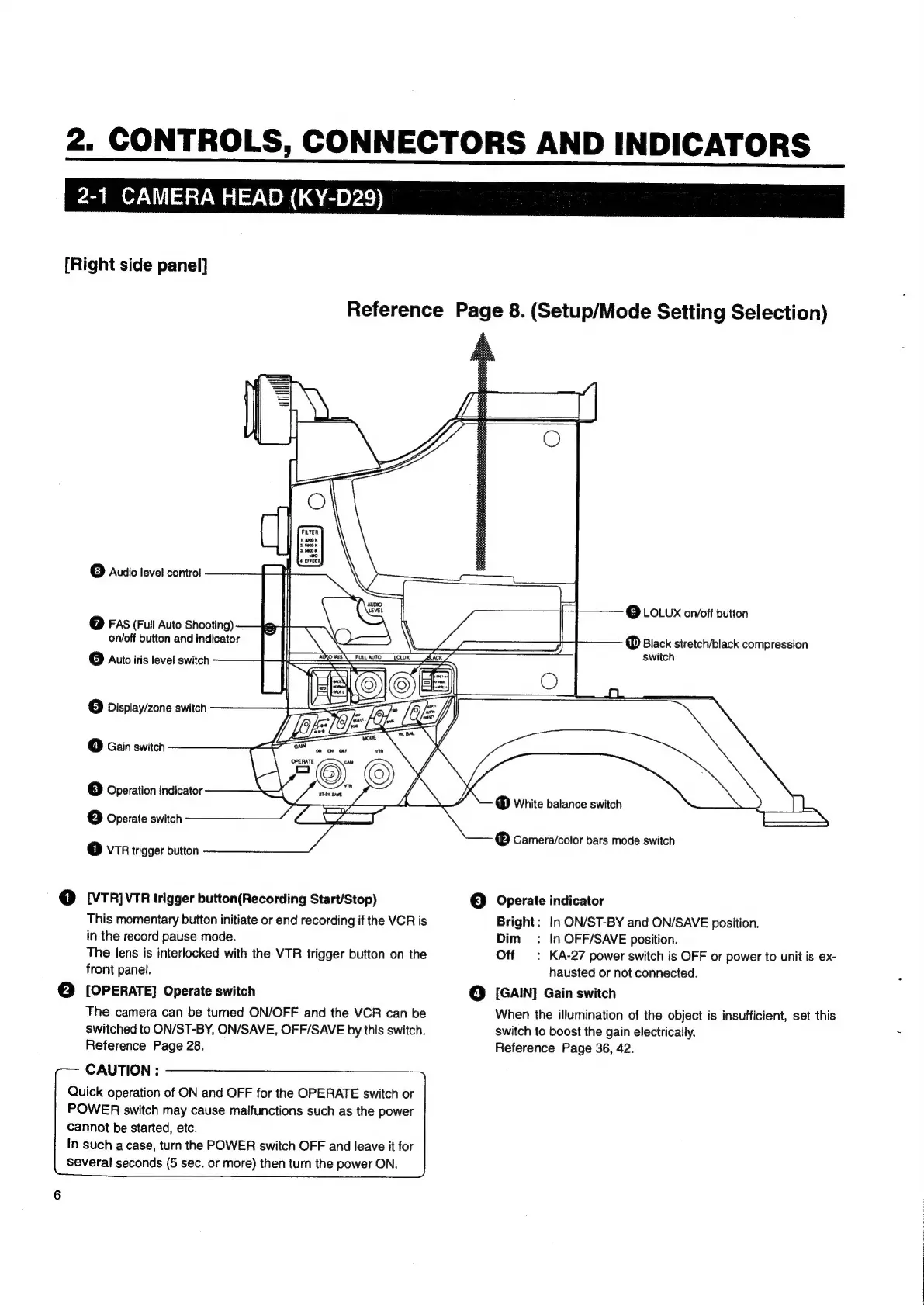
Audio
level
control
@
FAS
(Full
Auto
Shooting)
on/off
button
and
indicator
©
Auto
iris
level
switch
@
Display/zone
switch
4]
Gain
switch
3
]
Operation
indicator
C2]
Operate
switch
1)
VTR
trigger
button
@
[VTR]vTR
trigger
button(Recording
Start/Stop)
This
momentary
button
initiate
or
end
recording
if
the
VCR
is
in
the
record
pause mode.
The
lens
is
interlocked
with
the
VTR
trigger
button
on
the
front
panel.
©
[OPERATE]
Operate
switch
The
camera
can
be
turned
ON/OFF
and
the
VCR
can
be
switched
to
ON/ST-BY,
ON/SAVE,
OFF/SAVE
by
this
switch.
Reference
Page
28.
CAUTION
:
Quick
operation
of
ON
and
OFF
for
the
OPERATE
switch
or
POWER
switch
may
cause
malfunctions
such
as
the
power
Cannot
be
started,
etc.
In
such
a
case,
turn
the
POWER
switch
OFF
and
leave
it
for
several
seconds
(5
sec.
or
more)
then
turn
the
power
ON,
©
LOLUX
on/off
button
®
Black
stretch/black
compression
switch
White
balance
switch
®
Camera/color
bars
mode
switch
©
Operate
indicator
Bright:
In
ON/ST-BY
and
ON/SAVE
position.
Dim:
In
OFF/SAVE
position.
Off
:
KA-27
power
switch
is
OFF
or
power
to
unit
is
ex-
hausted
or
not
connected.
@
[GAIN]
Gain
switch
When
the
illumination
of
the
object
is
insufficient,
set
this
switch
to
boost
the
gain
electrically.
Reference
Page
36,
42.

Table of Contents

Related product manuals