EasyManua.ls Logo

JVC KY-D29 - Connection with a Portable VCR; Cs Seescesceesteceneee Wane

JVC KY-D29
56 pages
Print Icon
To Next Page IconTo Next Page
To Previous Page IconTo Previous Page
Loading...
3.
BASIC
SYSTEM
CONNECTIONS
AND
ADJUSTMENTS
3-2
INSTALLING
THE
BASIC
SYSTEM
(Cont'd)
CONNECTION
WITH
A
PORTABLE
VCR
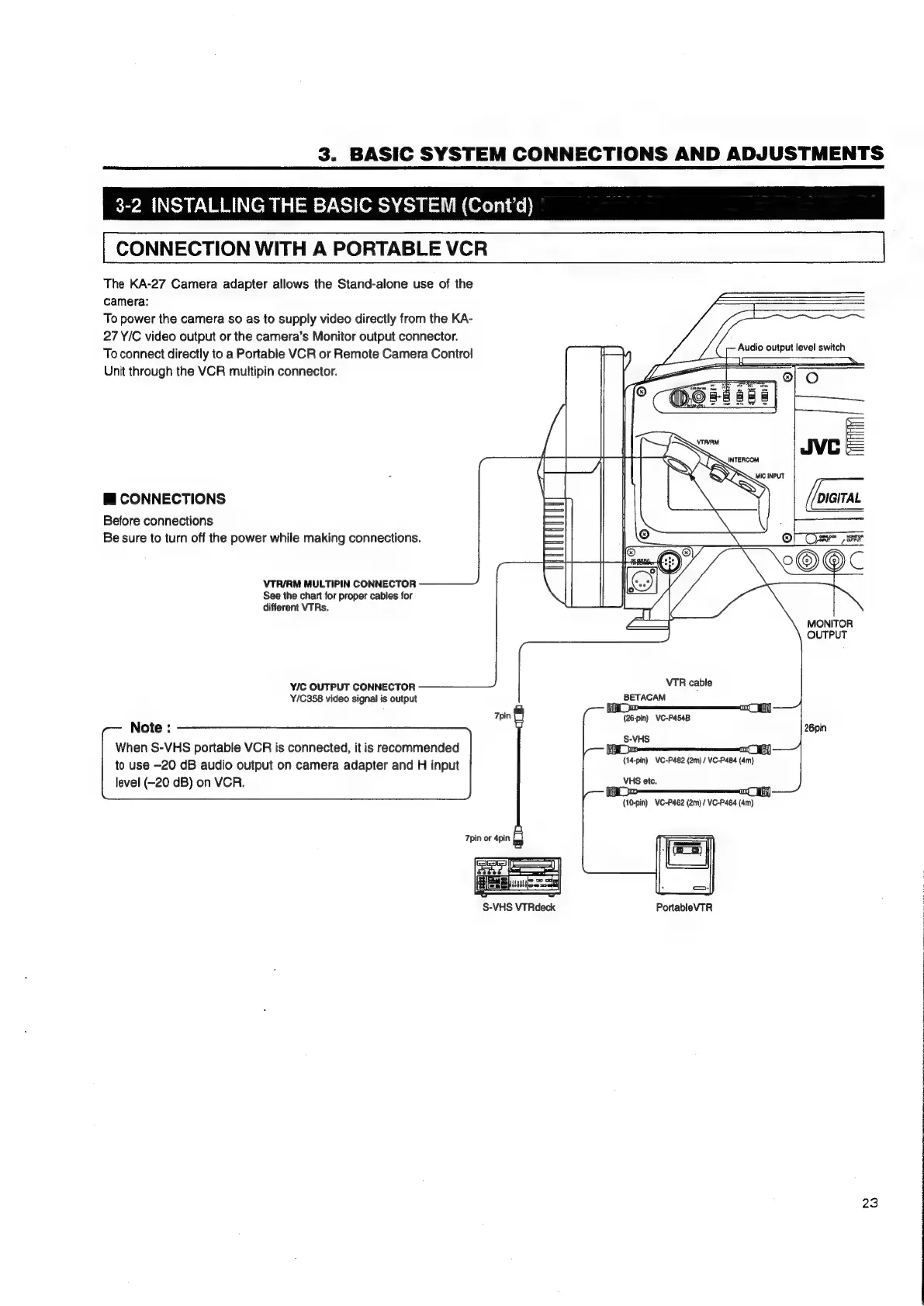
The
KA-27
Camera
adapter
allows
the
Stand-alone
use
of
the
camera:
To
power
the
camera
so
as
to
supply
video
directly
from
the
KA-
27
Y/C
video
output
or
the
camera’s
Monitor
output
connector.
To
connect
directly
to
a
Portable
VCR
or
Remote
Camera
Control
Unit
through
the
VCR
multipin
connector.
@
CONNECTIONS
Before
connections
Be
sure
to
turn
off
the
power
while
making
connections.
VTR/RM
MULTIPIN
CONNECTOR
See
the
chart
for
proper
cables
for
different
VTRs.
Y/C
OUTPUT
CONNECTOR
Y/C358
video
signal
is
output
Tpin
Note
:
When
S-VHS
portable
VCR
is
connected,
it
is
recommended
to
use
-20
dB
audio
output
on
camera
adapter
and
H
input
level
(-20
dB)
on
VCR.
7pin
or
4pin
|
S-VHS
VTRdeck
aj
VTR
cable
BETACAM
(26-pin)
VC-P454B
S-VHS
(14-pin)
VC-P482
(2m)
/
VC-P484
(4m)
VHS
etc.
gag
TT
pin)
VC-P462
(2m)
/
VC-P464
(4m)
PortableVTR
ae
output
level
switch
DIGITAL
al
Ca
eats
NES
MONITOR
OUTPUT
J
~
aw,
23

Table of Contents

Related product manuals