EasyManua.ls Logo

JVC KY-D29 - 5 Shooting (Applied Operations); Iris (Brightness) Adjustment; Lens Iris Agjustmene; Zebra Pattern DISPLAY During Manual Adjustment

JVC KY-D29
56 pages
Print Icon
To Next Page IconTo Next Page
To Previous Page IconTo Previous Page
Loading...
5.
SHOOTING
(APPLIED
OPERATIONS)
5-1
IRIS
(BRIGHTNESS)
ADJUSTMENT
LENS
IRIS
ADJUSTMENT
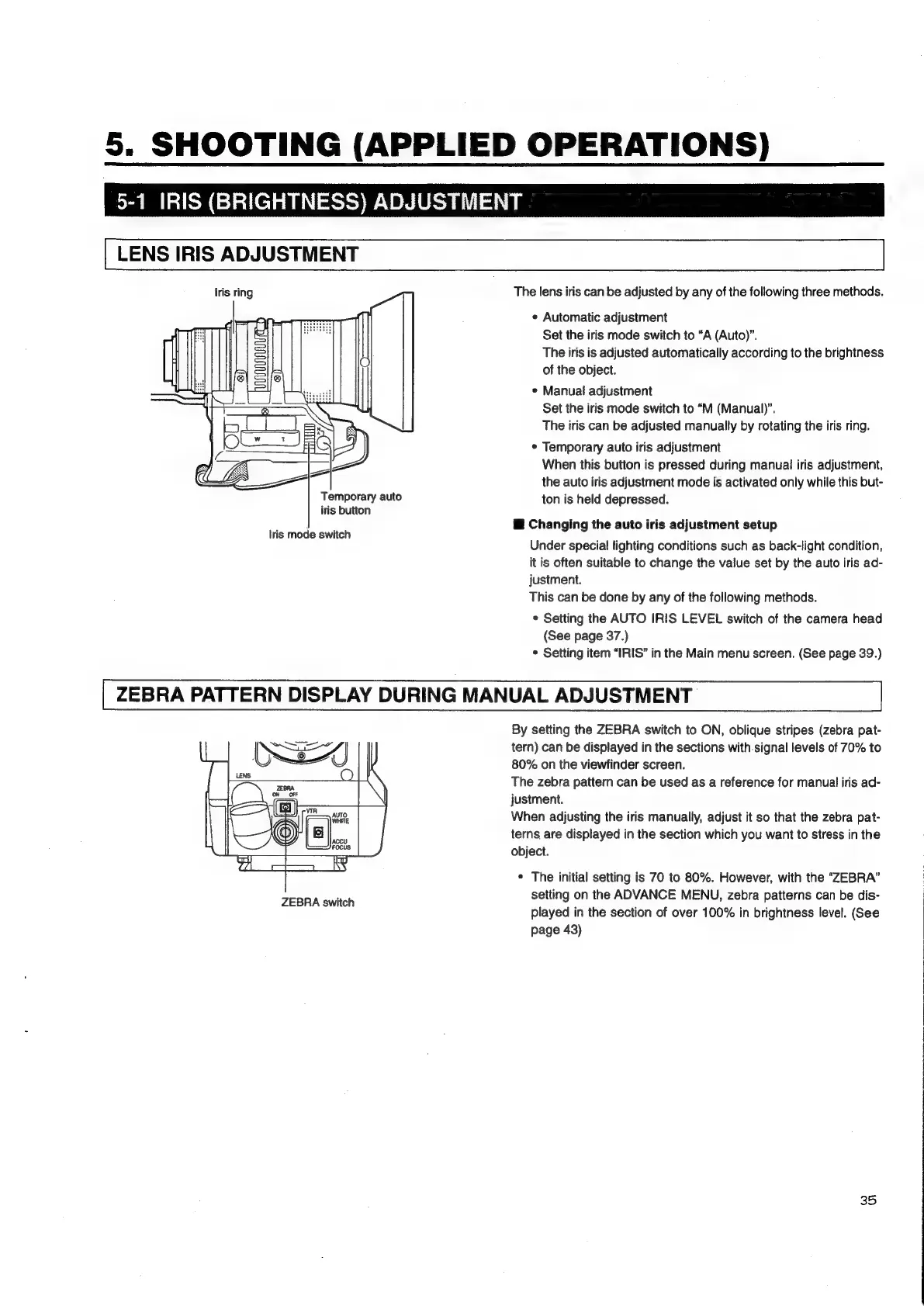
Iris
ring
The
lens
iris
can
be
adjusted
by
any
of
the
following
three
methods.
¢
Automatic
adjustment
Set
the
iris
mode
switch
to
“A
(Auto)’.
The
iris
is
adjusted
automatically
according
to
the
brightness
of
the
object.
*
Manuai
adjustment
Set
the
iris
mode
switch
to
“M
(Manual)”.
The
iris
can
be
adjusted
manually
by
rotating
the
iris
ring.
©
Temporary
auto
iris
adjustment
When
this
button
is
pressed
during
manual
iris
adjustment,
the
auto
iris
adjustment
mode
is
activated
only
while
this
but-
Temporary
auto
ton
is
held
depressed.
iris
button
@
Changing
the
auto
iris
adjustment
setup
Under
special
lighting
conditions
such
as
back-light
condition,
it
is
often
suitable
to
change
the
value
set
by
the
auto
iris
ad-
justment.
This
can
be
done
by
any
of
the
following
methods.
*
Setting
the
AUTO
IRIS
LEVEL
switch
of
the
camera
head
(See
page
37.)
*
Setting
item
“IRIS”
in
the
Main
menu
screen.
(See
page
39.)
ZEBRA
PATTERN
DISPLAY
DURING
MANUAL
ADJUSTMENT
By
setting
the
ZEBRA
switch
to
ON,
oblique
stripes
(zebra
pat-
tern)
can
be
displayed
in
the
sections
with.signal
levels
of
70%
to
80%
on
the
viewfinder
screen.
The
zebra
pattern
can
be
used
as
a
reference
for
manual
iris
ad-
justment.
When
adjusting
the
iris
manually,
adjust
it
so
that
the
zebra
pat-
terns
are
displayed
in
the
section
which
you
want
to
stress
in
the
object.
*
The
initial
setting
is
70
to
80%.
However,
with
the
“ZEBRA”
setting
on
the
ADVANCE
MENU,
zebra
patterns
can
be
dis-
played
in
the
section
of
over
100%
in
brightness
level.
(See
page
43)
tris
mode
switch
ZEBRA
switch
35

Table of Contents

Related product manuals