EasyManua.ls Logo

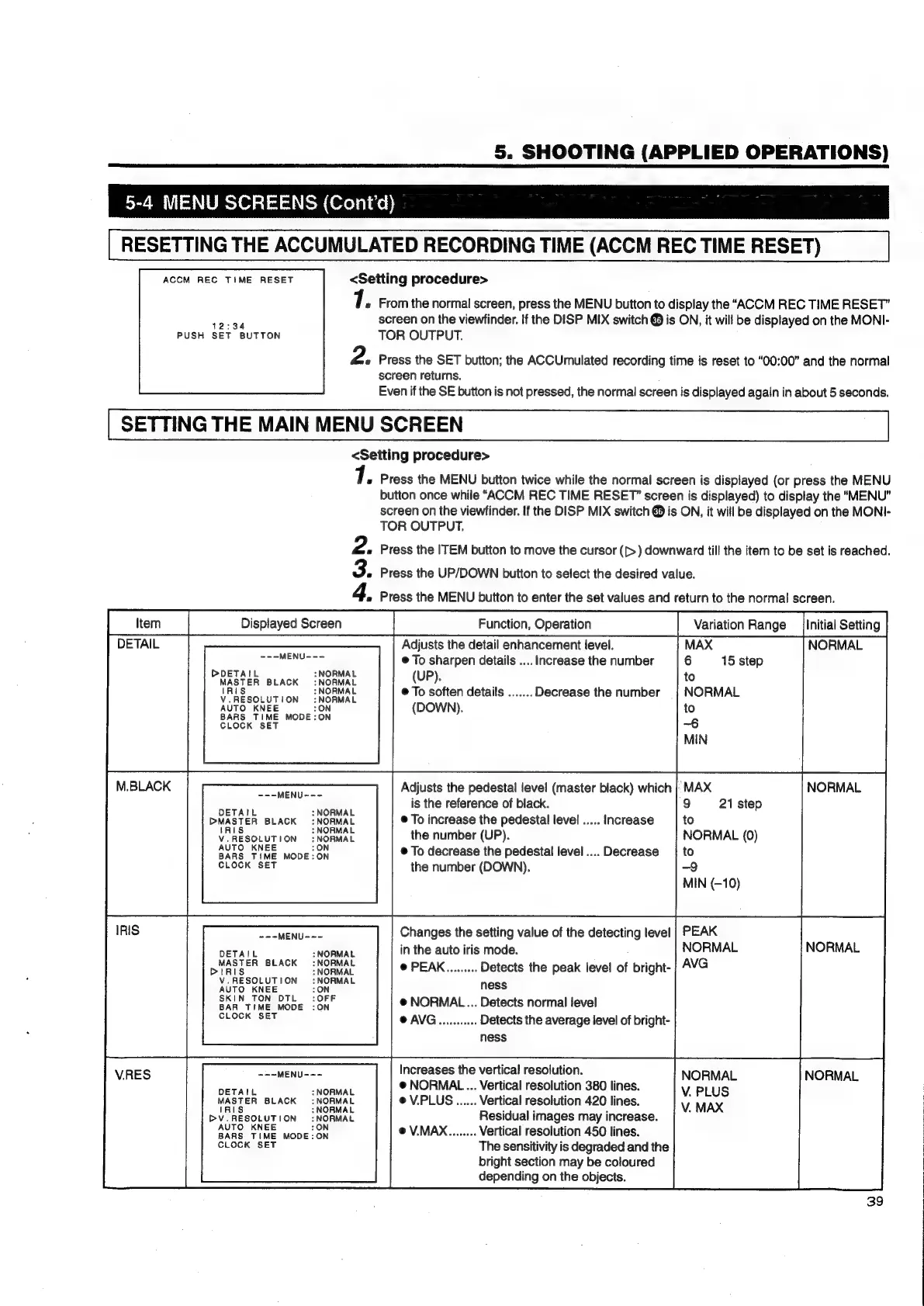
JVC KY-D29 - Resetting the Accumulated Recording Time; Setting the Main Menu Screen

JVC KY-D29
56 pages
Print Icon
To Next Page IconTo Next Page
To Previous Page IconTo Previous Page
Loading...
5.
SHOOTING
(APPLIED
OPERATIONS)
5-4
MENU
SCREENS
(Cont'd)
RESETTING
THE
ACCUMULATED
RECORDING
TIME
(ACCM
REC
TIME
RESET)
ACCM
REC
TIME
RESET
<Setting
procedure>
1.
From
the
normal
screen,
press
the
MENU
button
to
display
the
“ACCM
REC
TIME
RESET”
conga
screen
on
the
viewfinder.
If
the
DISP
MIX
switch
@
is
ON,
it
will
be
displayed
on
the
MONI-
PUSH
SET
BUTTON
TOR
OUTPUT.
2.
Press
the
SET
button;
the
ACCUmulated
recording
time
is
reset
to
“00:00”
and
the
normal
screen
returns.
Even
if
the
SE
button
is
not
pressed,
the
normal
screen
is
displayed
again
in
about
5
seconds.
SETTING
THE
MAIN
MENU
SCREEN
<Setting
procedure>
«
Press
the
MENU
button
twice
while
the
normal
screen
is
displayed
(or
press
the
MENU
button
once
while
“ACCM
REC
TIME
RESET”
screen
is
displayed)
to
display
the
“MENU”
screen
on
the
viewfinder.
If
the
DISP
MIX
switch
@
is
ON,
it
will
be
displayed
on
the
MONI-
TOR
OUTPUT.
2.
Press
the
ITEM
button
to
move
the
cursor
([>)
downward
till
the
item
to
be
set
is
reached.
3.
Press
the
UP/DOWN
button
to
select
the
desired
value.
4.
Press
the
MENU
button
to
enter
the
set
values
and
return
to
the
normal
screen.
Displayed
Screen
Function,
Operation
Variation
Range
_jinitial
Setting
DETAIL
Adjusts
the
detail
enhancement
level.
MAX
NORMAL
©
To
sharpen
details
....
Increase
the
number
6
15
step
to
NORMAL
to
—6
MIN
M.BLACK
Toe
Adjusts
the
pedestal
level
(master
black)
which
|
MAX
NORMAL
Sy
is
the
reference
of
black.
9
21
step
DWASTER
BLACK
NORMAL
@
To
increase
the
pedestal
level
.....
Increase
to
V
RESOLUTION
:NORMAL
the
number
(UP).
NORMAL
(0)
SANS.
TIME
wove
oN
©
To
decrease
the
pedestal
level....
Decrease
|
to
CLOCK
SET
the
number
(DOWN),
-9
MIN
(—10)
IRIS
Changes
the
setting
value
of
the
detecting
level
in
the
auto
iris
mode.
NORMAL
V.RES
NORMAL
39
---MENU---
ODETAIL
NORMAL
(UP)
WASTER
BLACK
:
NORMAL
x
4
Ri
NORMAL
@
To
soften
details
.......
Decrease
the
number
iS
V.RESOLUTION
:NORMAL
AUTO
KNEE
:ON
BARS
TIME
MODE:ON
CLOCK
SET
(DOWN).
~+-MENU---
DETAIL
NORMAL
Moreen
BLACK
:
NORMAL
DIR
NORMAL
@
PEAK.........
Detects
the
peak
level
of
bright-
V
RESOLUTION
:NORMAL
ness
ATS
EE
rift
BAR
TIME
MODE
:ON
@
NORMAL...
Detects
normal
level
SLOSS
BET
@
AVG
woes
Detects
the
average
level
of
bright-
ness
Increases
the
vertical
resolution.
~==MENU---
NORMAL
.
@
NORMAL
...
Vertical
resolution
380
lines.
DETAIL
:
NORMAL
.
;
:
V.
PLUS
MASTER
BLACK
:
NORMAL
@V.PLUS......
Vertical
resolution
420
lines.
IRIS
:NORMAL
V.
MAX
Residual
images
may
increase.
@V.MAX........
Vertical
resolution
450
lines.
The
sensitivity
is
degraded
and
the
bright
section
may
be
coloured
depending
on
the
objects.
BV.RESOLUTION
:NORMAL
AUTO
KNEE
:ON
BARS
TIME
MODE:ON
CLOCK
SET

Table of Contents

Related product manuals