EasyManua.ls Logo

JVC KY-D29 - Switch Setup According to Illumination and Object; Switch FUNCTIONS; Ees Ceteeeeseserenectensescstsaseaesoessnesesseanscees; Full Auto Shooting (FAS) Function

JVC KY-D29
56 pages
Print Icon
To Next Page IconTo Next Page
To Previous Page IconTo Previous Page
Loading...
5.
SHOOTING
(APPLIED
OPERATIONS)
5-3
SWITCH
SETUP
ACCORDING
TO
ILLUMINATION
AND
OBJECT
SWITCH
FUNCTIONS
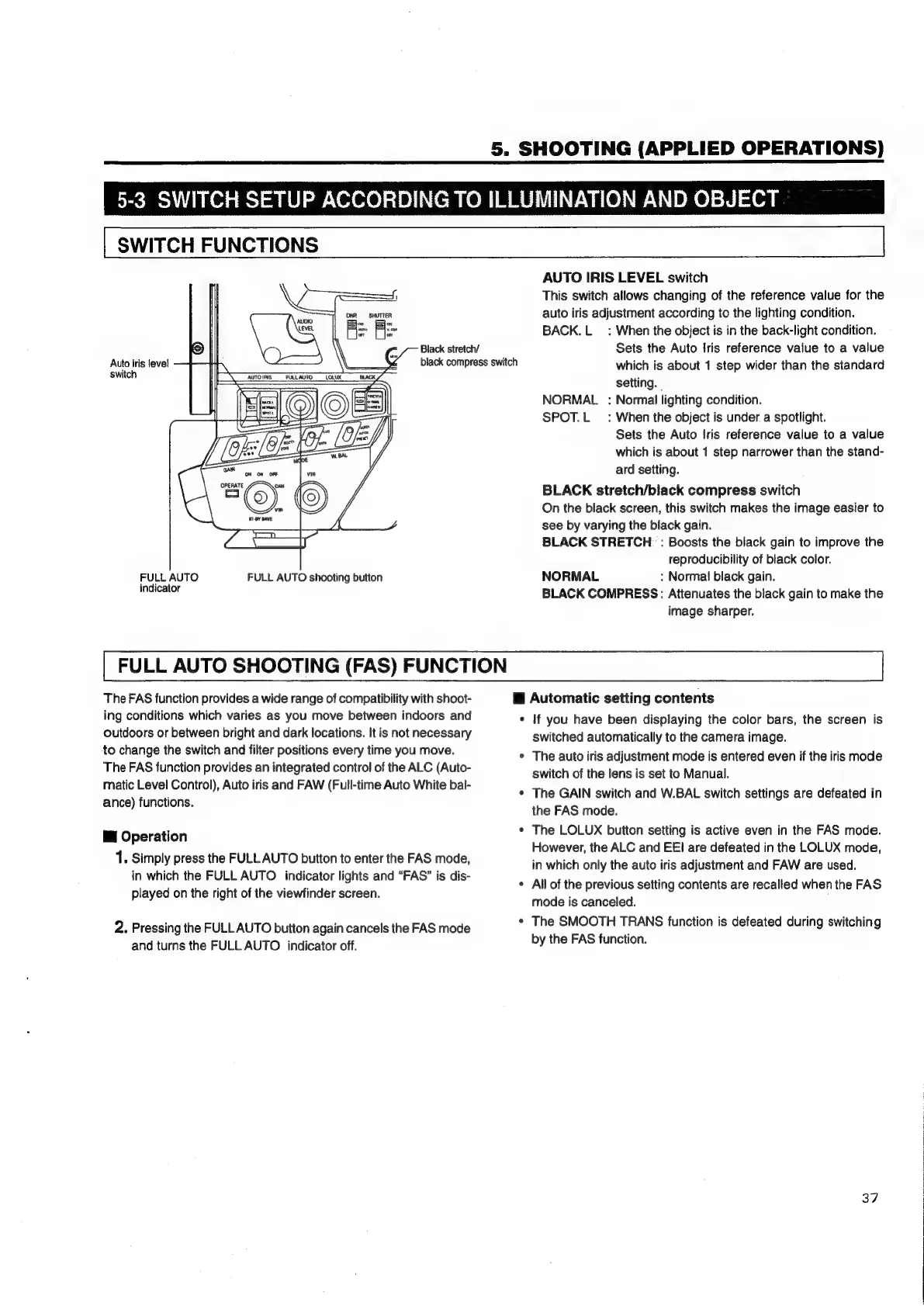
AUTO
IRIS
LEVEL
switch
This
switch
allows
changing
of
the
reference
value
for
the
auto
iris
adjustment
according
to
the
lighting
condition.
BACK.L_
:
When
the
object
is
in
the
back-light
condition.
Black
stretch/
Sets
the
Auto
Iris
reference
value
to
a
value
black
compress
switch
which
is
about
1
step
wider
than
the
standard
setting.
NORMAL
:
Normal
lighting
condition.
SPOT.L
_:
When
the
object
is
under.
a
spotlight.
Sets
the
Auto
Iris
reference
value
to
a
value
which
is
about
1
step
narrower
than
the
stand-
ard
setting.
BLACK
stretch/black
compress
switch
On
the
black
screen,
this
switch
makes
the
image
easier
to
see
by
varying
the
black
gain.
BLACK
STRETCH
:
Boosts
the
black
gain
to
improve
the
reproducibility
of
black
color.
FULL
AUTO
FULL
AUTO
shooting
button
NORMAL
:
Normal
black
gain.
aniealt
BLACK
COMPRESS:
Attenuates
the
black
gain
to
make
the
image
sharper.
Auto
iris
level
switch
|
AUTOIRIS_
FURLLAUTO
FULL
AUTO
SHOOTING
(FAS)
FUNCTION
The
FAS
function
provides
a
wide
range
of
compatibility
with
shoot-
i
Automatic
setting
contents
ing
conditions
which
varies
as
you
move
between
indoors
and
*
If
you
have
been
displaying
the
color
bars,
the
screen
is
outdoors
or
between
bright
and
dark
locations.
It
is
not
necessary
switched
automatically
to
the
camera
image.
to
change
the
switch
and
filter
positions
every
time
you
move.
*
The
auto
iris
adjustment
mode
is
entered
even
if
the
iris
mode
The
FAS
function
provides
an
integrated
control
of
the
ALC
(Auto-
switch
of
the
lens
is
set
to
Manual.
matic
Level
Control),
Auto
iris
and
FAW
(Full-time
Auto
White
bal-
;
¢
The
GAIN
switch
and
W.BAL
switch
settings
are
defeated
in
ance)
functions.
the
FAS
mode.
¢
The
LOLUX
button
setting
is
active
even
in
the
FAS
mode.
However,
the
ALC
and
EEI
are
defeated
in
the
LOLUX
mode,
in
which
only
the
auto
iris
adjustment
and
FAW
are
used.
¢
All
of
the
previous
setting
contents
are
recalled
when
the
FAS
mode
is
canceled.
¢
The
SMOOTH
TRANS
function
is
defeated
during
switching
by
the
FAS
function.
i
Operation
1.
Simply
press
the
FULL
AUTO
button
to
enter
the
FAS
mode,
in
which
the
FULL
AUTO
indicator
lights
and
“FAS”
is
dis-
played
on
the
right
of
the
viewfinder
screen.
2.
Pressing
the
FULL
AUTO
button
again
cancels
the
FAS
mode
and
turns
the
FULL
AUTO
indicator
off.
37

Table of Contents

Related product manuals