EasyManua.ls Logo

JVC KY-D29 - External Monitor Adjustment; Viewfinder Adjustmene

JVC KY-D29
56 pages
Print Icon
To Next Page IconTo Next Page
To Previous Page IconTo Previous Page
Loading...
3.
BASIC
SYSTEM
CONNECTIONS
AND
ADJUSTMENTS
3-4
ADJUSTMENTS
BEFORE
SHOOTING
(Cont’d)
EXTERNAL
MONITOR
ADJUSTMENT
(For
NTSC
Model)
Display
the
color
bar
signal
built
in
the
camera
head
and
adjust
the
colors,
contrast
and
brightness.
Color
video
monitor
7.
Connect
a
color
video
monitor
to
the
MONITOR
OUTPUT
connector
of
the
camera
head.
[zes-1
yes
D)
——~
Qo
4
b
/
2
1
3
a
Set
the
monitor
so
that
the
screen
turns
entirely
biue.
2.
Set
the
MODE
switch
@to
COLOR
BARS
to
output
the
color
bar
signal
(SMPTE
color
bars).
4.
Adjust
the
chroma
control
of
the
monitor
so
that
there
is
no
difference
in
brightness
between
@
and
®
or
between
()
and
@4
of
the
color
bars.
@
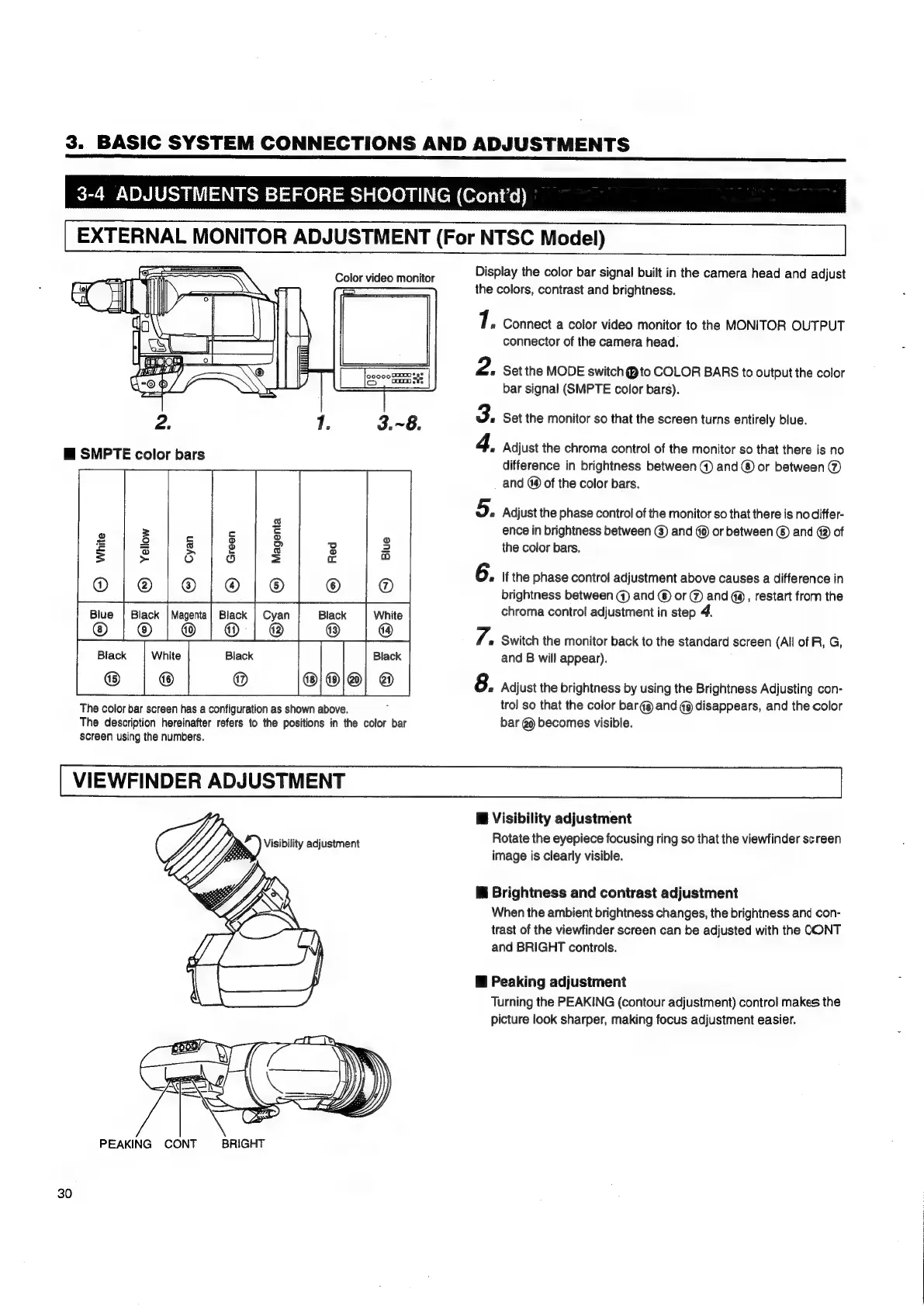
SMPTE
color
bars
5.
Adjust
the
phase
control
of
the
monitor
so
that
there
is
nodiffer-
ence
in
brightness
between
(@)
and
@
or
between
©
and
@
of
the
color
bars,
6.
If
the
phase
control
adjustment
above
causes
a
difference
in
brightness
between
@
and
©
or
@
and
@,
restart
from
the
chroma
control
adjustment
in
step
4.
Black
White
Black Black
8.
Adjust
the
brightness
by
using
the
Brightness
Adjusting
con-
The
color
bar
screen
has
a
configuration
as
shown
above.
trol
so
that
the
color
bar
@@
and
@9
disappears,
and
the
color
The
description
hereinafter
refers
to
the
positions
in
the
color
bar
bar
@)
becomes
visible.
screen
using
the
numbers.
7.
«
Switch
the
monitor
back
to
the
standard
screen
(All
of
R,
G,
and
B
will
appear).
VIEWFINDER
ADJUSTMENT
Bi
Visibility
adjustment
Rotate
the
eyepiece
focusing
ring
so
that
the
viewfinder
screen
image
is
clearly
visible.
Mi
Brightness
and
contrast
adjustment
When
the
ambient
brightness
changes,
the
brightness
and
con-
trast
of
the
viewfinder
screen
can
be
adjusted
with
the
CONT
and
BRIGHT
controls.
@
Peaking
adjustment
Turning
the
PEAKING
(contour
adjustment)
control
makes
the
picture
look
sharper,
making
focus
adjustment
easier.
PEAKING
CONT
BRIGHT
30

Table of Contents

Related product manuals