EasyManua.ls Logo

JVC KY-D29 - Power Supply Using the AA-P250;AA-G10

JVC KY-D29
56 pages
Print Icon
To Next Page IconTo Next Page
To Previous Page IconTo Previous Page
Loading...
3.
BASIC
SYSTEM
CONNECTIONS
AND
ADJUSTMENTS
3-3
POWER
SUPPLY
PREPARATION
(Cont'd)
1
2.
Battery
retainer
NB-G1
a
\
2yVa.
\.
3.
4,
Battery
retainer
1.
Battery
case
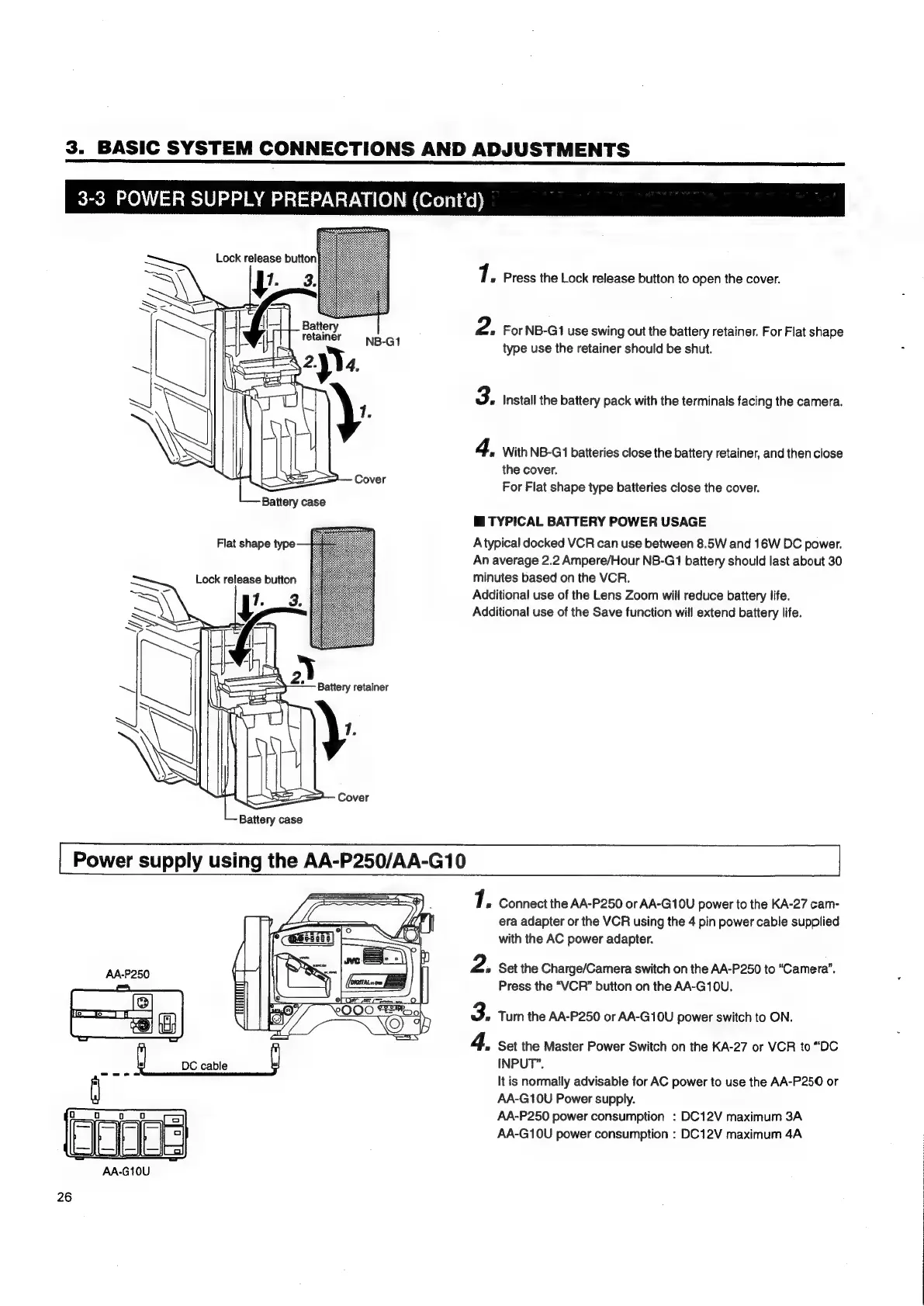
Press
the
Lock
release
button
to
open
the
cover.
For
NB-G1
use
swing
out
the
battery
retainer.
For
Flat
shape
type
use
the
retainer
should
be
shut.
Install
the
battery
pack
with
the
terminals
facing
the
camera.
With
NB-G1
batteries
close
the
battery
retainer,
and
then
close
the
cover.
For
Flat
shape
type
batteries
close
the
cover.
@
TYPICAL
BATTERY
POWER
USAGE
Atypical
docked
VCR
can
use
between
8.5W
and
16W
DC
power.
An
average
2.2
Ampere/Hour
NB-G11
battery
should
last
about
30
minutes
based
on
the
VCR.
Additional
use
of
the
Lens
Zoom
will
reduce
battery
life.
Additional
use
of
the
Save
function
will
extend
battery
life.
Power
supply
using
the
AA-P250/AA-G10
Eee
ee
»
Le
ee
oo
Connect
the
AA-P250
or
AA-G10U
power
to
the
KA-27
cam-
era
adapter
or
the
VCR
using
the
4
pin
power
cable
supplied
with
the
AC
power
adapter.
Set
the
Charge/Camera
switch
on
the
AA-P250
to
“Camera”.
Press
the
“VCR”
button
on
the
AA-G10U.
Turn
the
AA-P250
or
AA-G10U
power
switch
to
ON.
Set
the
Master
Power
Switch
on
the
KA-27
or
VCR
to
“DC
INPUT”.
It
is
normally
advisable
for
AC
power
to
use
the
AA-P250
or
AA-G10U
Power
supply.
AA-P250
power
consumption
:
DC12V
maximum
3A
AA-G10U
power
consumption
:
DC12V
maximum
4A

Table of Contents

Related product manuals