EasyManua.ls Logo

JVC KY-D29 - Csssctcectsetettereeseerees

JVC KY-D29
56 pages
Print Icon
To Next Page IconTo Next Page
To Previous Page IconTo Previous Page
Loading...
3.
BASIC
SYSTEM
CONNECTIONS
AND
ADJUSTMENTS
3-3
POWER
SUPPLY
PREPARATION
(Cont'd)
Power
supply
using
the
AA-P200
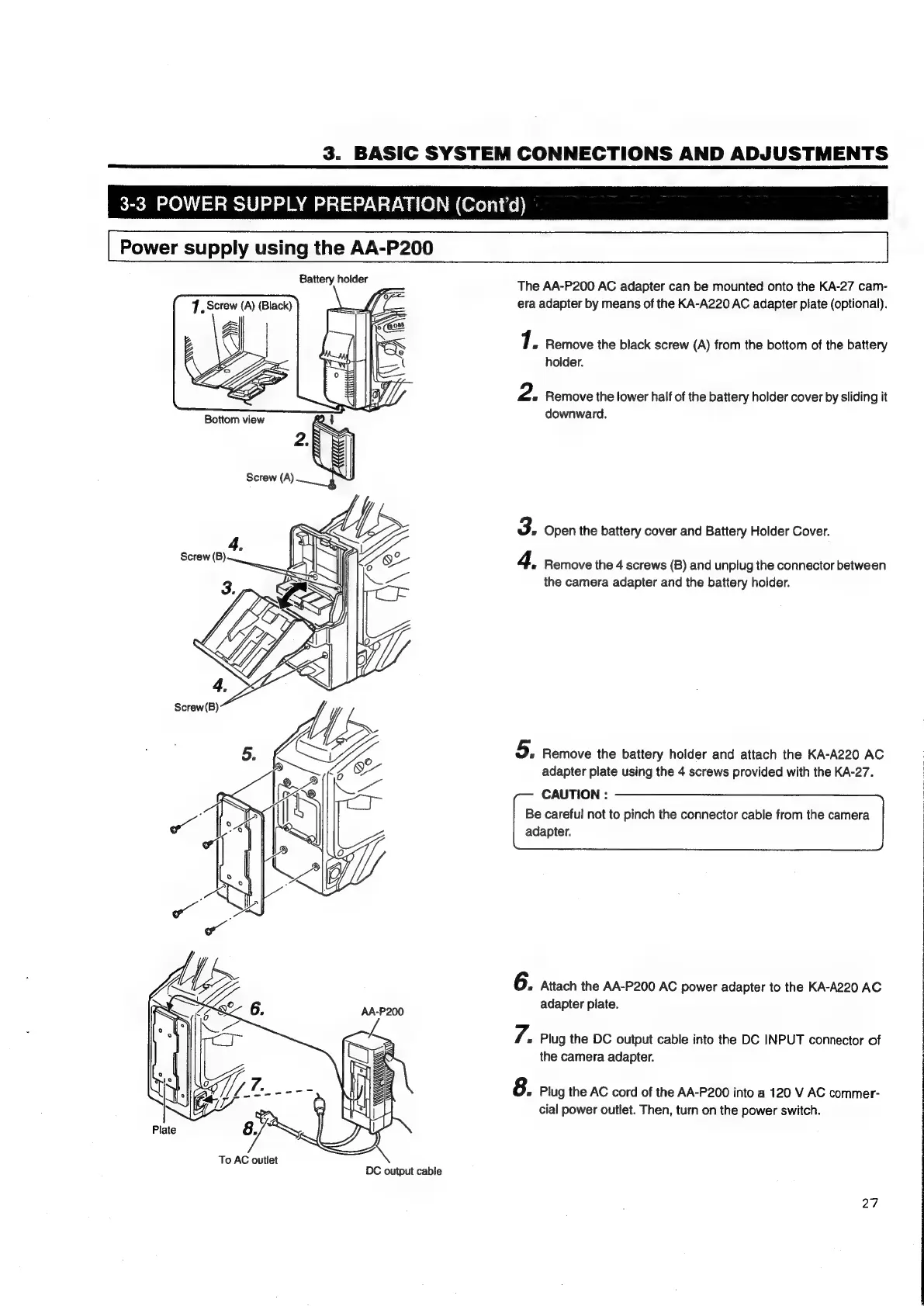
Battery
holder
Bottom
view
Screw
(A)
To
AC
outlet
DC
output
cabie
The
AA-P200
AC
adapter
can
be
mounted
onto
the
KA-27
cam-
era
adapter
by
means
of
the
KA-A220
AC
adapter
plate
(optional).
7.
Remove
the
black
screw
(A)
from
the
bottom
of
the
battery
holder.
2
«
Remove
the
lower
half
of
the
battery
holder
cover
by
sliding
it
downward.
3.
Open
the
battery
cover
and
Battery
Holder
Cover.
4.
Remove
the
4
screws
(B)
and
unplug
the
connector
between
the
camera
adapter
and
the
battery
holder.
5.
Remove
the
battery
holder
and
attach
the
KA-A220
AC
adapter
plate
using
the
4
screws
provided
with
the
KA-27.
CAUTION
:
Be
careful
not
to
pinch
the
connector
cable
from
the
camera
adapter.
6.
Attach
the
AA-P200
AC
power
adapter
to
the
KA-A220
AC
adapter
plate.
7.
»
Plug
the
DC
output
cable
into
the
DC
INPUT
connector
of
the
camera
adapter.
8.
Plug
the
AC
cord
of
the
AA-P200
into
a
120
V
AC
commer-
cial
power
outlet.
Then,
turn
on
the
power
switch.
27

Table of Contents

Related product manuals