EasyManua.ls Logo

JVC KY-D29 - Installing the Basic System; Leris Iristallation Ss I.éi2 Edcccssckcventsadedonsceses Codes Sveeteocaesisboasebeodensies; Viewfinder Installation; Microphone Installation

JVC KY-D29
56 pages
Print Icon
To Next Page IconTo Next Page
To Previous Page IconTo Previous Page
Loading...
Refer
to
the
section
2.6.4
“Dynamic
shading
adjustment”
on
page
2-10.
3.
BASIC
SYSTEM
CONNECTIONS
AND
ADJUSTMENTS
3-2
INSTALLING
THE
BASIC
SYSTEM
LENS
INSTALLATION
ee
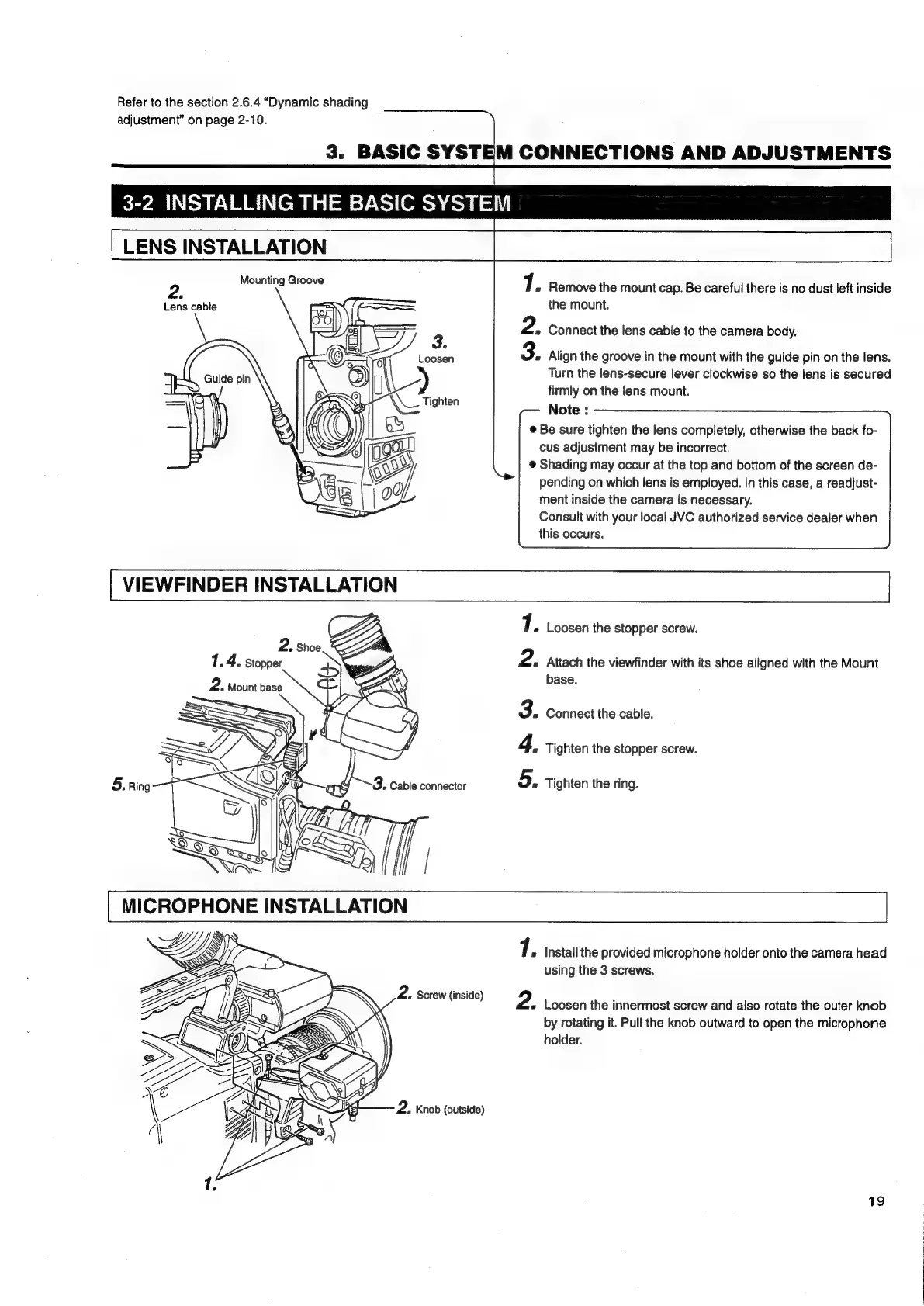
Mounting
Groove
7.
Removethariount
cap.
Be
careful
there
is
no
dust
left
inside
the
mount.
.
Lens
cable
2.
Connect
the
lens
cable
to
the
camera
body.
3.
Align
the
groove
in
the
mount
with
the
guide
pin
on
the
lens.
Turn
the
lens-secure
lever
clockwise
so
the
lens
is
secured
firmly
on
the
lens
mount.
Note
:
©
Be
sure
tighten
the
lens
completely,
otherwise
the
back
fo-
cus
adjustment
may
be
incorrect.
@
Shading
may
occur
at
the
top
and
bottom
of
the
screen
de-
pending
on
which
lens
is
employed.
In
this
case,
a
readjust-
Guide
pin
/
ment
inside
the
camera
is
necessary.
Consult
with
your
local
JVC
authorized
service
dealer
when
this
occurs.
7.
Loosen
the
stopper
screw.
2.
Shoe
1.
4.
Stopper
2.
Mount
base
Attach
the
viewfinder
with
its
shoe
aligned
with
the
Mount
base.
Tighten
the
stopper
screw.
2.
3.
Connect
the
cable.
4,
5.
Tighten
the
ring.
MICROPHONE
INSTALLATION
Sy
7.
Install
the
provided
microphone
holder
onto
the
camera
head
using
the
3
screws.
2.
Loosen
the
innermost
screw
and
also
rotate
the
outer
knob
by
rotating
it.
Pull
the
knob
outward
to
open
the
microphone
holder.
19

Table of Contents

Related product manuals