EasyManua.ls Logo

JVC KY-D29 - 6 System Upgrading; Connection with & Switchel 0; Connection with the Studio-Use Viewfinder (VF-P400)

JVC KY-D29
56 pages
Print Icon
To Next Page IconTo Next Page
To Previous Page IconTo Previous Page
Loading...
6.
SYSTEM
UPGRADING
6-1
CONNECTION
WITH
A
SWITCHER
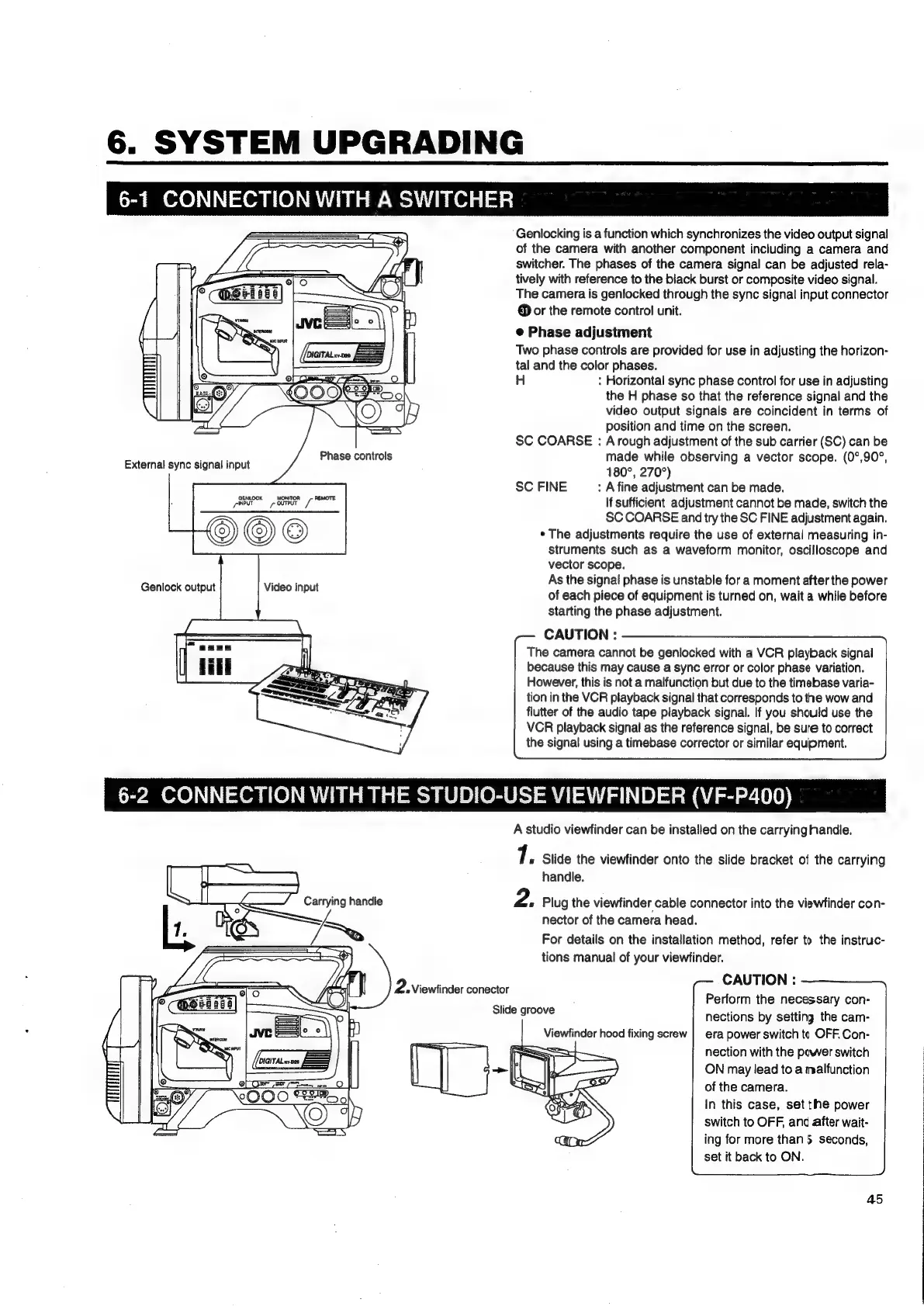
GENLOCK
MONITOR
-—_-
REMOTE
yeeur
=
ourpur
7”
Genlocking
is
a
function
which
synchronizes
the
video
output
signal
of
the
camera
with
another
component
including
a
camera
and
switcher.
The
phases
of
the
camera
signal
can
be
adjusted
rela-
tively
with
reference
to
the
black
burst
or
composite
video
signal.
The
camera
is
genlocked
through
the
sync
signal
input
connector
@
or
the
remote
control
unit.
e
Phase
adjustment
Two
phase
controls
are
provided
for
use
in
adjusting
the
horizon-
tal
and
the
color
phases.
H
:
Horizontal
sync
phase
control
for
use
in
adjusting
the
H
phase
so
that
the
reference
signal
and
the
video
output
signals
are
coincident
in
terms
of
position
and
time
on
the
screen.
SC
COARSE
:
A
rough
adjustment
of
the
sub
carrier
(SC)
can
be
made
while
observing
a
vector
scope.
(0°,90°,
180°,
270°)
SC
FINE
:
A
fine
adjustment
can
be
made.
If
sufficient
adjustment
cannot
be
made,
switch
the
SC
COARSE
and
try
the
SC
FINE
adjustment
again.
*
The
adjustments
require
the
use
of
external
measuring
in-
struments
such
as
a
waveform
monitor,
oscilloscope
and
vector
scope.
As
the
signal
phase
is
unstable
for
a
moment
after
the
power
of
each
piece
of
equipment
is
turned
on,
wait
a
while
before
starting
the
phase
adjustment.
CAUTION
:
The
camera
cannot
be
genlocked
with
a
VCR
playback
signal
because
this
may
cause
a
sync
error
or
color
phase
variation.
However,
this
is
not
a
malfunction
but
due
to
the
timebase
varia-
tion
in
the
VCR
playback
signal
that
corresponds
to
the
wow
and
flutter
of
the
audio
tape
playback
signal.
If
you
should
use
the
VCR
playback
signal
as
the
reference
signal,
be
sure
to
correct
the
signal
using
a
timebase
corrector
or
similar
equipment.
Carrying
handle
2
#
Viewfinder
conector
Slide
groove
A
studio
viewfinder
can
be
installed
on
the
carryinghandle.
7.
Slide
the
viewfinder
onto
the
slide
bracket
of
the
carrying
handle.
2.
Plug
the
viewfinder
cable
connector
into
the
viewfinder
con-
nector
of
the
camera
head.
For
details
on
the
installation
method,
refer
to
the
instruc-
tions
manual
of
your
viewfinder.
CAUTION
:
Perform
the
necessary
con-
nections
by
setting
the
cam-
era
power
switch
tc
OFF.
Con-
nection
with
the
power
switch
ON
may
lead
to
a
malfunction
of
the
camera.
in
this
case,
set
the
power
switch
to
OFF,
and
after
wait-
ing
for
more
than
5
seconds,
set
it
back
to
ON.
Viewfinder
hood
fixing
screw
45

Table of Contents

Related product manuals