EasyManua.ls Logo

JVC KY-D29 - Sel Indeibanseatiasieeoaes

JVC KY-D29
56 pages
Print Icon
To Next Page IconTo Next Page
To Previous Page IconTo Previous Page
Loading...
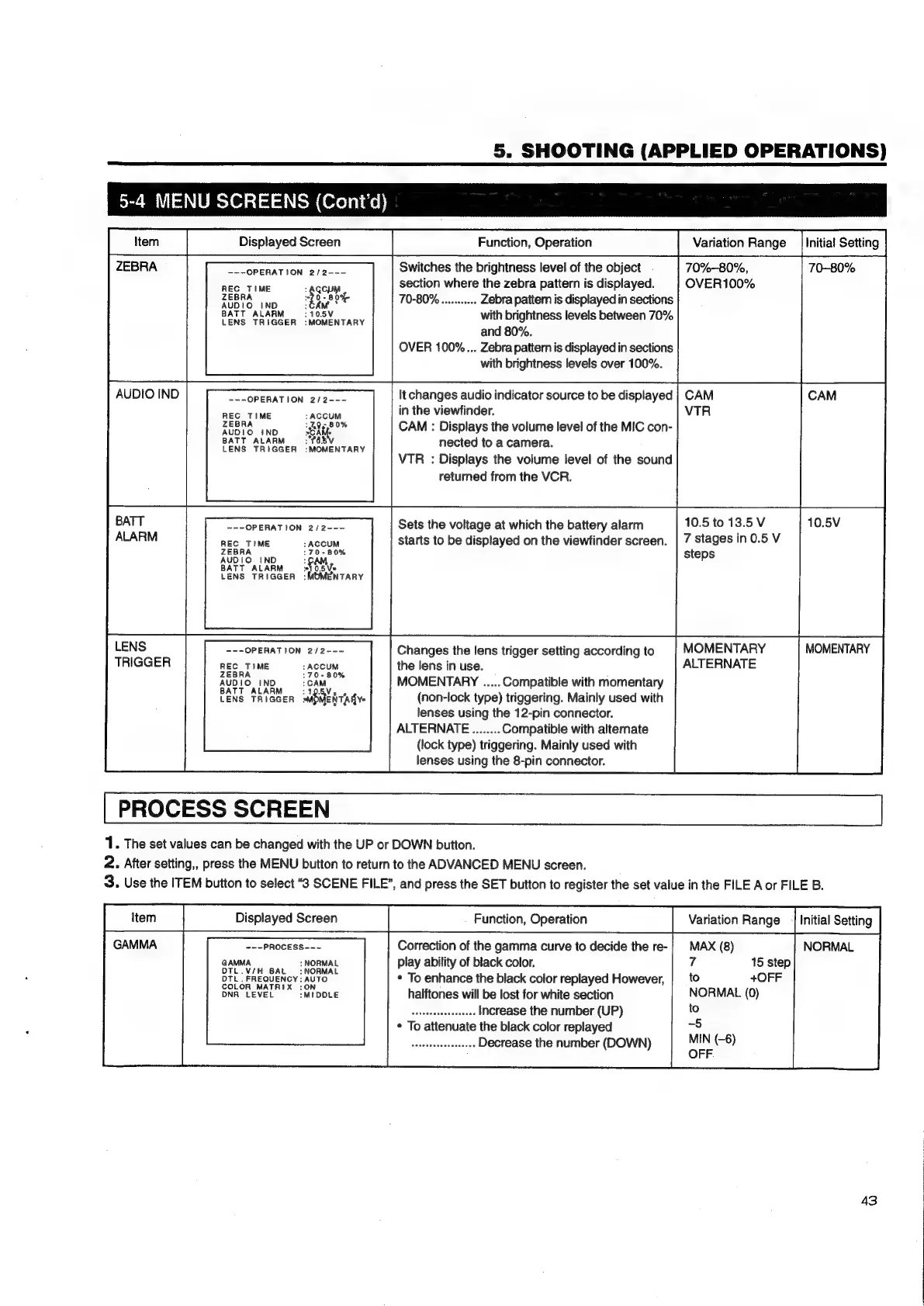
5.
SHOOTING
(APPLIED
OPERATIONS)
5-4
MENU
SCREENS
(Cont'd)
tem
Displayed
Screen
Function,
Operation
Variation
Range
|
Initial
Setting
---OPERATION
2/2---
REC
TIME
:
PR
a
40-8
0%
70-80%
...seerseee
Zebra
pattem
is
displayed
in
sections
BATT
AEA
AGEN
oa
with
brightness
levels
between
70%
and
80%.
OVER
100%...
Zebra
pattern
is
displayed
in
sections
with
brightness
levels
over
100%.
It
changes
audio
indicator
source
to
be
displayed
in
the
viewfinder.
---OPERATION
2/2---
REC
TIME
:
ACCUM
%
ZEBRA
“AR
g
80%
CAM
:
Displays
the
volume
level
of
the
MIC
con-
BATT
ALARM
:
"783
nected
to
a
camera.
LENS
TRIGGER
:MOMENTARY
VTR
:
Displays
the
volume
level
of
the
sound
returned
from
the
VCR.
Sets
the
voltage
at
which
the
battery
alarm
starts
to
be
displayed
on
the
viewfinder
screen.
---OPERATION
2/2---
REC
TIME
:
ACCUM
170-80%
AUDIO
!tND
BATT
ALARM
Say,
LENS
TRIGGER
:MOMENTARY
Changes
the
lens
trigger
setting
according
to
---OPERATION
2/2---
REC
TIME
:
ACCUM
the
lens
in
use.
AUDIO
IND
:GAM.
MOMENTARY
.....
Compatible
with
momentary
LENS
TRIGGER
ERERTAR
Y=
(non-lock
type)
triggering.
Mainly
used
with
lenses
using
the
12-pin
connector.
ALTERNATE........
Compatible
with
alternate
(lock
type)
triggering.
Mainly
used
with
lenses
using
the
8-pin
connector.
ZEBRA
Switches
the
brightness
level
of
the
object
70%-80%,
70-80%
section
where
the
zebra
pattern
is
displayed.
OVER100%
AUDIO
IND
CAM
CAM
VTR
7
stages
in
0.5
V
steps
LENS
MOMENTARY
MOMENTARY
TRIGGER
ALTERNATE
2.
After
setting,,
press
the
MENU
button
to
return
to
the
ADVANCED
MENU
screen.
3.
Use
the
ITEM
button
to
select
“38
SCENE
FILE’,
and
press
the
SET
button
to
register
the
set
value
in
the
FILE
A
or
FILE
B.
GAMMA
~--PROCESS--~
Correction
of
the
gamma
curve
to
decide
the
re-}
MAX
(8
NORMAL
GAMMA
:
NORMAL
play
ability
of
black
color.
7
15
step
BATT
10.5
to
13.5
V
10.5V
ALARM
1.
The
set
values
can
be
changed
with
the
UP
or
DOWN
button.
|
tem
Displayed
Screen
Function,
Operation
Variation
Range
|
Initial
Setting
)
DTU.
FREQUENCY
:AUTO
*
To
enhance
the
black
color
replayed
However,
|_
to
+OFF
DTL.
FREQUENCY:
AUTO
DNA
LEVEL
:MIDOLE
halftones
will
be
lost
for
white
section
NORMAL
(0)
mates
teeeeaee
Increase
the
number
(UP)
to
*
To
attenuate
the
black
color
replayed
-5
aucesadesessaseys
Decrease
the
number
(DOWN)
pad
(-6)
43

Table of Contents

Related product manuals