EasyManua.ls Logo

JVC KY-D29 - Page 13

JVC KY-D29
56 pages
Print Icon
To Next Page IconTo Next Page
To Previous Page IconTo Previous Page
Loading...
2.
CONTROLS,
CONNECTORS
AND
INDICATORS
2-3
LENS
a
ES
I
AE
I
iE
A
TIS
5
]
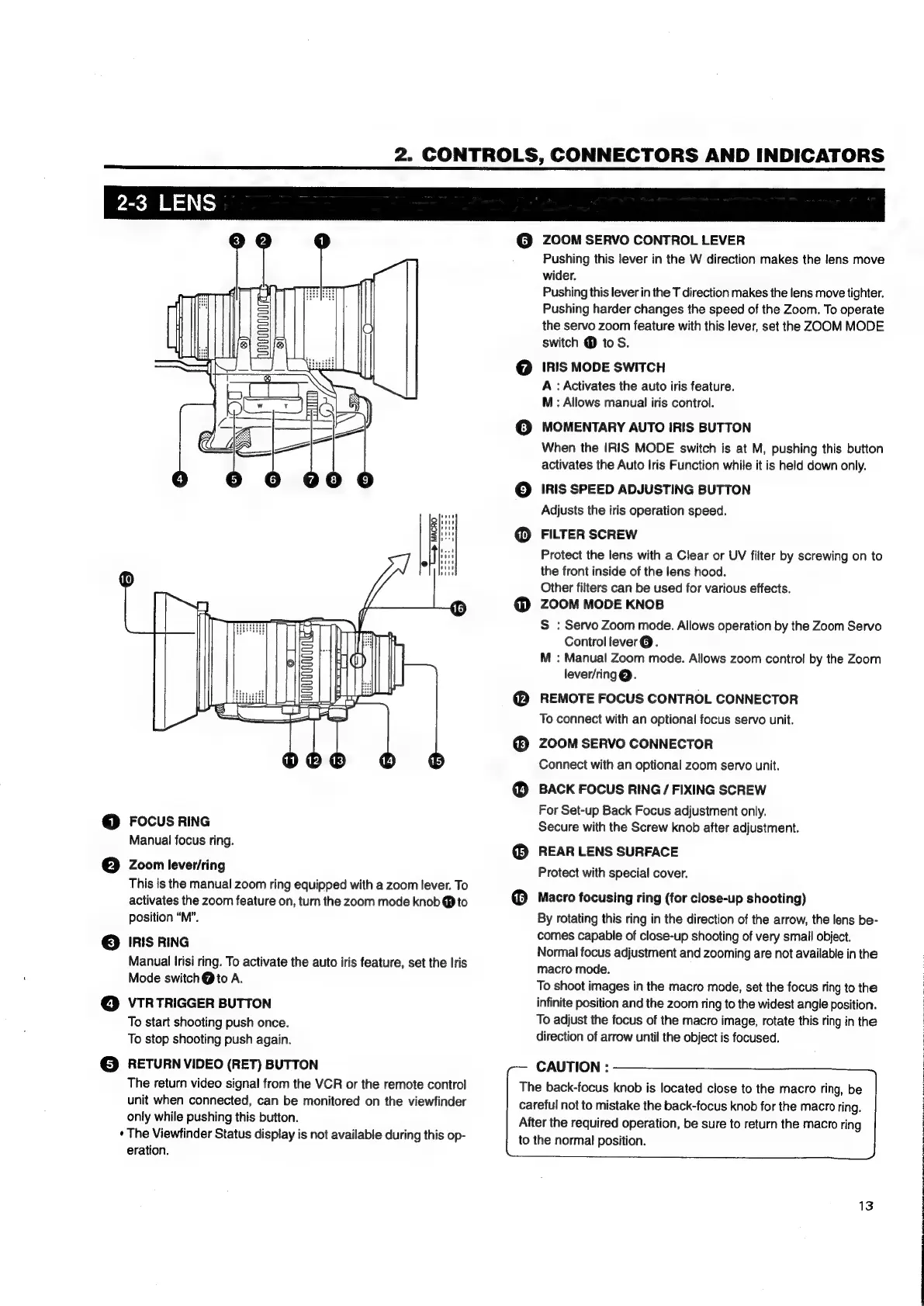
FOCUS
RING
Manual
focus
ring.
Zoom
lever/ring
This
is
the
manual
zoom
ring
equipped
with
a
zoom
lever.
To
activates
the
zoom
feature
on,
turn
the
zoom
mode
knob
®
to
position
“M”.
IRIS
RING
Manual
Irisi
ring.
To
activate
the
auto
iris
feature,
set
the
Iris
Mode
switch
@
to
A.
VTR
TRIGGER
BUTTON
To
start
shooting
push
once.
To
stop
shooting
push
again.
RETURN
VIDEO
(RET)
BUTTON
The
return
video
signal
from
the
VCR
or
the
remote
control
unit
when
connected,
can
be
monitored
on
the
viewfinder
only
while
pushing
this
button.
*
The
Viewfinder
Status
display
is
not
available
during
this
op-
eration.
@
ZOOM
SERVO
CONTROL
LEVER
Pushing
this
lever
in
the
W
direction
makes
the
lens
move
wider.
Pushing
this
lever
in
the
T
direction
makes
the
lens
move
tighter.
Pushing
harder
changes
the
speed
of
the
Zoom.
To
operate
the
servo
zoom
feature
with
this
lever,
set
the
ZOOM
MODE
switch
@
to
S.
IRIS
MODE
SWITCH
A
:
Activates
the
auto
iris
feature.
M:
Allows
manual
iris
control.
MOMENTARY
AUTO
IRIS
BUTTON
When
the
IRIS
MODE
switch
is
at
M,
pushing
this
button
activates
the
Auto
Iris
Function
while
it
is
held
down
only.
IRIS
SPEED
ADJUSTING
BUTTON
Adjusts
the
iris
operation
speed.
FILTER
SCREW
Protect
the
lens
with
a
Clear
or
UV
filter
by
screwing
on
to
the
front
inside
of
the
lens
hood.
Other
filters
can
be
used
for
various
effects.
ZOOM
MODE
KNOB
S
:
Servo
Zoom
mode.
Allows
operation
by
the
Zoom
Servo
Control
lever@.
M
:
Manual
Zoom
mode.
Allows
zoom
control
by
the
Zoom
lever/ring@.
REMOTE
FOCUS
CONTROL
CONNECTOR
To
connect
with
an
optional
focus
servo
unit.
ZOOM
SERVO
CONNECTOR
Connect
with
an
optional
zoom
servo
unit.
BACK
FOCUS
RING
/
FIXING
SCREW
For
Set-up
Back
Focus
adjustment
only.
Secure
with
the
Screw
knob
after
adjustment.
REAR
LENS
SURFACE
Protect
with
special
cover.
Macro
focusing
ring
(for
close-up
shooting)
By
rotating
this
ring
in
the
direction
of
the
arrow,
the
lens
be-
comes
capable
of
close-up
shooting
of
very
small
object.
Normal
focus
adjustment
and
zooming
are
not
available
in
the
macro
mode.
To
shoot
images
in
the
macro
mode,
set
the
focus
ring
to
the
infinite
position
and
the
zoom
ring
to
the
widest
angle
position.
To
adjust
the
focus
of
the
macro
image,
rotate
this
ring
in
the
direction
of
arrow
until
the
object
is
focused.
CAUTION
:
The
back-focus
knob
is
located
close
to
the
macro
ring,
be
careful
not
to
mistake
the
back-focus
knob
for
the
macro
ring.
After
the
required
operation,
be
sure
to
return
the
macro
ring
to
the
normal
position.
13

Table of Contents

Related product manuals