EasyManua.ls Logo

JVC KY-D29 - Page 16

JVC KY-D29
56 pages
Print Icon
To Next Page IconTo Next Page
To Previous Page IconTo Previous Page
Loading...
2.
CONTROLS,
CONNECTORS
AND
INDICATORS
a
mcinkt
attend
atthe
that
htt
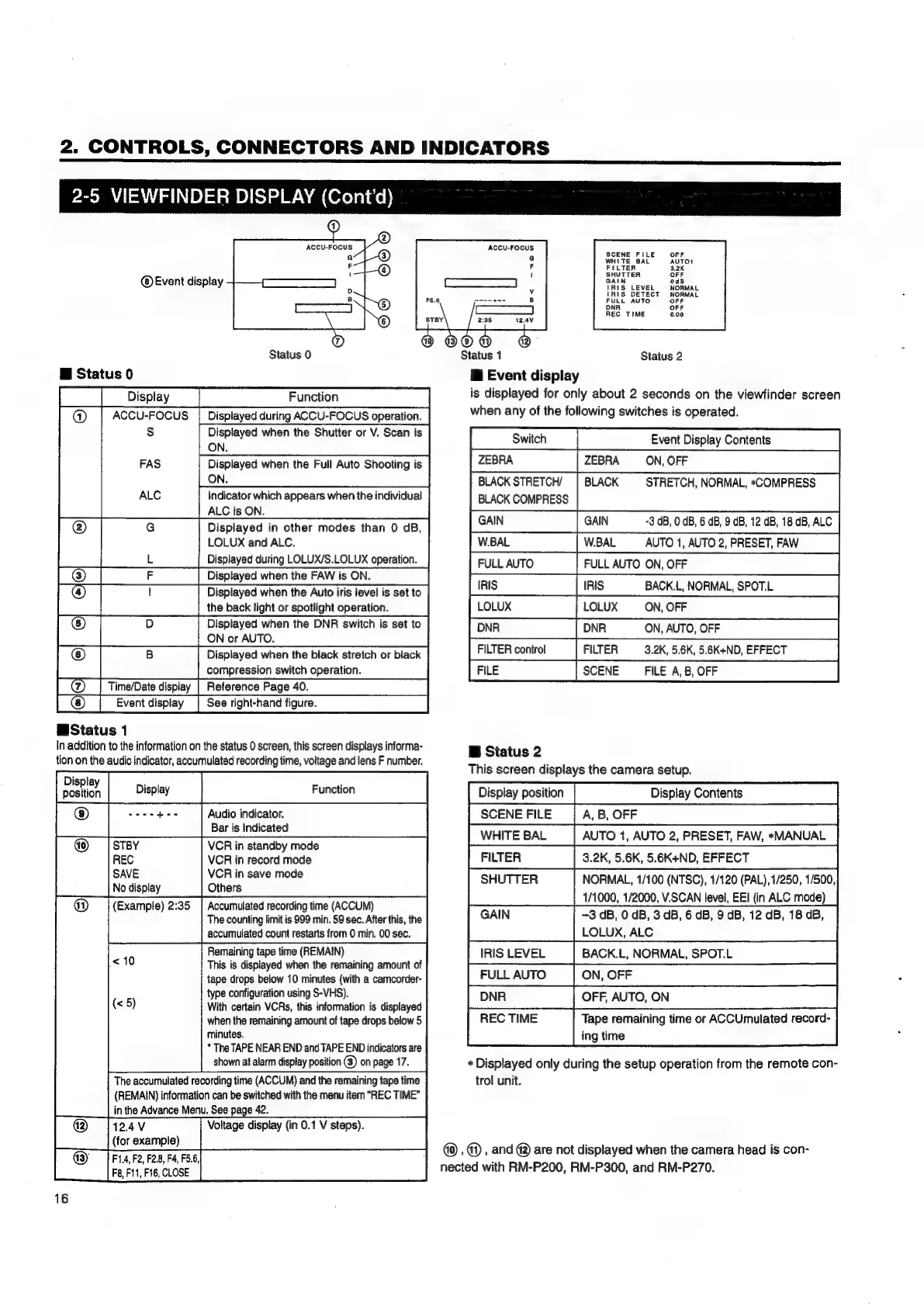
2-5
VIEWFINDER
DISPLAY
(Cont'd)
ACCU-FOCUS
Event
display
Status
0
@
Status
0
Display
Function
ACCU-FOCUS
|
Displayed
during
ACCU-FOCUS
operation.
s
Displayed
when
the
Shutter
or
V.
Scan
is
ON.
Displayed
when
the
Full
Auto
Shooting
is
ON.
Indicator
which
appears
when
the
individual
ALC
is
ON.
Displayed
in
other
modes
than
0
GB,
LOLUX
and
ALC.
Displayed
during
LOLUX/S.LOLUX
operation.
(4)
Displayed
when
the
Auto
iris
level
is
set
to
eT
|
itagnar
song
opto
|
Ba
ill
ON
or
AUTO.
©
Displayed
when
the
black
stretch
or
black
pO
|_|
eerssonsvtonspemtons
[@_|
TimeDate
display
[Reference
Page
40.
[@
[Event
display
|
See
righthand
figure
WStatus
1
In
addition
to
the
information
on
the
status
0
screen,
this
screen
displays
informa-
tion
on
the
audio
indicator,
accumulated
recording
time,
voltage
and
lens
F
number.
2
|
®
weeedee
Audio
indicator.
Bar
is
Indicated
VCR
in
standby
mode
VCR
in
record
mode
VCR
in
save
mode
Others
@
(Example)
2:35
|
Accumulated
recording
time
(ACCUM)
The
counting
limit
is
999
min.
59
sec.
After
this,
the
accumulated
count
restarts
from
0
min.
00
sec.
<10
Remaining
tape
time
(REMAIN)
This
is
displayed
when
the
remaining
amount
of
tape
drops
below
10
minutes
(with
a
camcorder-
type
configuration
using
S-VHS).
With
certain
VCRs,
this
information
is
displayed
when
the
remaining
amount
of
tape
drops
below
5
minutes.
*
The
TAPE
NEAR
END
and
TAPE
END
indicators
are
shown
at
alarm
display
position
@)
on
page
17.
The
accumulated
recording
time
(ACCUM)
and
the
remaining
tape
time
(REMAIN)
information
can
be
switched
with
the
menu
item
“REC
TIME”
in
the
Advance
Menu.
See
page
42.
@
12.4V
Voltage
display
(in
0.1
V
steps).
(for
example)
@
6
(<5)
@3)
|
F1.4,
F2,
F2.8,
Fd,
F5.6,
F8,
F11,
F16,
CLOSE
1
Status
1
ACCU-FOCUS.
SCENE
FILE
Status
2
i
Event
display
is
displayed
for
only
about
2
seconds
on
the
viewfinder
screen
when
any
of
the
following
switches
is
operated.
Event
Display
Contents
ZEBRA ZEBRA
ON,
OFF
BLACK
STRETCH/
|
BLACK
STRETCH,
NORMAL,
*COMPRESS
BLACK
COMPRESS
GAIN
GAIN
-3
dB,
0
dB,
6
dB,
9
dB,
12
dB,
18
dB,
ALC
fis
«(|S
BACK
NORWAL
SPOTL
row
[NR
ONTOS
Bi
Status
2
This
screen
displays
the
camera
setup.
Display
position
Display
Contents
SCENE
FILE
A,
B,
OFF
WHITE
BAL
AUTO
1,
AUTO
2,
PRESET,
FAW,
*MANUAL
FILTER
3.2K,
5.6K,
5.6K+ND,
EFFECT
SHUTTER
NORMAL,
1/100
(NTSC),
1/120
(PAL),1/250,
1/500,
1/1000,
1/2000,
V.SCAN
level,
EEI
(in
ALC
mode)
GAIN
-3
dB,
0
dB,
3
dB,
6
dB,
9
dB,
12
dB,
18
dB
LOLUX,
ALC
IRIS
LEVEL
BACK.L,
NORMAL,
SPOT.L
FULL
AUTO
ON,
OFF
REC
TIME
Tape
remaining
time
or
ACCUmulated
record-
ing
time
*
Displayed
only
during
the
setup
operation
from
the
remote
con-
trol
unit.
,
@)
,
and
@)
are
not
displayed
when
the
camera
head
is
con-
nected
with
RM-P200,
RM-P300,
and
RM-P270.

Table of Contents

Related product manuals