EasyManua.ls Logo

Kaypro 2 - 15-03.TIFF

Default Icon
157 pages
Print Icon
To Next Page IconTo Next Page
To Previous Page IconTo Previous Page
Loading...
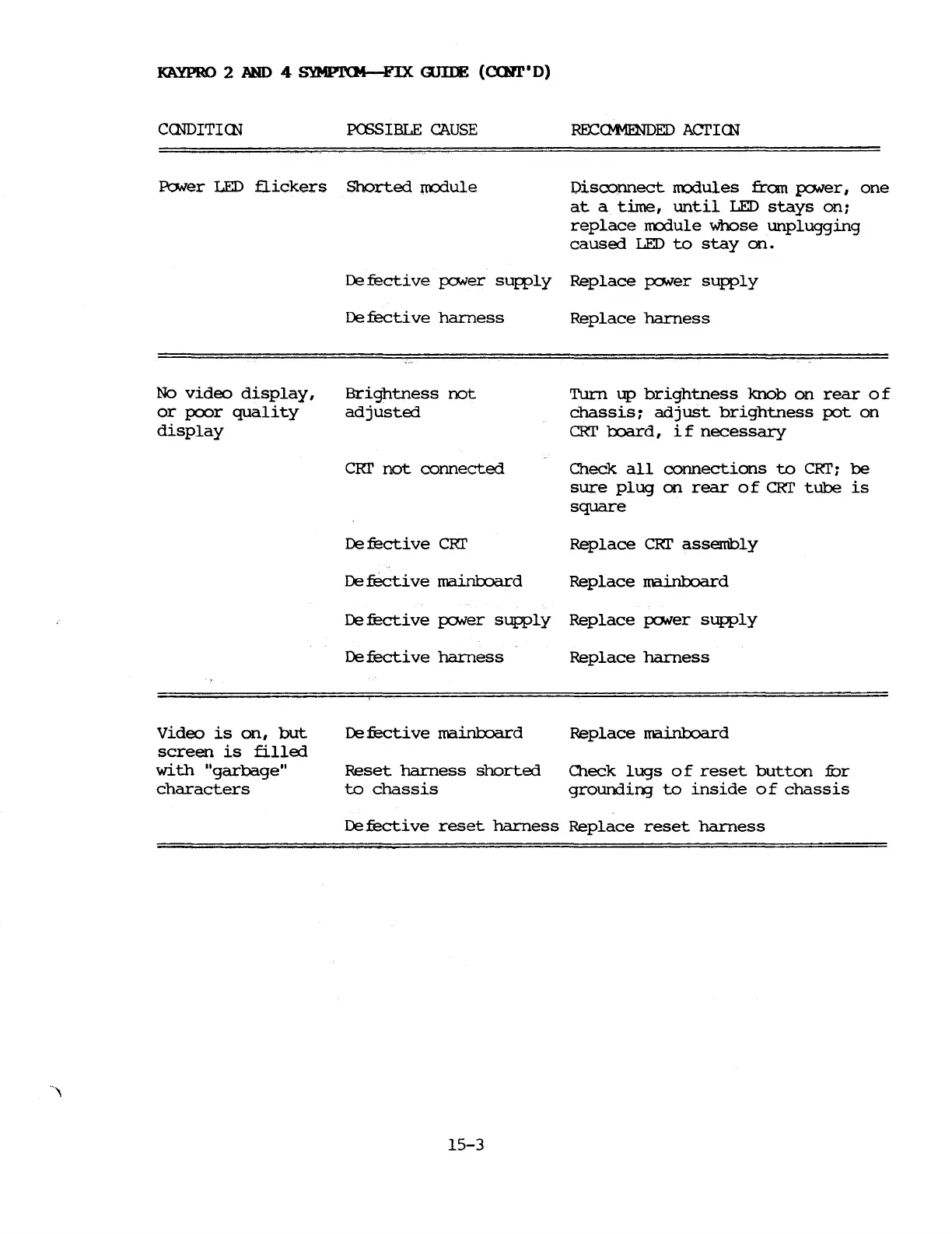
KAYPRO
2
AND
4
SYMPI'CM-FIX
<nIlE
(CCNT'
D)
CCNDITICN
PCSSIBLE
CAUSE
PoNer
LED
flickers
Shorted
ITOOule
ROCC»1ENDED ACI'ICN
Disconnect
rrodules
fran
p:JNer,
one
at
a
time,
until
LED
stays
on:
replace
m:x:1ule
whose
unplugging
caused
LED
to
stay
on.
Defective
po..;er
sUfPly
Replace
pcMer
sUfPly
No
video
display,
or
poor
quality
display
De
fecti
ve
harness
Brightness
not
adjusted
CRr
not
connected
De
fecti
ve
CRr
De
fecti
ve
mainboard
Replace
harness
Turn
up
brightness
knob
on
rear
0 f
chassis:
adjust
brightness
pot
on
CRI'
lxlard,
if
necessary
Check
all
connections
to
CRI':
be
sure
plug
on
rear
of
CRI'
tube
is
square
Replace
CRI'
assembly
Replace
mainboard
Defective
po..;er
sUfPly
Replace
po..;er
sUfPly
Video
is
on,
but
screen
is
filled
with
"garbage"
characters
Defective
harness
De
fecti
ve
mainboard
Reset
harness
shorted
to
chassis
Replace
harness
Replace
mainboard
O1eck
lugs
of
reset
button
fur
groundirg
to
inside
of
chassis
Defective
reset
harness
Replace
reset
harness
15-3

Table of Contents

Related product manuals