EasyManua.ls Logo

Kaypro 2 - 15-06.TIFF

Default Icon
157 pages
Print Icon
To Next Page IconTo Next Page
To Previous Page IconTo Previous Page
Loading...
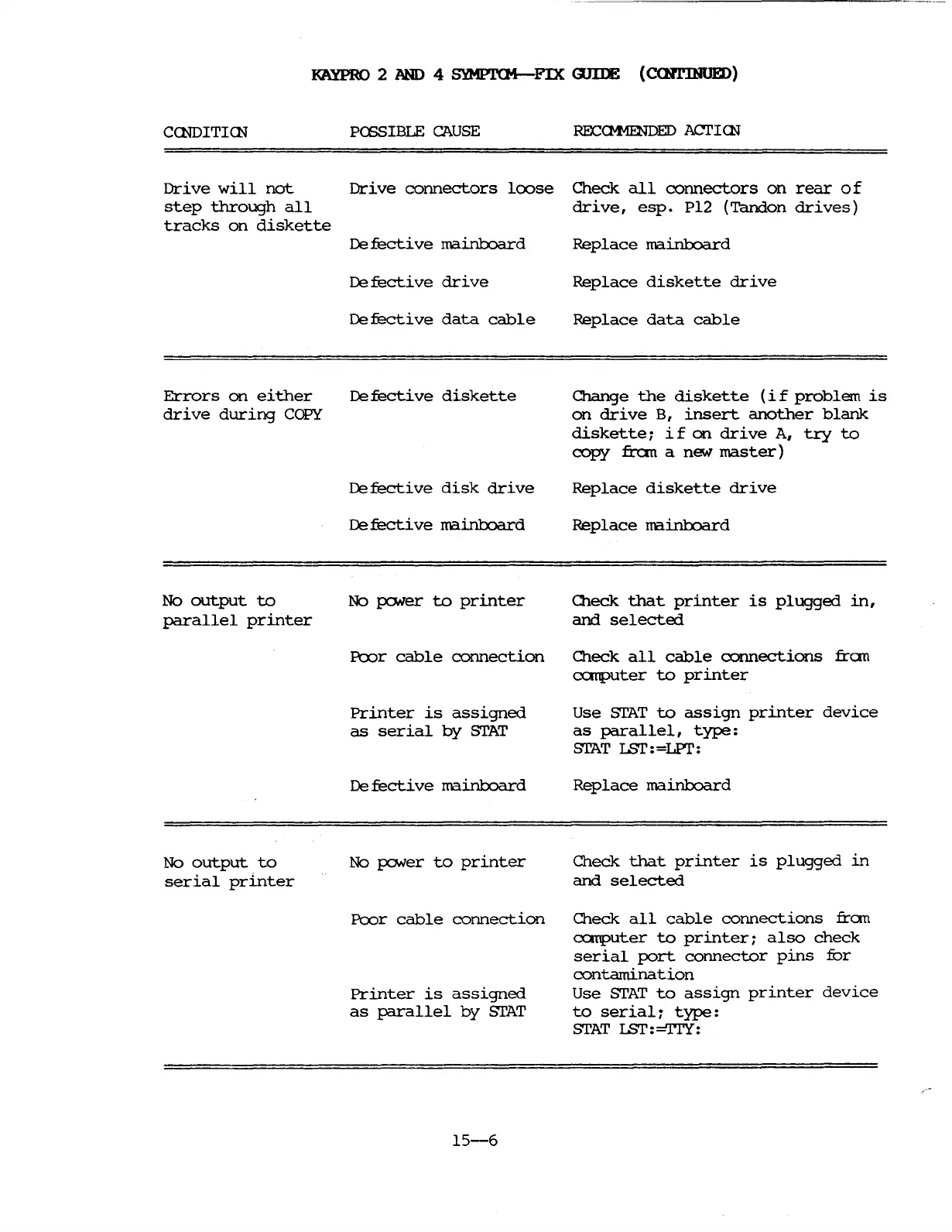
KAYPRO
2
.AND
4 SYMPl'CM-FIX
WIlE
(C<H1'INUED)
CCNDITICN
PCSSIBLE
CAUSE
Drive
will
not
Drive
connectors
loose
step
through
all
tracks
on
diskette
De
fecti
ve
mainbJard
De
fecti
ve
drive
Defective
data
cable
Errors
on
either
Defective
diskette
drive
during
COPY
De
fecti
ve
disk
drive
De
fecti
ve
mainbJard
RECCM-fENDED
ACI'ICN
Check
all
connectors
on
rear
0 f
drive,
esp.
P12
(Tandon
drives)
Replace
mainbJard
Replace
diskette
drive
Replace
data
cable
Change
the
diskette
(i
f
problem
is
on
drive
B,
insert
another
blank
diskette;
if
on
drive
A,
try
to
copy
:fran
a new
master)
Replace
diskette
drive
Replace
mai.nlJoard
No
output
to
parallel
printer
No
output
to
serial
printer
No
pcMer
to
printer
Pcor
cable
connection
Printer
is
assigned
as
serial
by
STAT
De
fecti
ve
mainboard
No pcMer
to
printer
Pcor
cable
connection
Printer
is
assigned
as
parallel
by
STAT
15-6
O1eck
that
printer
is
plugged
in,
and
selected
O1eck
all
cable
connections
fran
a::rrputer
to
printer
Use
STAT
to
assign
printer
device
as
parallel,
type:
STAT
ISr:=LPI':
Replace
rnainbJard
Check
that
printer
is
plugged
in
and
selected
Check
all
cable
connections
fran
CClTq?Uter
to
printer
i
also
check
serial
port
connector
pins
for
contamination
Use
STAT
to
assign
printer
device
to
serial
i
type:
STAT
ISr:
=TrY:

Table of Contents

Related product manuals