EasyManua.ls Logo

Kaypro 2 - 16-10.TIFF

Default Icon
157 pages
Print Icon
To Next Page IconTo Next Page
To Previous Page IconTo Previous Page
Loading...
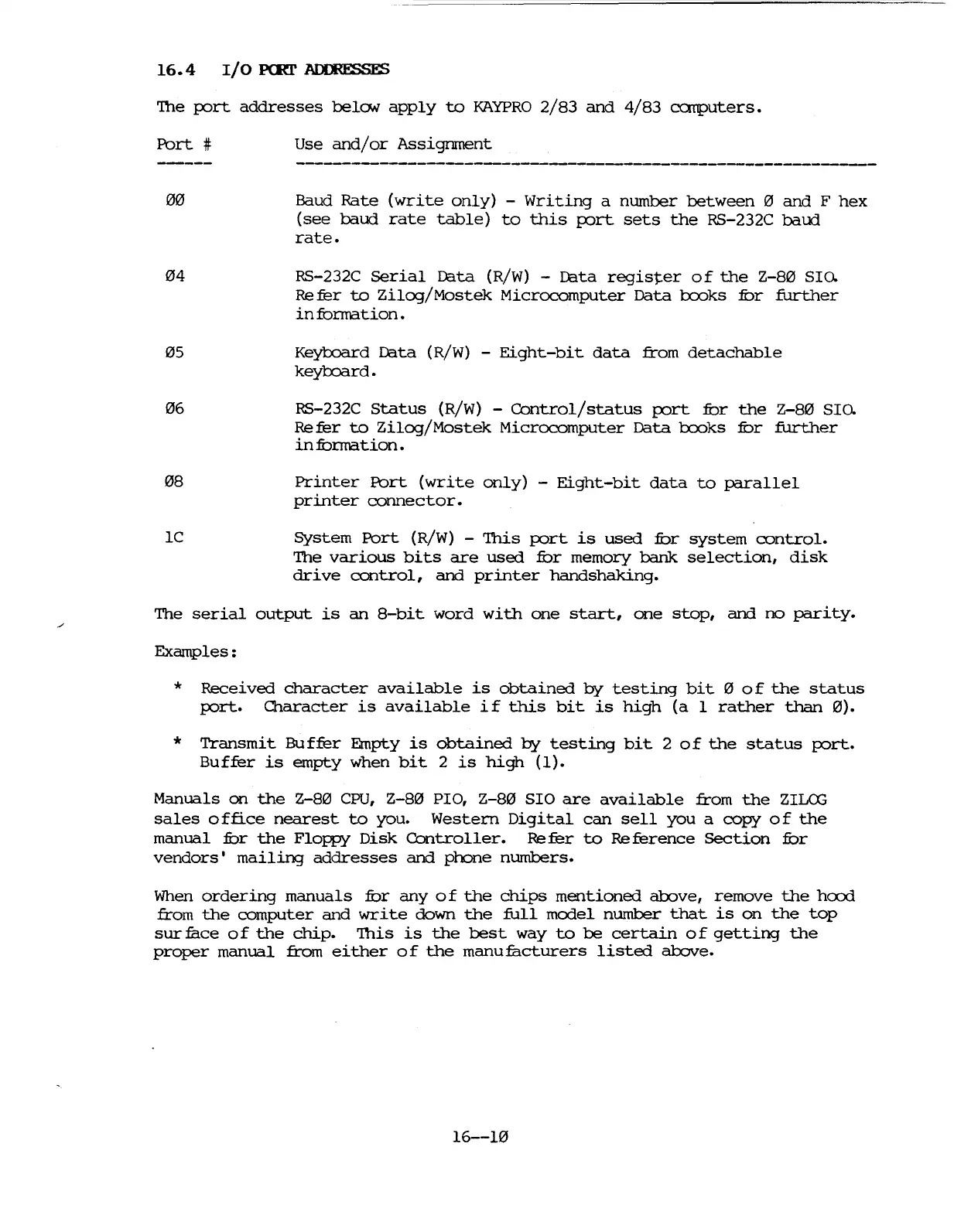
16.4
I/O
PeRl'
~
'The
port
addresses
belo.v
apply
to
KAYPRO
2/83
and
4/83
eat1puters.
Port
#
00
04
05
06
08
lC
Use
and/or
Assignment
Baud
Rate
(write
only)
-
Writing
a
number
between
0
and
F
hex
(see
baud
rate
table)
to
this
port
sets
the
RS-232C
baud
rate.
RS-232C
serial
D3.ta (R/W) - D3.ta
register
of
the
Z-80
SIo.
Re
fer
to
Zilog/Mostek
Microcomputer
Data
1:xx:>ks
fur
further
in
fonnation.
KeybJard
D3.ta (R/W) -
Eight-bit
data
from
detachable
keylxlard.
RS-232C
Status
(R/W) -
ContrOl/status
port
fur
the
Z-80
SIo.
Re
fer
to
Zilog/Mostek
Microcomputer
Data
1:xx:>ks
fur
further
infunnation.
Printer
Port
(write
only)
-
Eight-bit
data
to
parallel
printer
connector.
System
Port
(R/W) -
This
port
is
used
fur
system
control.
The
various
bits
are
used
fur
memory
bank
selection,
disk
drive
control,
and
printer
handshaking.
The
serial
output
is
an
8-bit
word
with
one
start,
one
stop,
and
no
parity.
Examples:
*
Received
character
available
is
obtained
by
testing
bit
0
of
the
status
port.
O1aracter
is
available
if
this
bit
is
high
(a
1
rather
than
0).
*
Transmit
Buffer
Empty
is
obtained
by
testing
bit
2
of
the
status
port.
Buffer
is
empty
when
bit
2
is
high
(I).
Manuals
on
the
Z-80
CPU,
Z-80
PIa,
Z-80
SIO
are
available
from
the
ZILffi
sales
office
nearest
to
you.
Western
Digital
can
sell
you
a
copy
of
the
manual
fur
the
Floppy
Disk
Controller.
Re
fer
to
Re
ference
section
fur
vendors
I
mailing
addresses
and
phone
numbers.
When
ordering
manuals
fur
any
of
the
chips
mentioned
above,
remove
the
h<X>d
from
the
computer
and
write
down
the
full
model
number
that
is
on
the
top
sur
face
0 f
the
chip.
'This
is
the
best
way
to
be
certain
0 f
getting
the
proper
manual
from
either
of
the
manufacturers
listed
above.
16--10

Table of Contents

Related product manuals