EasyManua.ls Logo

Kaypro 2 - 15-15.TIFF

Default Icon
157 pages
Print Icon
To Next Page IconTo Next Page
To Previous Page IconTo Previous Page
Loading...
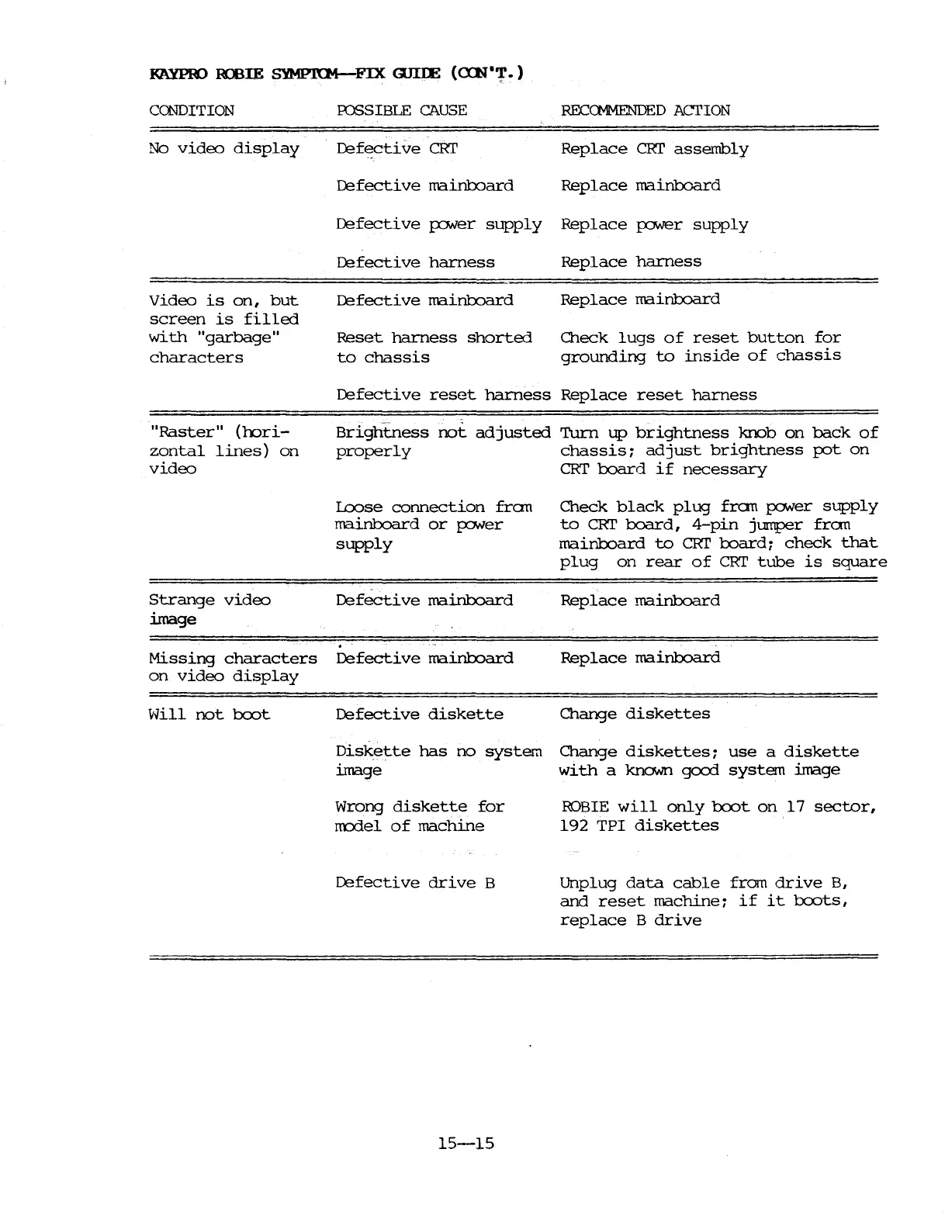
J(AYPBO
103!E
SYMfi'ltM-FIX
WIlE
(<nl"or.)
CCNDITION
No
video
display
IDSSIBLE
CAUSE
~fective
CRI'
RECCMMENDED
ACTION
Replace
CRI'
assembly
~fecti
ve
mainb::>ard
Replace
mainroard
Defective
fONer
supply
Replace
p:JWer
supply
~fective
harness
Replace
harness
Video
is
on,
but
screen
is
filled
with
"garbage"
characters
~fective
mainb::>ard
Reset
harness
shorted
to
chassis
Replace
mainb::>ard
O1eck
lugs
of
reset
button
for
grounding
to
inside
of
chassis
"Raster"
(oori-
zontal
lines)
on
video
~fective
reset
harness
Replace
reset
harness
Brightness
not
adjusted
Turn
up
brightness
knob
on
back
of
properly
chassis:
adjust
brightness
pot
on
CRT
board
if
necessary
Loose
connection
fran
mainb::>ard
or
fONer
supply
Strange
video
Defective
mainb::>ard
image
Missing
characters
~fecti
ve
mainboard
on
video
display
Hill
not
bcx:>t
~fective
diskette
Check
black
plug
fran
palNer
supply
to
CRT
board,
4-pin
jumper
fran
mainb::>ard
to
CRI'
board:
check
that
plug
on
rear
of
CRI'
tube
is
square
Replace
mainb::>ard
Replace
mainboard
O1ange
diskettes
Diskette
has
no
system
O1ange
diskettes:
use
a
diskette
image
with
a
known
good
system
image
Wrong
diskette
for
rrodel
of
machine
~fective
drive
B
15-15
ROBIE
will
only
bcx:>t
on
17
sector,
192
TPI
diskettes
Unplug
data
cable
from
drive
B,
and
reset
machine:
if
it
bcx:>ts,
replace
B
drive

Table of Contents

Related product manuals