EasyManua.ls Logo

Kaypro 2 - 15-04.TIFF

Default Icon
157 pages
Print Icon
To Next Page IconTo Next Page
To Previous Page IconTo Previous Page
Loading...
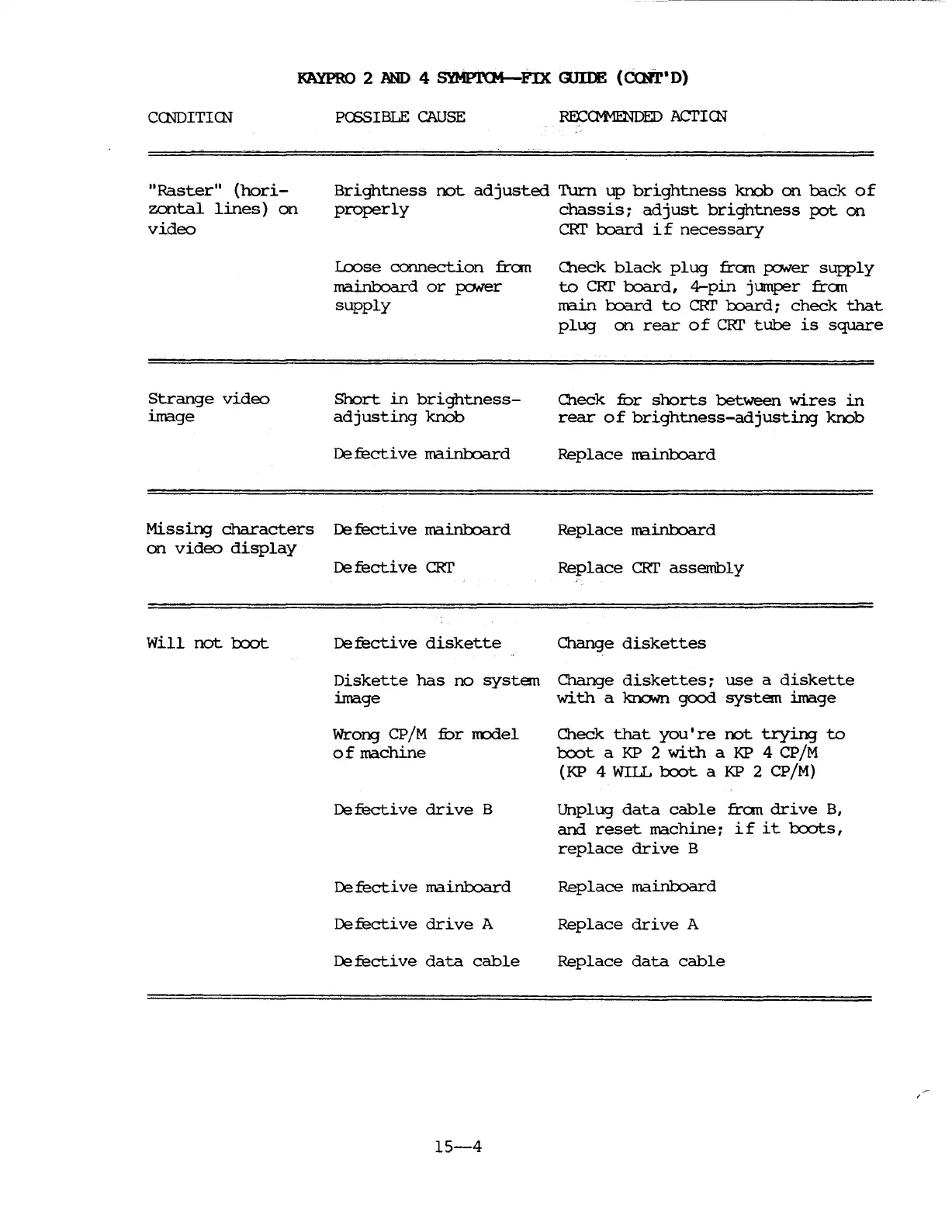
KAYPRO 2 AND 4
SYMPJ.'(M-rn
<mIE
(cxNr"D)
CCNDITICN
PCSSIBLE
CAUSE
ROCCM1ENDED
ACI'ICN
"Raster"
(hori-
zontal
lines)
on
video
Brightness
not
adjusted
Turn
up
brightness
knob
on
bade
of
properly
chassis
~
adjust
brightness
IXJt
on
CRI'
board
if
necessary
Strange
video
image
Loose
connection
fran
mainboard
or
poNer
supply
Short
in
brightness-
adjusting
knob
De
fecti
ve
ma.inboard
Oleck
black
plug
fran
poNer
supply
to
CRr
board,
4-pin
jumper
fran
main
1:x:lard
to
eRr
1:x:lard
~
check
that
plug
on
rear
0 f
eRr
tube
is
square
Check
fur
shorts
between
wires
in
rear
of
brightness-adjusting
krx:>b
Replace
rrainboard
Missing
characters
De
fecti
ve
ma.inboard
on
video
display
De
fecti
ve
eRr
Replace
ma.inboard
Replace
eRr
asserribly
will
not
l:x:x:>t
De
fecti
ve
diskette
Change
diskettes
Diskette
has
no
system
Change
diskettes
~
use
a
diskette
image
with
a
1<rloNn
good
system
image
Wrong
CP/M
fur
m::rlel
of
rrachine
De
fecti
ve
drive
B
De
fecti
ve
rrainboard
Defective
drive
A
Defective
data
cable
15-4
Check
that
you
I
re
rot
trying
to
1::x:x:>t
a
KP
2
with
a
KP
4
CP/M
(KP
4 WIIL
l:x:x:>t
a
KP
2 CP/M)
Unplug
data
cable
fran
drive
B,
and
reset
machine
~
if
it
l:x:x:>ts,
replace
drive
B
Replace
mainboard
Replace
drive
A
Replace
data
cable

Table of Contents

Related product manuals