EasyManua.ls Logo

Kaypro 2 - 15-07.TIFF

Default Icon
157 pages
Print Icon
To Next Page IconTo Next Page
To Previous Page IconTo Previous Page
Loading...
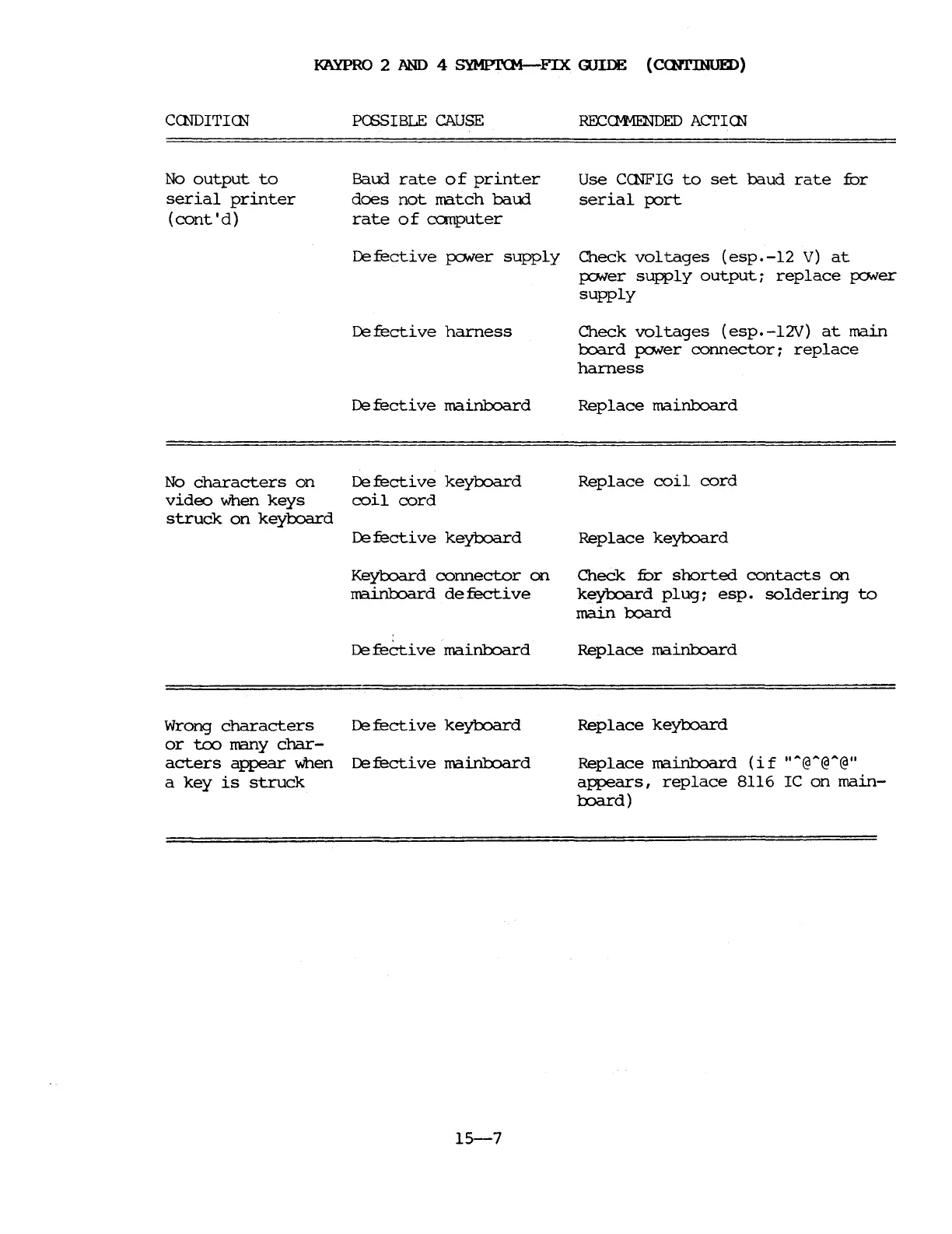
KAYPRO
2
AND
4
SYMPI'(M-FIX
GUIDE (CCNl'INUED)
CCNDITICN
No
output
to
serial
printer
(cont'd)
PffiSIBLE
CAUSE
Baud
rate
0 f
printer
does
not
match
baud
rate
of
canputer
RECc:M-1ENDED
ACTICN
Use
CCNFIG
to
set
baud
rate
fur
serial
p:>rt
Defective
fONer
supply
Check
voltages
(esp.-l2
V)
at
Pfller
supply
output:
replace
po.ver
supply
Defective
harness
Check
voltages
(esp.-l2V)
at
main
l::xJard
po.ver
connector:
replace
harness
De
fecti
ve
mainboard
Replace
main1::XJard
De
fecti
ve
keyboard
Replace
keyl:x)a.rd
No
characters
on
video
when
keys
struck
on
keyl::xJard
De
fecti
ve
keyboard
coil
cord
Replace
coil
cord
Keyl::xJard
connector
on
Check
fur
shorted
contacts
on
mainl.x:>ard
defective
keyboard
plug:
esp.
soldering
to
main
board
De
feCti
ve
mainboard
Replace
main1::XJard
Wrong
characters
De
fecti
ve
keyboard
or
tcx>
many
char-
acters
appear
when
De
fecti
ve
mainboard
a
key
is
struck
15-7
Replace
keyl::xJard
Replace
main1::XJard
(if
""@"@"@"
appears,
replace
8116
IC
on
main-
board)

Table of Contents

Related product manuals