EasyManua.ls Logo

Kaypro 2 - 15-08.TIFF

Default Icon
157 pages
Print Icon
To Next Page IconTo Next Page
To Previous Page IconTo Previous Page
Loading...
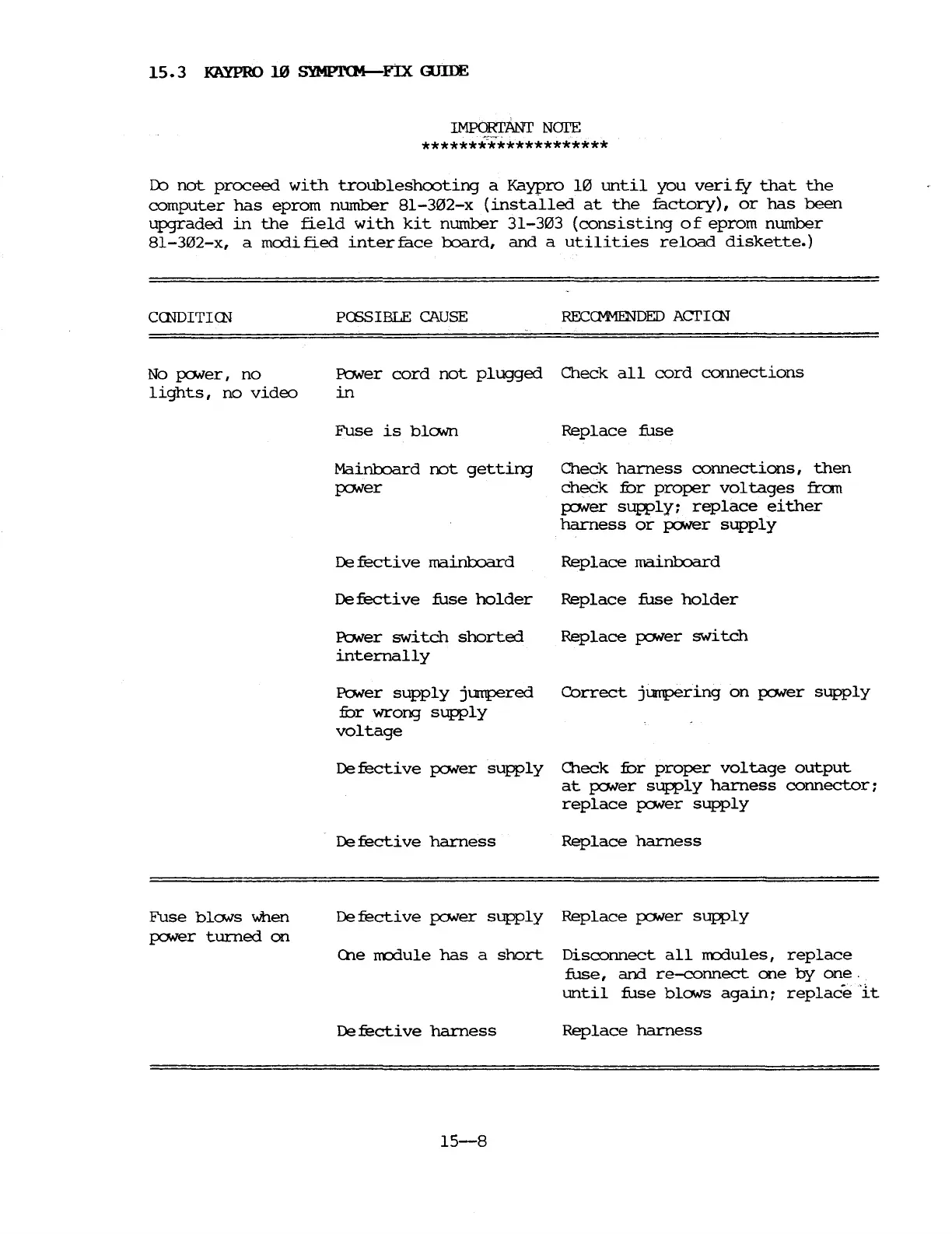
15.3
KAYPRO
10
SYMPl'(M-F!X GJIDE
IMPORI'ANT
NOI'E
********************
Do
not
proceed
with
troubleshooting
a
Kaypro
10
until
you
verify
that
the
computer
has
eprom
number
81-302-x
(installed
at
the
factory),
or
has
been
upgraded
in
the
field
with
kit
number
31-303
(consisting
of
eprom
number
81-302-x,
a
modified
interface
board,
and
a
utilities
reload
diskette.)
CCNDITICN
PCSSIBLE
CAUSE
RECCM1ENDED ACTICN
No
poNer,
no
lights,
no
video
Power
cord
not
plugged
Check
all
cord
connections
in
Fuse
is
blONn
Mainboard
not
getting
poNer
De
fecti
ve
mainboard
De
fecti
ve
fuse
holder
Power
switch
shorted
internally
Power
supply
jumpered
fur
wrong
supply
voltage
Replace
:fuse
Check
harness
connections,
then
check
fur
proper
voltages
fran
poNer
supply;
replace
either
harness
or
po.ver
supply
Replace
mainboard
Replace
:fuse
holder
Replace
poNer
switch
Correct
jumpering
on
poNer
supply
Defective
poNer
supply
Oleck
fur
proper
voltage
output
at
poNer
supply
harness
connector;
replace
poNer
supply
De
fecti
ve
harness
Replace
harness
Fuse
blo.vs
when
pc:Mer
turned
on
Defective
poNer
supply
Replace
poNer
supply
(he
rn::rlule
has
a
short
Disconnect
all
rn::rlules,
replace
:fuse,
and
re-eonnect
one
by
one.
until
fuse
blo.vs
again;
replace
It
De
fecti
ve
harness
Replace
harness
15-8

Table of Contents

Related product manuals