EasyManua.ls Logo

Kaypro 2 - 07-01.TIFF

Default Icon
157 pages
Print Icon
To Next Page IconTo Next Page
To Previous Page IconTo Previous Page
Loading...
7.1
HARIH\RE
~<NS
1\ND
ADJUS'IMENl'S
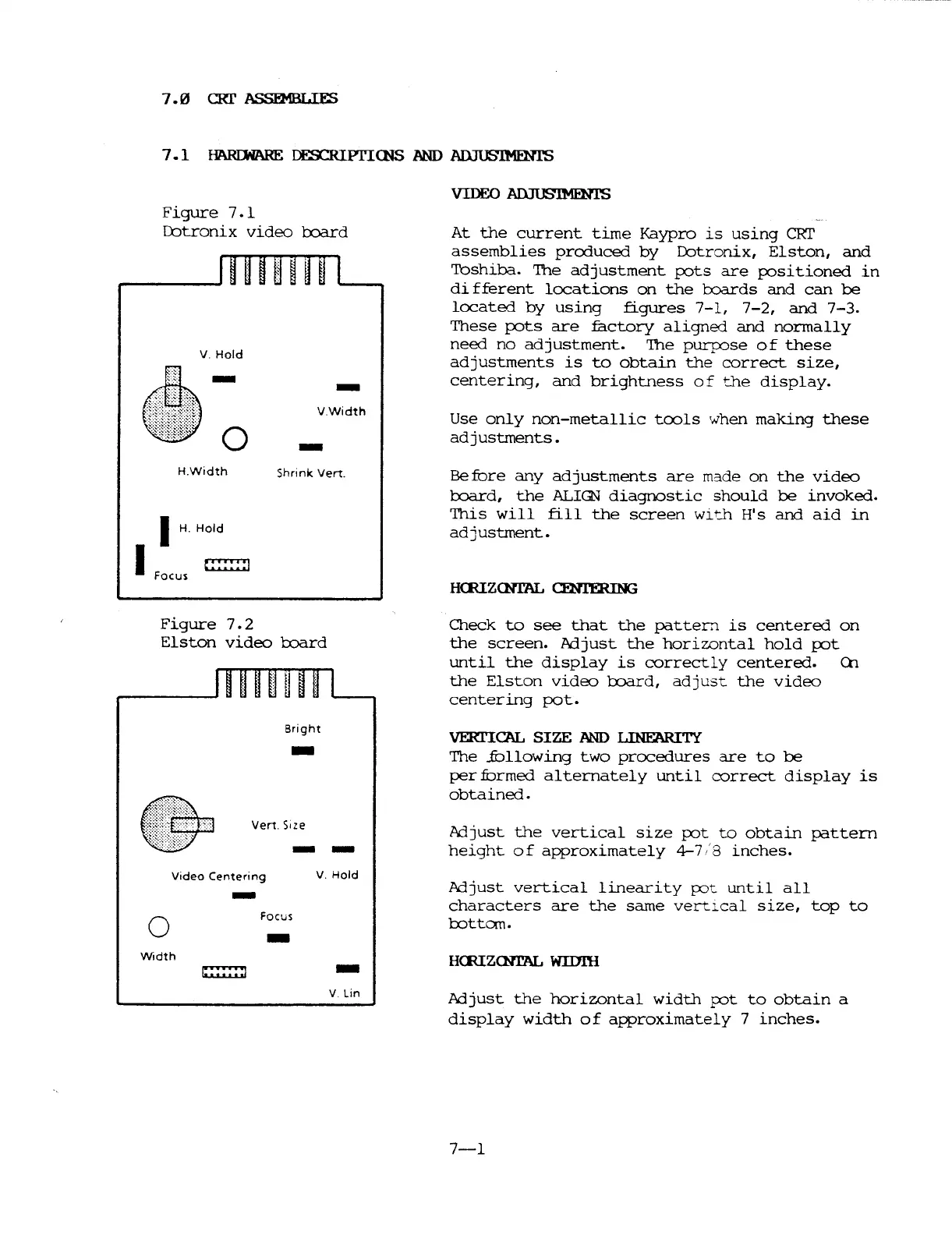
Figure
7.1
Dotronix
video
board
V.
Hold
-
VWidth
-
At
the
current
time
Kaypro
is
using
eRr
assemblies
produced
by
Dotronix,
Elston,
and
Toshiba.
The
adjustment
pots
are
positioned
in
di
fferent
locations
on
the
toards
and
can
be
located
by
using
figures
7-1,
7-2,
and
7-3.
These
pots
are
factory
aligned
and
norma
11
y
need
no
adjustment.
'The pllrjX)se
of
these
ad
justments
is
to
obtain
the
correct
size,
centering,
and
brightness
of
the
display.
Use
only
non-metallic
tools
when
making
these
adjustments.
Focus
H.Width
I
H.
Hold
I
Shrink
Vert.
Before
any
adjustments
are
made
on
the
video
board,
the
ALIGN
diagnostic
should
be
invoked.
This
will
fill
the
screen
with
H's
and
aid
in
adjustment.
HOUZCNrAL CENTERING
Figure
7.2
Elston
video
board
Bright
-
Vert.
Size
--
Check
to
see
that
the
pattern
is
centered
on
the
screen.
ACijust
the
horizontal
hold
pot
until
the
display
is
correctly
centered.
en
the
Elston
video
board,
adjust
the
video
centering
pot.
VERI'ICAL
SIZE
AND
LINEARITY
The
..fOllowing
two
procedures
are
to
be
pernormed
alternately
until
correct
display
is
obtained.
Adjust
the
vertical
size
pot
to
obtain
pattern
height
of
approximately
4-7/8
inches.
Width
o
Video
Centering
-
Focus
-
V.
Hold
-
V Lin
ACijust
vertical
linearity
pot
until
all
characters
are
the
same
vertical
size,
top
to
rottc::m.
HOUZCNrAL WIIJl'H
ACijust
the
horizontal
width
pot
to
obtain
a
display
width
of
approximately
7
inches.
7-1

Table of Contents

Related product manuals