EasyManua.ls Logo

Kaypro 2 - 07-02.0.TIFF

Default Icon
157 pages
Print Icon
To Next Page IconTo Next Page
To Previous Page IconTo Previous Page
Loading...
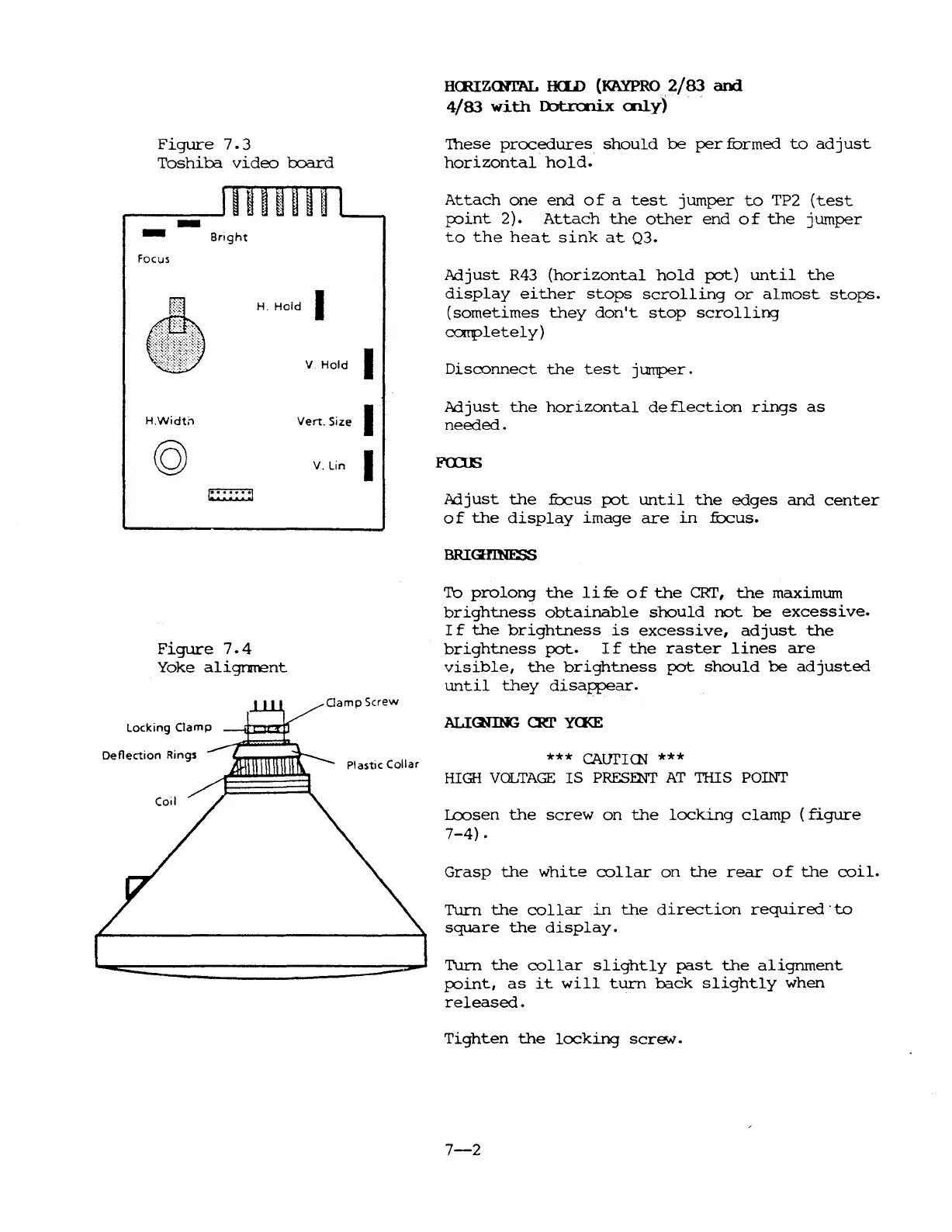
Figure
7.3
Toshiba
video
l:xxrrd
HauZ<NrAL
H<ID
(KAYPRO
2/83
and
4/83
with
Ultrcnix
cnly)
'Ihese
procedures
should
be
per
furmed
to
ad
just
horizontal
hold.
-
-
Focus
HWidth
Bnght
H.
Hold
I
V
Hold
I
Vert.
Size I
V.
Lin I
Attach
one
end
of
a
test
jumper
to
TP2
(test
PJint
2).
Attach
the
other
end
of
the
jumper
to
the
heat
sink
at
03.
Adjust
R43
(horizontal
hold
pot)
until
the
display
either
stops
scrolling
or
almost
stops.
(sometimes
they
don't
stop
scrolling
carpletely)
Disconnect
the
test
jumper.
Adjust
the
horizontal
deflection
rings
as
needed.
Figure
7.4
Yoke
alignrrent
Oamp
Screw
Locking
Clamp
Adjust
the
frJcus
pot
until
the
edges
and
center
of
the
display
image
are
in
:fOcus.
To
prolong
the
life
of
the
CRI',
the
maximum
brightness
obtainable
should
not
be
excessive.
I f
the
brightness
is
excessive,
adjust
the
brightness
pot.
I f
the
raster
lines
are
visible,
the
brightness
pot
should
be
adjusted
until
they
disappear.
ALIGnNG
CRT
Ya<E
Deflection
Rings
Plastic Collar
***
CAtJrICN
***
HIGH
VOLTAGE
IS
PRESENr
AT
THIS POINT
Lcosen
the
screw
on
the
locking
clamp
(figure
7-4)
.
Grasp
the
white
collar
on
the
rear
of
the
coil.
Turn
the
collar
in
the
direction
required'
to
square
the
display.
Turn
the
collar
slightly
past
the
alignment
p:>int,
as
it
will
turn
back
slightly
when
released.
Tighten
the
locking
screN.
7-2

Table of Contents

Related product manuals