EasyManua.ls Logo

Kaypro 2 - 15-10.TIFF

Default Icon
157 pages
Print Icon
To Next Page IconTo Next Page
To Previous Page IconTo Previous Page
Loading...
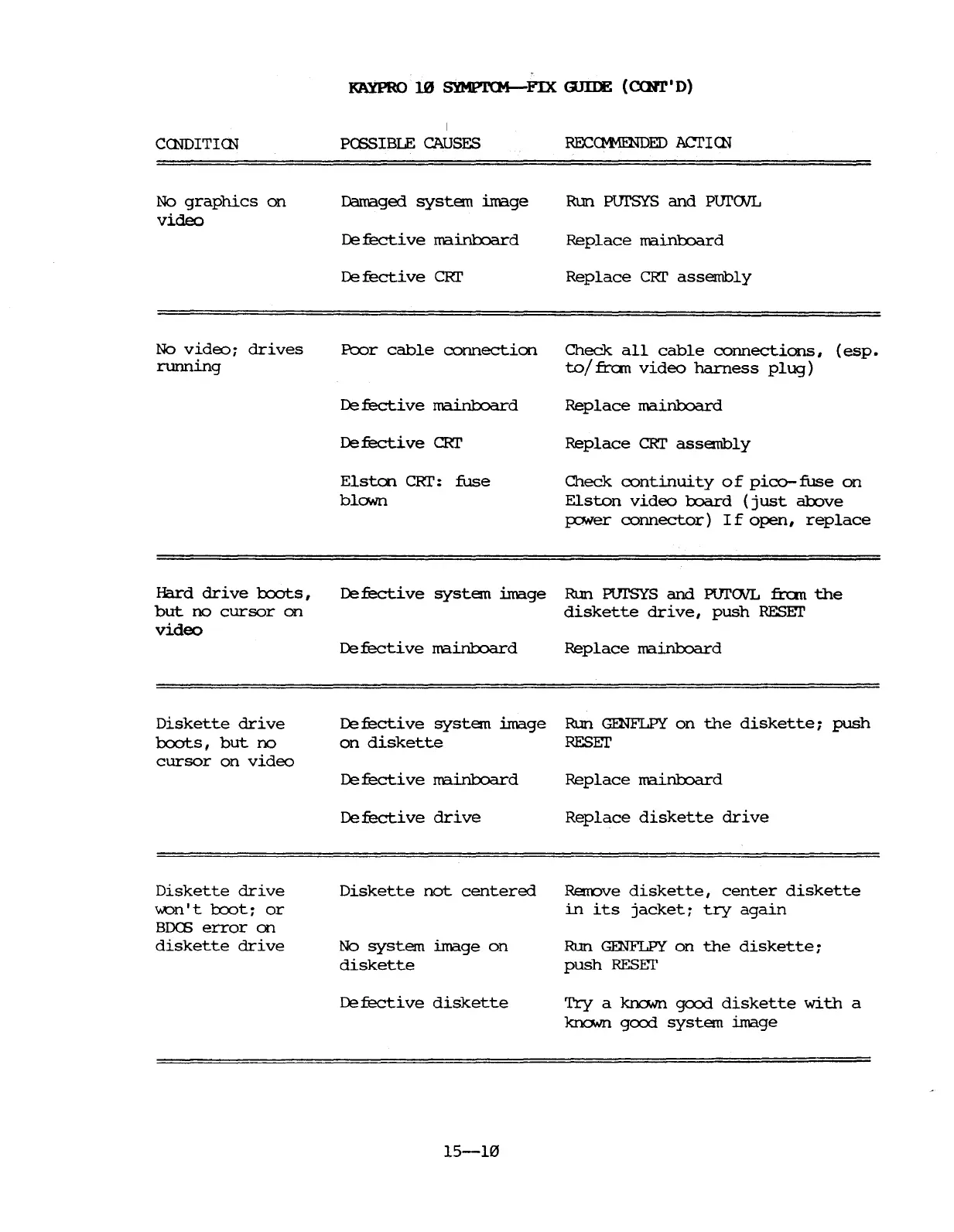
KAYPRO
10
SYMPJ.'(M-FIX
GJIIE
(CQl1'1
D)
CCNDITICN
No
graphics
on
video
I
PCSSIBIE
CAUSES
Damaged
system
image
De
fecti
ve
ma.i.n1:x:>ard
De
fecti
ve
CRI'
Run
PursYS
and
PurOVL
Replace
ma.i.n1:x:>ard
Replace
CRI'
assembly
No
video~
drives
running
l?cx)r
cable
connection
Check
all
cable
connections,
(esp.
to/fbom
video
harness
plug)
De
fecti
ve
mainl:::oard
De
fecti
ve
CRI'
Elston
CRr:
fuse
blown
Replace
ma.inboard
Replace
CRI'
assembly
Check
continuity
of
pica-
fuse
on
Elston
video
toard
(just
above
FO'Ner
connector)
If
open,
replace
Hard
drive
1:oots,
but
no
cursor
on
video
De
fecti
ve
system
image
Run PUI'SYS
and
PUl'OVL fbom
the
diskette
drive,
push
RESEr
Diskette
drive
boots,
but
no
cursor
on
video
Diskette
drive
\\.On' t
1:oot
~
or
BDCE
error
on
diskette
drive
De
fecti
ve
ma.i.n1:x:>ard
De
fecti
ve
system
image
on
diskette
De
fecti
ve
mainl:::oard
Defective
drive
Diskette
not
centered
No
system
image
on
diskette
De
fecti
ve
diskette
15-10
Replace
ma.i.n1:x:>ard
RLm
GENF1PY
on
the
diskette~
push
RESET
Replace
ma.inb::>ard
Replace
diskette
drive
Renove
diskette,
center
diskette
in
its
jacket~
try
again
Run
GENF1PY
on
the
diskette~
push
RESET
Try
a kr1o.vn
gCXJd
diskette
with
a
kno.vn
gcx:x:l
system
image

Table of Contents

Related product manuals