EasyManua.ls Logo

Kaypro 2 - 15-13.TIFF

Default Icon
157 pages
Print Icon
To Next Page IconTo Next Page
To Previous Page IconTo Previous Page
Loading...
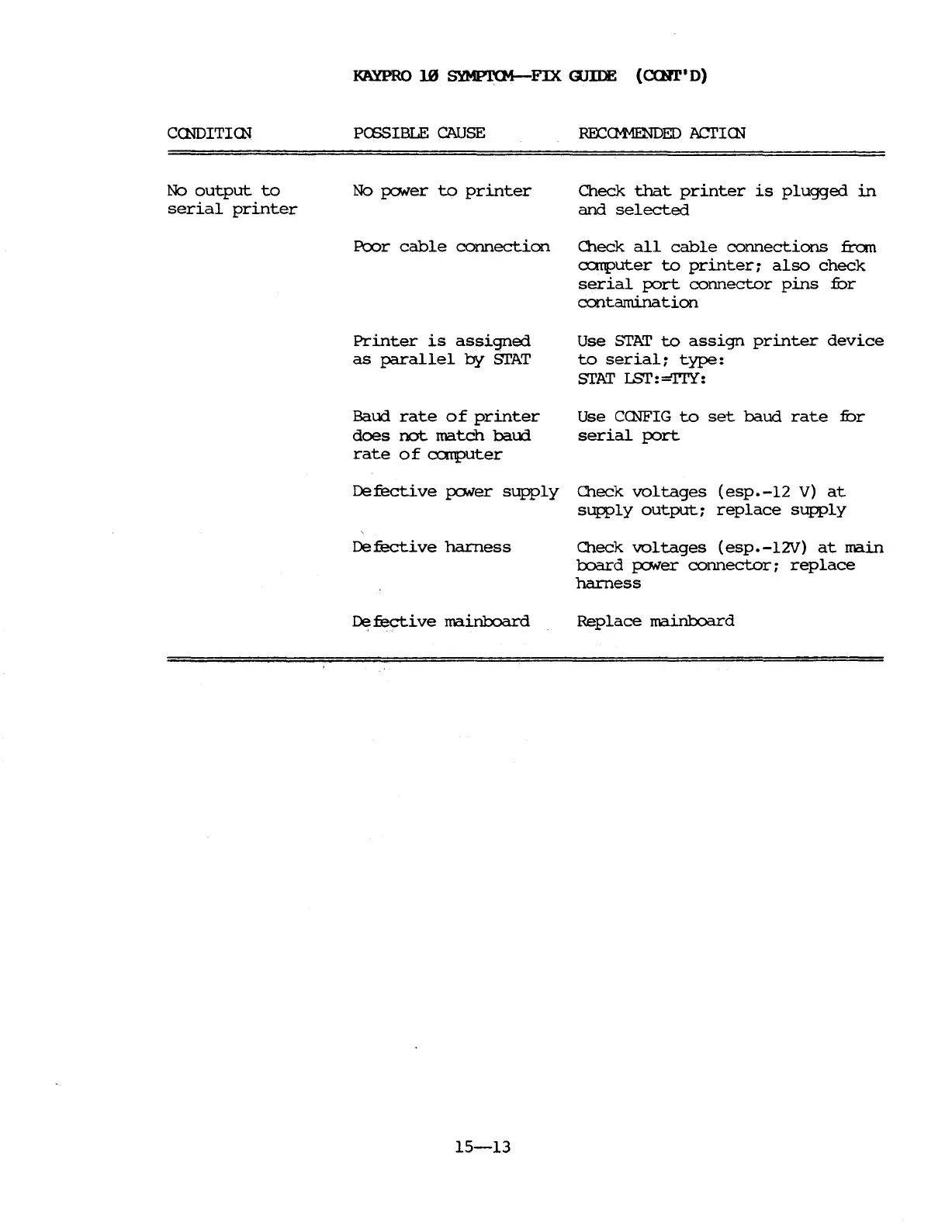
KAYPRO
10
SYMPT(M-FIX
GJIIE
(C(Hl"
D)
CCNDITlrn
No
output
to
serial
printer
PCESIBLE
CAUSE
No
J?ONer
to
printer
Pcx:>r
cable
connection
Printer
is
assigned
as
parallel
by
STAT
Baud
rate
of
printer
does
not
match
baud
rate
0 f
<:X:'.1Tputer
RECCMv1ENDED
ACI'ICN
Check
that
printer
is
plugged
in
and
selected
Check
all
cable
connections
fran
a::mputer
to
printer;
also
check
serial
port
connector
pins
fur
contamination
Use
STAT
to
assign
printer
device
to
serial;
type:
STAT
r..sr:
=TrY:
Use
CCNFIG
to
set
baud
rate
fur
serial
port
Defective
J?ONer
supply
Check
voltages
(esp.-12
V)
at
supply
output;
replace
supply
De
fecti
ve
harness
De
fective
mainboard
15-13
Check
voltages
(esp.-l2V)
at
main
board
J?ONer
connector;
replace
harness
Replace
mainboard

Table of Contents

Related product manuals