EasyManua.ls Logo

Kaypro 2 - 16-13.TIFF

Default Icon
157 pages
Print Icon
To Next Page IconTo Next Page
To Previous Page IconTo Previous Page
Loading...
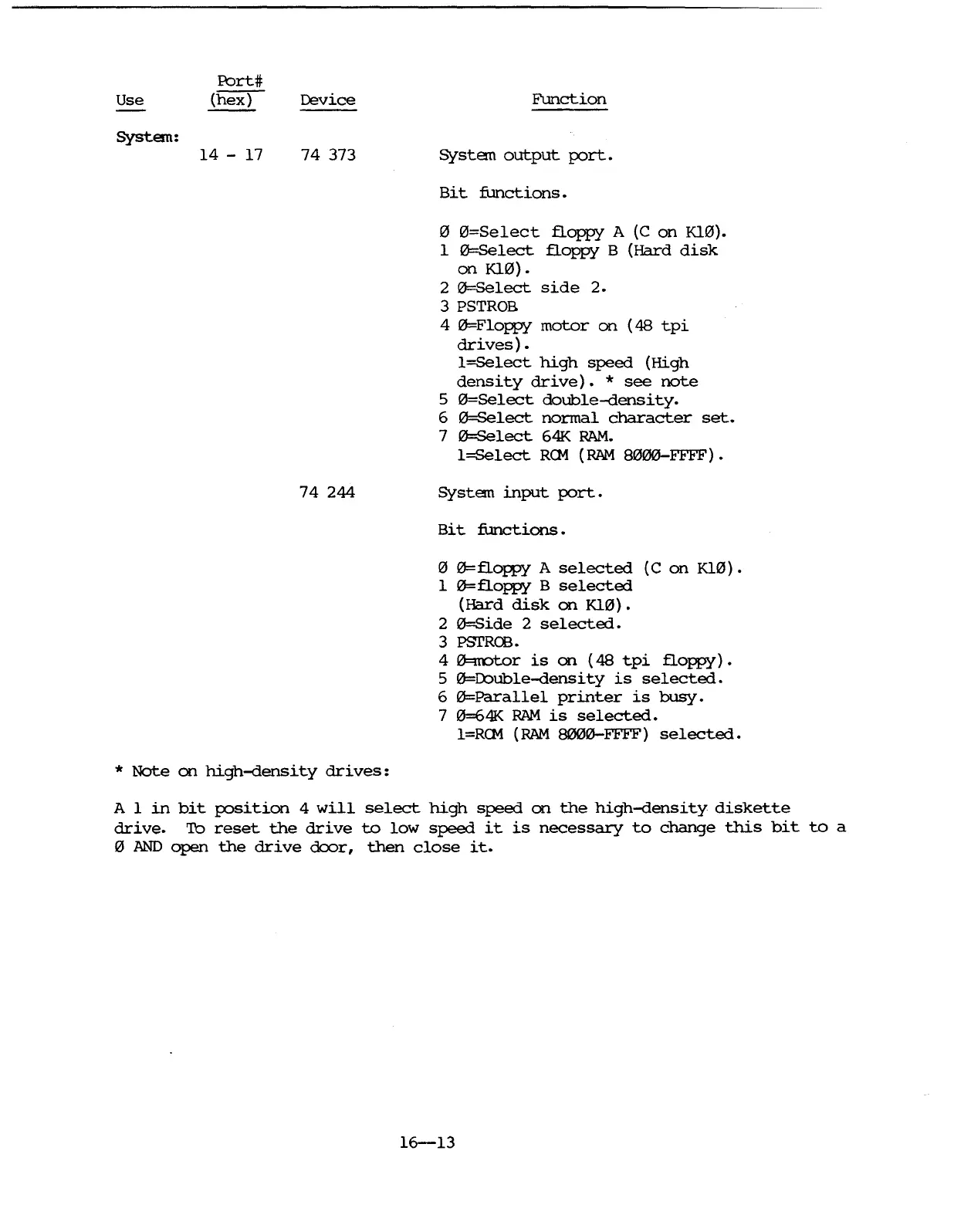
Use
System:
Port#
(hex)
14
- 17
Device
74
373
74
244
Function
System
output
port.
Bit
functions.
o
0=Select
floppy
A
(C
on
Kl0).
1
0=Select
floppy
B
(Hard
disk
on
Kl0).
2
0=Select
side
2.
3 PSTROB
4
0=Floppy
motor
on
(48
tpi
drives)
.
l=Select
high
speed
(High
density
drive).
*
see
note
5 fZ'=8elect
double-density.
6
0=Select
normal
character
set.
7
0=Select
64K
RAM.
l=Select
RCM
(RAM
8fZ'00-FFFF).
System
input
port.
Bit
functions.
12'
0=floppy
A
selected
(C
on
KlfZ').
1
0=floppy
B
selected
(Hard
disk
on
KlfZ').
2
0=Side
2
selected.
3 PSTROO.
4
0=rcotor
is
on
(48
tpi
floppy).
5
0=Double-density
is
selected.
6
0=Parallel
printer
is
busy.
7
0=641<
RAM
is
selected.
l=RCM
(RAM
8000-FFFF)
selected.
*
Note
on
high-density
drives:
A 1
in
bit
position
4
will
select
high
speed
on
the
high-density
diskette
drive.
To
reset
the
drive
to
low
speed
it
is
necessary
to
change
this
bit
to
a
12'
AND
open
the
drive
door,
then
close
it.
16-13

Table of Contents

Related product manuals